6
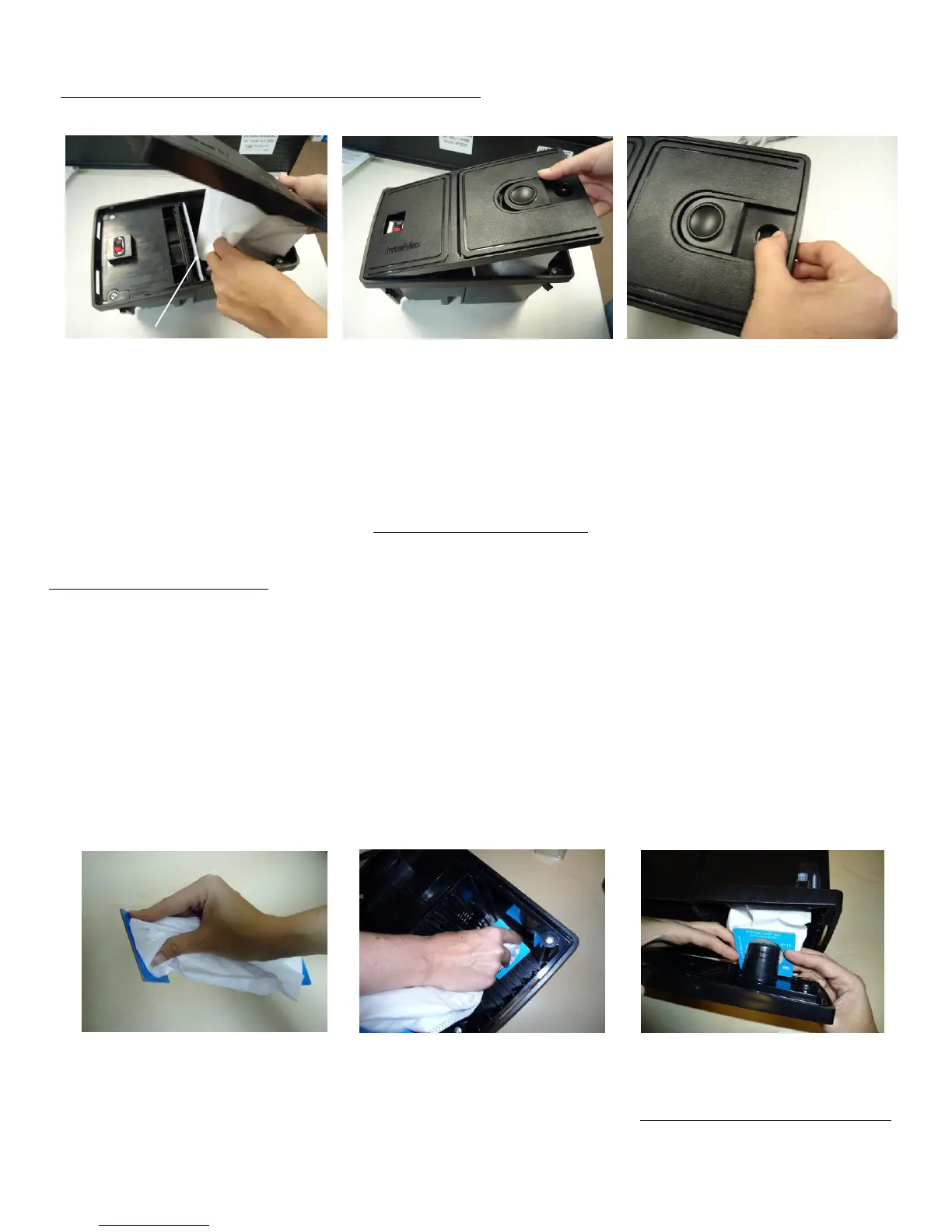
Attaching Front Panel and Dust Bag to Vacuum
Never use Vacuum without Motor Filter
Insert Motor filter first, then
slide dust bag into vacuum
chamber.
Slide front panel with left
side into the vacuum
frame.
Watch out that bag does
not get clamped between
front panel and frame!
Snap front panel down into
the frame and push the
latch hard to the right to lock.
C: How to change the Y11 dust bag. DO NOT REUSE DUST BAGS
CS-RM MODELS double collar bag
Replacement bag: Part # Y11 high filtration 5 layer fiber bag.
1. Remove the front panel on the vacuum cleaner by sliding the latch/lock to the left and remove the front
panel and dust bag. Remove full bag and discard.
2. Please notice: the #Y11 double sided bag has 2 openings. The collar which attaches in the back of the
vacuum chamber is clearly marked “PUSH THIS COLLAR OVER PIPE IN THE VACUUM CHAMBER FIRST”
Hold the dust in your hand like shown in the picture #1 below. Then push onto “scooped pipe” in the back Pic.#2.
3. Push the front card board collar of the dust bag all the way over the pipe on the front panel, Pic.#3
4. Slide the front panel, with the left side first into the small slots on the left side of the vacuums frame, see Pic’s E
and F above. Ensure dust bag is completely inside compartment, then push the right side into the frame until the
lock/latch clicks into place.
Picture 1 Picture 2 Picture 3
C: To change motor filter, replacement Part # Y22
1. Remove FRONT PANEL with DUST BAG.
2. On the left side, inside the vacuum chamber, you will see the filter with the arrow pointing towards the back wall.
3. Replace the filter with a new or cleaned filter, with the arrow pointing towards the back wall check that the
filter stays on the left side in the top and bottom support. If the filter is dirty you can wash in mild soap by hand.
Picture D Picture E Picture F


 To Next Page
 Loading...