EN
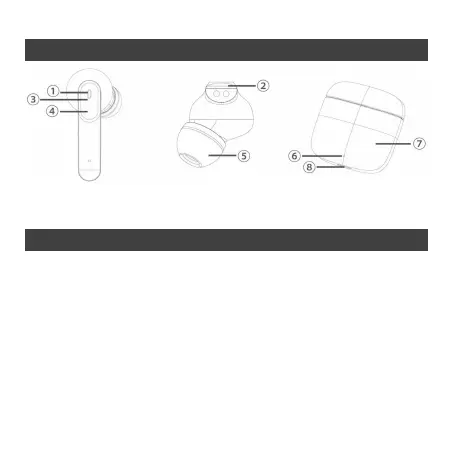
Product description
1 - Microphone 2 - Microphone 3 - LED indication 4 - Touch control area
5 - Ear tip 6 - LED indication 7 - Charging case 8 - USB-C charging interface
Pairing
After being taken out from the charging case, the earphones will be paired
automatically together. Prior to the first use with every device, it is necessary to
pair the earphones:
1) Remove both earphones from the case and wait for about 3 seconds
before pairing mode is activated (both earbuds will flash blue).
2) Select “Intezze CLIQ” from the available BT devices on your phone
and select connect (if necessary, confirm the intention to pair the
earphones). After successful pairing you´ll hear a confirmation message
“Connected”.


 To Next Page