operation of the air conditioner
4
In addition to cooling, the air conditioner has two other functions, i.e. air circulation and dehumidification. The air condi-
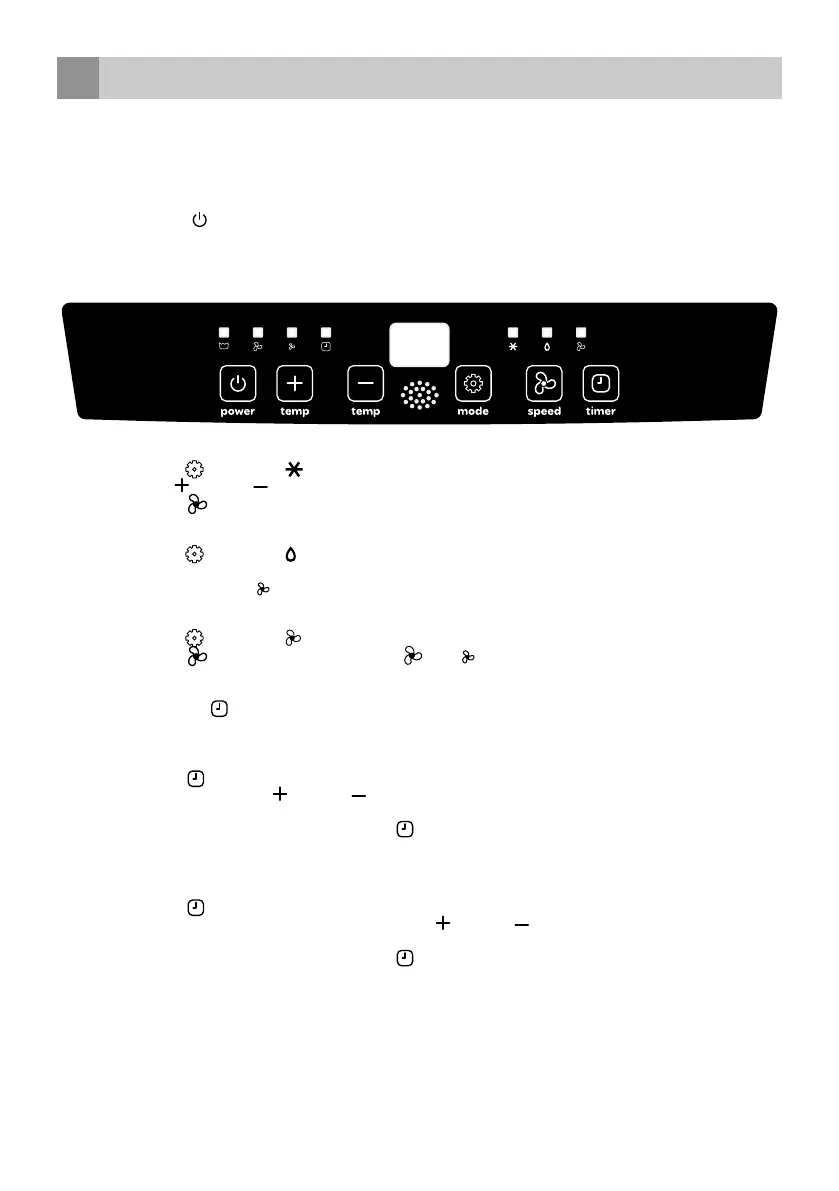
tioner can be operated via the control panel on the appliance and with the provided remote control.
• Choose a location near a socket.
• Install the discharge hose in accordance with the figures and make sure the window is closed as much as possible.
• Insert the plug in an earthed socket.
• Press the on/off key
to switch on the air conditioner.
• The temperature range of the air conditioner is: 18 to 35°C.
• Check that the discharge hose is mounted correctly.
• Do not share the socket with any other appliances.
COOLING
• Press the [ MODE /
] key until the symbol appears in the display.
• Press the [ TEMP
and TEMP ] keys to set the required room temperature (between 16°C and 31°C).
• Press the [ SPEED /
] key to adjust the wind speed.
DEHUMIDIFICATION
• Press the [ MODE /
] key until the symbol appears in the display.
• The air conditioner automatically adjusts the temperature to the current room temperature minus 2°C.
• The wind speed is at low speed
automatically. This cannot be changed.
AIR CIRCULATION
• Press the [ MODE /
] key until the symbol appears in the display.
• Press the [ SPEED /
] key to set the wind speed - high or low .
English • 23
ADJUSTING THE TIMER
-
The timer function can be used to allow the air conditioner to switch on automatically (delayed start) or switch off
automatically at a set time (automatic deactivation).
Delayed start
• Press the timer key
when the air conditioner is off and select the required time at which you want the air conditioner to
switch on by means of the [ TEMP
and TEMP ] keys.
The delayed start can be set between 0 and 24 hours.
• Confirm the number of hours by pressing the timer key
once more.
• The set number of hours is shown in the display.
• When the set number of hours have passed, the air conditioner switches on automatically.
Automatic deactivation
• Press the timer key
when the air conditioner is on and select the required time at which you want the air conditioner to
switch off by means of the temperature and time keys [ TEMP
and TEMP ].
Automatic deactivation can be set between 0 and 24 hours.
• Confirm the number of hours by pressing the timer key
once more.
• The set number of hours is shown in the display.
• When the set number of hours have passed, the air conditioner switches off automatically.


 To Next Page