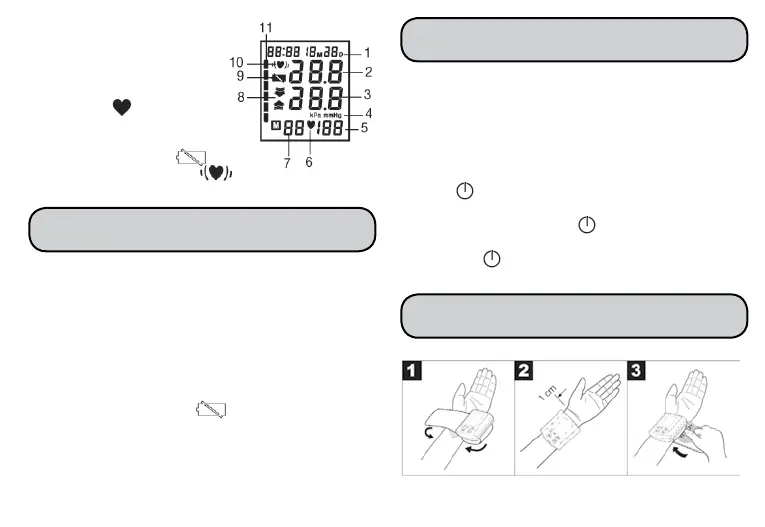
1. Time and date
2.Systolicpressure
3. Diastolic pressure
4. mmHg unit
5. Measured pulse
6. Pulse icon
7.Numberofmemoryspace
8.Inate/deatearrow
9.Changebatteryicon
10.Cardiacarrhytmiaicon
11.WHOclassication
•Removethebatterycompartmentcover(leftsideof
the unit).
•Inserttwo1,5VAAAbatteries(AlkalineTypeLR03).
Makeabsolutelysurethatyouinsertthebatteries
withthecorrectpolarityasmarked.Donotuse
rechargeable batteries.
•Replacethebatterycovercarefully.
Ifthechangebatteryicon isdisplayed,
measurementisnolongerpossibleandyoumust
replace all the batteries.
Note: Batteries containing pollutant substances are
markedasfollows:Pb=Batterycontainslead,
Cd=Batterycontainscadmium,Hg=Batterycontains
mercury.
Itisvitaltosetdateandtime.Onlythiswayisit
possibletosaveandsubsequentlyretrieveyour
measured values with the right date and time. Time
is shown in 24 hour format.
Note:ifyouholddown“M”,youcansetthevalues
faster.
•Press“
”and“M”simultaneously.Themonth
startsashing.Usingthe“M”button,setthemonth
1to12andconrmwith“
”.
•Settheday,hourandminuteandconrmineach
casewith“
”.
4 | INSERTING/ CHANGING BATTERIES
5 | SETTING DATE & TIME
6 | APPLYING THE CUFF
32



 To Next Page