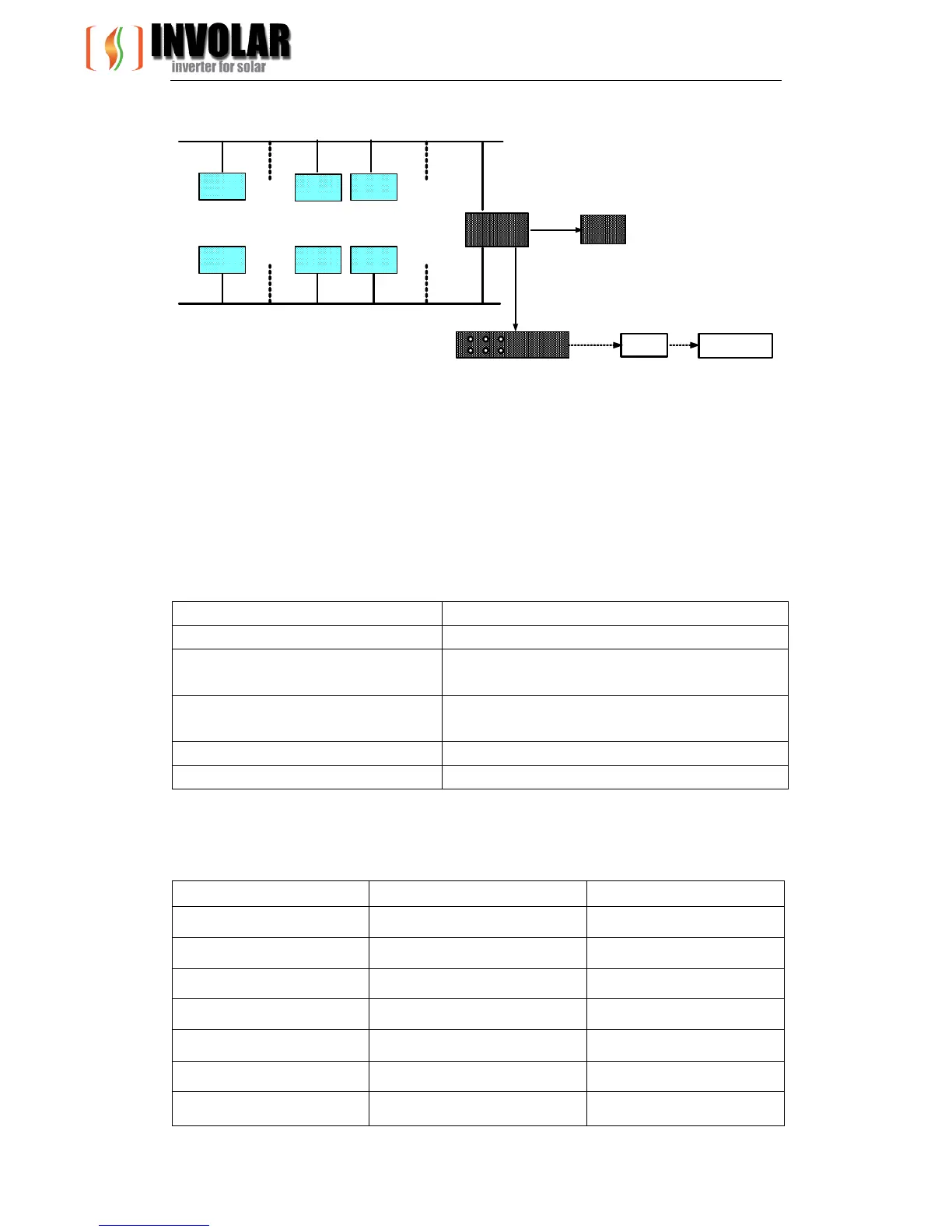
Power line
MAC250 MAC250 MAC250
Server
Broadband
router
Energy
Terminal
Unit
Local
PC
MAC250
MAC250
MAC250
Power line
Internet
Customer
web terminal
Figure 7-1 MAC250 Micro-Inverter Communication System
8.2 MAC250 MICRO-INVERTER Status LED Indications and Error
Reporting
You can access the INVOLAR MAC250 Micro-Inverter system LED menu to detect the
operation conditions. MAC250 MICRO-INVERTER Status LED indications and error
report shows as below diagram (7-1)
LED Operation Working Mode
2 short yellow blinks startup
Flashing yellow continuously
Producing power and communicating with
ETU
4 short yellow blinks
Producing power and not communicating with
ETU
6 short yellow blinks Disable
3 short yellow blinks Standby
Diagram (7-2) MAC250 MICRO-INVERTER Status LED Indications and Error Reporting
Fields Explain Unit
Grid Voltage Grid Voltage V
Grid Current Export DC A
Grid Frequency Grid Frequency Hz
DC input voltage DC input voltage V
DC Input DC A
Power Output Power W
Temperature Ambient temperature °C


 To Next Page