Need help?
Do you have a question about the InWin Jupiter AJ120 Series and is the answer not in the manual?
Provides a video overview of the Jupiter Series fan product.
Offers a video guide for installing the Jupiter Series fan.
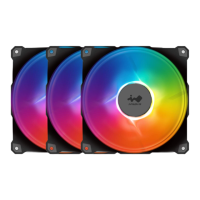
Highlights key features: seven blades, long-lifespan sleeve bearings, ARGB LEDs with 16.8M colors, and a controller.
Lists items included in the Triple Pack: 3 fans, 1 controller, and 12 screws.
Lists items included in the Single Pack: 1 fan and 4 screws.
Details the Addressable RGB Fan Cable and Addressable RGB Y-Cable connections.
Explains the ARGB One-Click Controller, noting its inclusion in the Triple Pack.
Steps for mounting fans and connecting basic fan/RGB cables to motherboard headers.
Instructions for using the ARGB controller and available lighting modes.
Instructions for checking system power and connector integrity for proper fan operation.
Guidelines for storage, handling, and safe operation of the fans, including environmental precautions.
The InWin Jupiter AJ120 is a high-airflow ARGB case fan designed for PC enthusiasts who prioritize both superior cooling performance and vibrant, customizable lighting. This fan is engineered to enhance the thermal management of a computer case while simultaneously adding a dynamic aesthetic element through its addressable RGB (ARGB) LEDs.
The primary function of the Jupiter AJ120 fan is to move air efficiently within a computer case, facilitating the removal of hot air generated by internal components and drawing in cooler ambient air. This helps maintain optimal operating temperatures for the CPU, GPU, and other critical hardware, preventing thermal throttling and extending the lifespan of components. The fan achieves high airflow through its specially designed seven-blade impeller, which is optimized for effective air movement.
Beyond its core cooling function, the Jupiter AJ120 integrates advanced lighting capabilities. Each fan is equipped with ARGB LEDs, offering 16.8 million color options. These LEDs are addressable, meaning each individual LED can be controlled independently to create complex and dynamic lighting effects. This allows users to personalize their PC build with a wide array of visual styles, from subtle color gradients to pulsating patterns and synchronized light shows.
The fan's design incorporates sleeve bearings, chosen for their long lifespan, contributing to the fan's durability and consistent performance over time. The inclusion of a PWM (Pulse Width Modulation) function allows for precise control over the fan's speed, enabling users to balance cooling performance with noise levels according to their specific needs and system load. This means the fan can spin faster during intense tasks requiring more cooling and slow down during lighter loads to operate more quietly.
For users whose motherboards do not support addressable RGB headers, InWin provides an ARGB One-Click Controller (included in the triple pack). This controller offers a standalone solution for managing the fan's lighting effects, ensuring that all users can enjoy the full spectrum of visual customization without requiring a specific motherboard feature. The controller simplifies the process of changing lighting modes, making it accessible even for those with less experience in PC building.
The Jupiter AJ120 fans are designed for straightforward installation and flexible integration into various PC setups. They can be installed as intake fans to bring cool air into the case or as exhaust fans to expel hot air, depending on the desired airflow configuration. The standard 120mm size ensures compatibility with most modern PC cases that support this fan dimension.
Connectivity is a key feature, offering multiple options for both power and RGB control. Each fan comes with an Addressable RGB Fan Cable and an Addressable RGB Y-Cable. The fan cable connects to the motherboard's fan header for power and PWM control, allowing the system to automatically adjust fan speed based on temperature. The ARGB Y-Cable is crucial for lighting control, connecting to a motherboard's 3-pin addressable RGB header. This allows synchronization of the fan's lighting with other ARGB components in the system through motherboard software.
For builds with multiple Jupiter AJ120 fans, the Y-cables facilitate daisy-chaining, simplifying cable management and reducing the number of headers required on the motherboard. This means that multiple fans can be connected in series to a single ARGB header, allowing them to display synchronized lighting effects.
The ARGB One-Click Controller, provided with the triple pack, offers an alternative and convenient way to manage lighting. This controller connects to the PSU's SATA cable for power and to the fan's Addressable RGB Y-Cable. It features a single button that allows users to cycle through 14 distinct lighting modes, including "Rainbow," "LED-Red Breathing," "LED-Green," "LED-Blue," "LED-Purple," "LED-White," "Light at the end of the Tunnel," "Two-Tone Ring," "Diagonal Transition," "Rotating LED Trio," "Full Circle," "Flow-Red," "Flow-Green," and "Flow-Blue." A long press of the button can turn the lights on or off, providing quick and easy control without needing to interact with software. This is particularly useful for users who prefer hardware-based control or whose motherboards lack ARGB headers.
The fan's high airflow and static pressure capabilities make it suitable for various cooling applications, including case ventilation, radiator cooling, and CPU heatsink cooling. Its versatility ensures it can contribute effectively to overall system thermal performance.
The Jupiter AJ120 is designed for durability and ease of maintenance, though specific user-performed maintenance tasks are minimal due to the sealed nature of modern fan components.
The use of long-lifespan sleeve bearings is a key maintenance feature, as it reduces the need for frequent replacement. Sleeve bearings are generally robust and provide reliable operation over extended periods, minimizing wear and tear.
Users are advised to keep the product away from high temperatures and liquids to prevent damage, which is standard advice for electronic components. When storing the fans, it's recommended to keep them in a cool, dry environment.
For optimal performance, it is generally good practice to periodically clean the fan blades and the fan grille to prevent dust buildup. Dust accumulation can impede airflow and reduce cooling efficiency. While the manual doesn't detail specific cleaning instructions, gentle cleaning with compressed air or a soft brush is typically effective for removing dust from fan blades. However, users are explicitly warned not to touch the fan blades when the fan is in operation, to avoid injury and potential damage to the fan.
The design of the fan, with its robust construction, aims to minimize the need for user intervention beyond initial installation and occasional dust removal. Users are also cautioned against modifying the wires or connectors provided by InWin, as this could void the warranty or lead to improper operation. The product is intended for use specifically within a computer case, reinforcing its specialized application and design.
In summary, the InWin Jupiter AJ120 fan offers a blend of high-performance cooling and extensive ARGB lighting customization, making it an attractive choice for PC builders looking to optimize both the functionality and aesthetics of their systems. Its user-friendly installation, flexible connectivity options, and durable design contribute to a reliable and visually engaging computing experience.
 General
| Model | AJ120 |
|---|---|
| Dimensions | 120 x 120 x 25 mm |
| Connector (Fan) | 4-Pin PWM |
| Connector (ARGB) | 3-Pin ARGB |
| LED | Addressable RGB |
| Type | Case Fan |
| Rated Voltage (Fan) | 12V |
| Rated Voltage (LED) | 5V DC |
| Operating Voltage (Fan) | 6V - 13.2V |
| Operating Voltage (LED) | 4.5 ~ 5.5V DC |
| Starting Voltage | 6V |
| Speed | 500 ~ 1800 RPM |
| Static Pressure | 2.62 mmH2O |
| Air Flow | 70.47 CFM |
| Bearing Type | Long Life Sleeve Bearing |

 To Next Page