The InWin Luna AL120 is a high-performance Addressable RGB (ARGB) case fan designed to provide efficient cooling and vibrant lighting for PC builds. This user manual outlines the fan's features, package contents, installation procedures, troubleshooting tips, and specifications, ensuring users can effectively integrate and utilize the Luna AL120 in their systems.
Function Description
The primary function of the InWin Luna AL120 fan is to provide high airflow and static pressure for PC cooling. It is engineered to keep your computer's internal components cool, even under demanding operations, by efficiently moving air through the case. The fan's optimized P/Q (Pressure/Flow) curve indicates its suitability for both static pressure and airflow-intensive applications, making it versatile for various cooling needs within a PC chassis. Beyond its cooling capabilities, the Luna AL120 also serves an aesthetic purpose, featuring Addressable RGB (ARGB) lighting. This allows users to customize the visual appearance of their PC with a wide range of colors and lighting effects, enhancing the overall look of their build. The fan's nine crescent white blades are specifically designed to amplify the brightness and color vibrancy of the ARGB lighting, ensuring a striking visual presentation.
Usage Features
The InWin Luna AL120 offers several features that enhance its usability and integration into PC systems:
- High Airflow and Static Pressure: With an airflow of up to 82.96 CFM, the Luna AL120 is designed to effectively dissipate heat from critical components. Its optimized P/Q curve ensures it performs well in scenarios requiring both high airflow (e.g., case ventilation) and high static pressure (e.g., radiator cooling).
- Addressable RGB Lighting: The fan incorporates ARGB lighting, providing extensive customization options for visual effects. Users can choose from 14 different lighting modes, including "Rainbow," "LED-Red Breathing," "LED-Green," "LED-Blue," "LED-Purple," "LED-White," "Light at the end of the Tunnel," "Two-Tone Ring," "Diagonal Transition," "Rotating LED Trio," "Full Circle," "Flow-Red," "Flow-Green," and "Flow-Blue." These modes allow for dynamic and personalized lighting schemes to match any build theme.
- Flexible Control Options:
- Motherboard Sync: For motherboards that support an addressable RGB header (3-pin, 5V), the Luna AL120 fans can be connected directly to the motherboard. This allows users to control the fan's lighting effects through the motherboard's software, synchronizing them with other ARGB components in the system. The fan uses an Addressable RGB Y-Cable for daisy-chaining multiple fans and an Addressable RGB Fan Cable to connect to the motherboard.
- ARGB One-Click Controller (Triple Pack only): If the motherboard lacks an addressable header, the triple pack includes an ARGB One-Click Controller (ver. 1.1). This controller connects to the PSU's SATA cable for power and to the fan's Addressable RGB Y-Cable. It provides a dedicated button to turn the lights on/off and cycle through the 14 pre-programmed lighting modes, offering a convenient standalone solution for lighting control.
- Daisy-Chain Connectivity: The fans are designed with Addressable RGB Y-Cables, enabling multiple fans to be daisy-chained together. This simplifies cable management and allows for synchronized lighting effects across all connected fans, whether controlled by the motherboard or the One-Click Controller.
- PWM Speed Control: The fan supports PWM (Pulse Width Modulation) control, allowing for precise adjustment of fan speed based on system temperature. This ensures optimal cooling performance while minimizing noise levels when high airflow is not required.
- Easy Installation: The manual provides clear, step-by-step instructions for installing the fans within a PC case. It details how to connect the fan cables, Addressable RGB Y-Cables, and their counterparts to ensure proper functionality and lighting synchronization.
- Available in Single and Triple Packs: The Luna AL120 is offered in both single and triple packs, catering to different user needs. The single pack includes one fan and four screws, while the triple pack includes three fans, twelve screws, and the ARGB One-Click Controller, providing a comprehensive solution for multi-fan setups.
Maintenance Features
To ensure the longevity and proper functioning of the InWin Luna AL120 fans, certain maintenance and care guidelines are provided:
- Proper Installation: Adhering to the installation instructions is crucial for the fan's optimal performance and safety. This includes ensuring the PC's power is off before installation and correctly mounting the fans in designated areas.
- Cable Management: Proper connection of all cables—fan cables, Addressable RGB Y-Cables, and their counterparts—is essential. Incorrect connections can lead to malfunction or damage.
- Environmental Considerations:
- Temperature: The fans should be stored away from high temperatures and heat-generating machines (e.g., heaters) to prevent damage.
- Liquids: It is important to keep the product away from any liquids to avoid electrical shorts and damage.
- Physical Handling:
- Impeller and Blades: Users are advised not to put anything in the impeller or touch the fan blades when the fan is in operation. This prevents damage to the fan and potential injury.
- Wires and Connectors: Do not modify the wires or connectors provided by InWin, as this could compromise the fan's functionality and safety.
- System Power Check: In case of improper fan operation, the first troubleshooting step is to check the system's power and ensure all connectors are properly secured.
- Intended Use: The fan is designed for use only within a computer case. Using it for other purposes may lead to damage or improper function.
- RoHS Compliance: The product complies with RoHS regulations, indicating its adherence to standards for restricting hazardous substances, which contributes to environmental protection and product safety.
- Warranty: The Luna AL120 comes with a 2-year warranty, providing assurance of product quality and support for potential manufacturing defects.
By following these guidelines, users can maximize the lifespan and performance of their InWin Luna AL120 fans, ensuring a cool and visually appealing PC build.

 Need help?
 General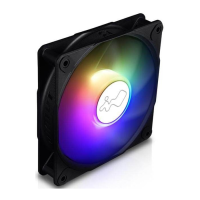

 To Next Page