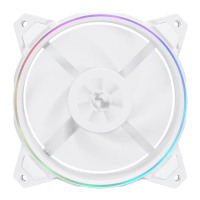
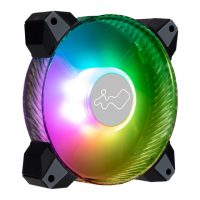
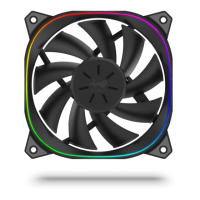
The InWin Sirius Extreme and Sirius Extreme Pure series fans are designed to provide optimal cooling performance for PC systems, featuring a unique "Squoval" geometric design that offers a fresh perspective on traditional case fans. These fans are part of InWin's transformative Sirius family, focusing on both aesthetic appeal and functional improvements.
Function Description
The primary function of the Sirius Extreme and Sirius Extreme Pure fans is to enhance the airflow within a computer case, thereby improving the cooling efficiency of internal components, particularly the CPU. Each fan in the Extreme edition features 9 fan blades, meticulously designed and tested to deliver optimal air pressure and an exceptional cooling capability of 54 CFM (Cubic Feet per Minute). This ensures that the fans can effectively dissipate heat, maintaining stable operating temperatures for high-performance systems.
The fans incorporate Addressable RGB (ARGB) lighting, allowing users to customize the visual aesthetics of their PC build. The ARGB lighting can be controlled either through a compatible motherboard's ARGB 3-pin header or via the included ARGB One-Click Controller ver. 1.1, which is part of the triple pack. This dual control option provides flexibility for users with different motherboard capabilities.
Usage Features
The InWin Sirius Extreme fans are designed for straightforward installation and versatile usage.
-
Installation:
- Before installation, users must ensure the PC's power is off.
- The fans are to be installed in designated areas within the PC case, with attention to airflow direction. An arrow indicator on the fan helps determine the intake direction of the air.
- For ARGB lighting, there are two primary connection methods:
- Motherboard Control (Addressable RGB effect): If the motherboard supports an addressable RGB header (ARGB 3-pin header), the fan's ARGB Y-cable can be connected directly to the motherboard. This allows for synchronization of lighting effects with other ARGB components in the system, managed through the motherboard's software.
- ARGB One-Click Controller (Standalone Control): For motherboards without an addressable RGB header, the included ARGB One-Click Controller ver. 1.1 (available in triple packs) can be used. This controller connects to the PSU's SATA cable for power and to the fan's Addressable RGB Y-cable. It provides 14 different pre-programmed lighting effects that can be cycled through by tapping a button. Holding the button turns the lights on or off.
-
Lighting Effects (via One-Click Controller): The controller offers a variety of dynamic and static lighting modes, including:
- Rainbow
- LED-Red Breathing
- LED-Green
- LED-Blue
- LED-Purple
- LED-White
- Light at the end of the Tunnel (first instance)
- Light at the end of the Tunnel (second instance)
- Light at the end of the Tunnel (third instance)
- Rotating LED Trio
- Full Circle
- Flow-Red
- Flow-Green
- Flow-Blue
Note: InWin reserves the right to change the lighting modes.
-
Cable Management: The fans utilize Addressable RGB Y-cables, which simplify cable routing and allow multiple fans to be daisy-chained for synchronized lighting effects, reducing the number of headers required on the motherboard or controller.
Maintenance Features
To ensure the longevity and optimal performance of the InWin Sirius Extreme fans, several maintenance guidelines and troubleshooting tips are provided:
- Installation Adherence: Always install the fan by following the provided instructions to prevent damage and ensure proper functionality.
- Environmental Storage: When not in use, store the product away from high temperatures and heat-generating machines like heaters to prevent material degradation.
- Impeller Protection: Avoid placing any objects in the fan's impeller. Obstructions can damage the blades, motor, or impede airflow, leading to reduced cooling efficiency or fan failure.
- No Modifications: Do not modify the wires or connectors provided by InWin. Unauthorized modifications can void the warranty, create electrical hazards, or lead to system instability.
- Safety During Operation: Refrain from touching the fan blades while the fan is in operation. This is a safety precaution to prevent injury and avoid interfering with the fan's rotation.
- Intended Use: The fan is designed exclusively for use within a computer case. Using it for other purposes may not only be ineffective but could also lead to damage.
- Liquid Avoidance: Keep the product away from any liquids. Exposure to liquids can cause short circuits, corrosion, and permanent damage to the electronic components.
- Troubleshooting (General):
- If the fan does not operate correctly, first check the system's power supply.
- Secondly, ensure all connectors (power, ARGB, and Y-cables) are properly and securely connected. Loose connections are a common cause of operational issues.
By adhering to these usage and maintenance guidelines, users can maximize the performance and lifespan of their InWin Sirius Extreme and Sirius Extreme Pure fans, ensuring a cool and visually appealing PC build.


 To Next Page
 General