5
Features
Top Panel
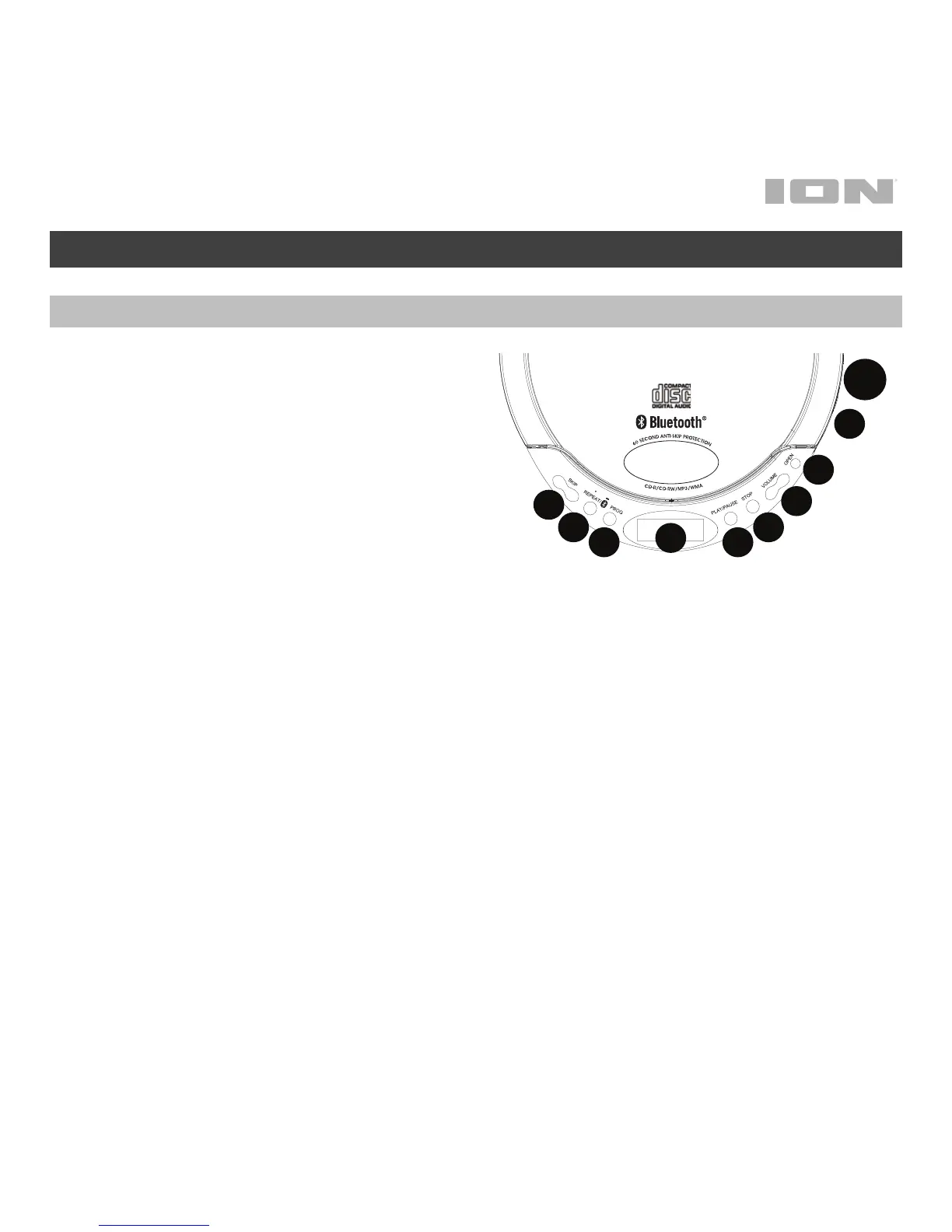
1. Skip/Search: Press and release |<<
or >>| to skip a playing track. Press
and hold |<< or >>| to rewind or fast
forward through a playing track.
2. Repeat/Bluetooth: Press and hold
this button for 2 seconds to enter
Bluetooth pairing mode to pair to
Bluetooth speakers or headphones.
To disconnect Bluetooth pairing,
press and hold this button for 2
seconds.
When in CD mode, press this button to cycle through the Repeat options:
• Repeat One: Plays the selected track repeatedly.
• Repeat All: Plays through all the CD tracks and then continuously
repeats through all the tracks.
• Intro: Plays through the first 10 seconds of each CD track.
• Random: Plays through all of the tracks in a random order. Playback
will stop once all tracks have been played.
3. Program: Set the playback order for up to 30 tracks. When a disc is stopped, press
the Prog button, select the desired track to be played using the |<< or >>| buttons,
and press Prog to add the track to the playback order. Repeat this process to add
more tracks. Once all tracks have been programmed, press Play/Pause to start
playback.
4. Play/Pause: Press this button to power on Air CD. Press this button to play a
stopped disc or pause a playing disc.
1
2
3
4
5
6
7
8
9
10


 To Next Page