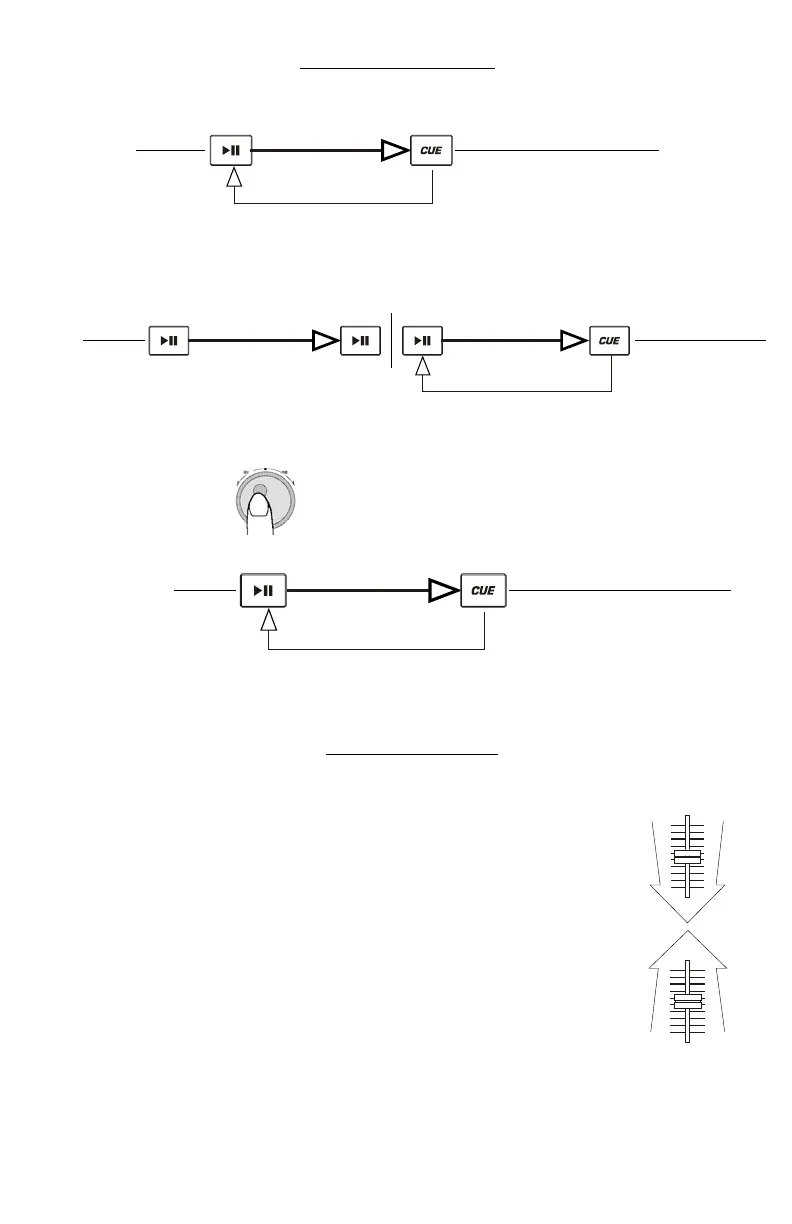
PLAY / PAUSE & CUE OPERATIONS
PLAY & CUE
Back Cue Operation
Play Interval
Press "PLAY/PAUSE"
to start music
Press "CUE" return to
last starting point
Position on Disc
Pressing the “PLAY/PAUSE” button starts the disc. Pressing the “CUE” button will reset the disc to the last place where the disc was
started. This is called the cue point. By alternately pressing the “PLAY/PAUSE” button and the “CUE” button, the disc may be
returned and played from the cue point any number of times. This function is called back cue.
PLAY, PAUSE & CUE
Back Cue Operation
Play Interval Play Interval
Press "PLAY/PAUSE"
to start music
Press "PLAY/PAUSE"
to start music
Press "CUE" return t
last starting point
Press "PLAY/PAUSE"
to pause music
Position on Disc
When play has been paused and then started again, the return position for the back cue will be updated to this
new position.
EDITING CUE POINT
Back Cue Operation
Play Interval
Press "PLAY/PAUSE"
to start music
Adjust the "CUE" point
with the jog wheel
Press "CUE" return to
last starting point
Position on Disc
When the inner dial is turned while a cue point is set, a new cue point can be located. The CD player will repeatedly play small parts of the
CD as you move it to the desired position. By pressing “PLAY/PAUSE” then “CUE” you can confirm that the new cue point is desirable.
Matching the Beats Per Minute
Match the tempo by monitoring the music of both PLAYER 1 and PLAYER 2 by ear and adjusting the pitch. When the tempo of the
music of the selected CD player is slow compared to the tempo of the other player, move the slider to the ( + ) side and match the
tempo. When faster, move the pitch slider to the ( - ) side. The following illustration shows the case of matching the pitch of PLAYER
2 to the pitch of the music being played on PLAYER 1.
1. Press PLAY/PAUSE to start PLAYER 1.
PLAYER 1 is playing
2. Press PLAY/PAUSE to start PLAYER 2
Both CD players are playing discs.
3. Listen to PLAYER 2 in your headphones. If the beat of channel 2 (in the headphones) is faster than
1, slow down the beat of channel 2 using the pitch control.
channel
he4. If the beat of channel 2 (in the headphones) slower than the beat of channel 1, speed up the beat using t
pitch control.



 To Next Page