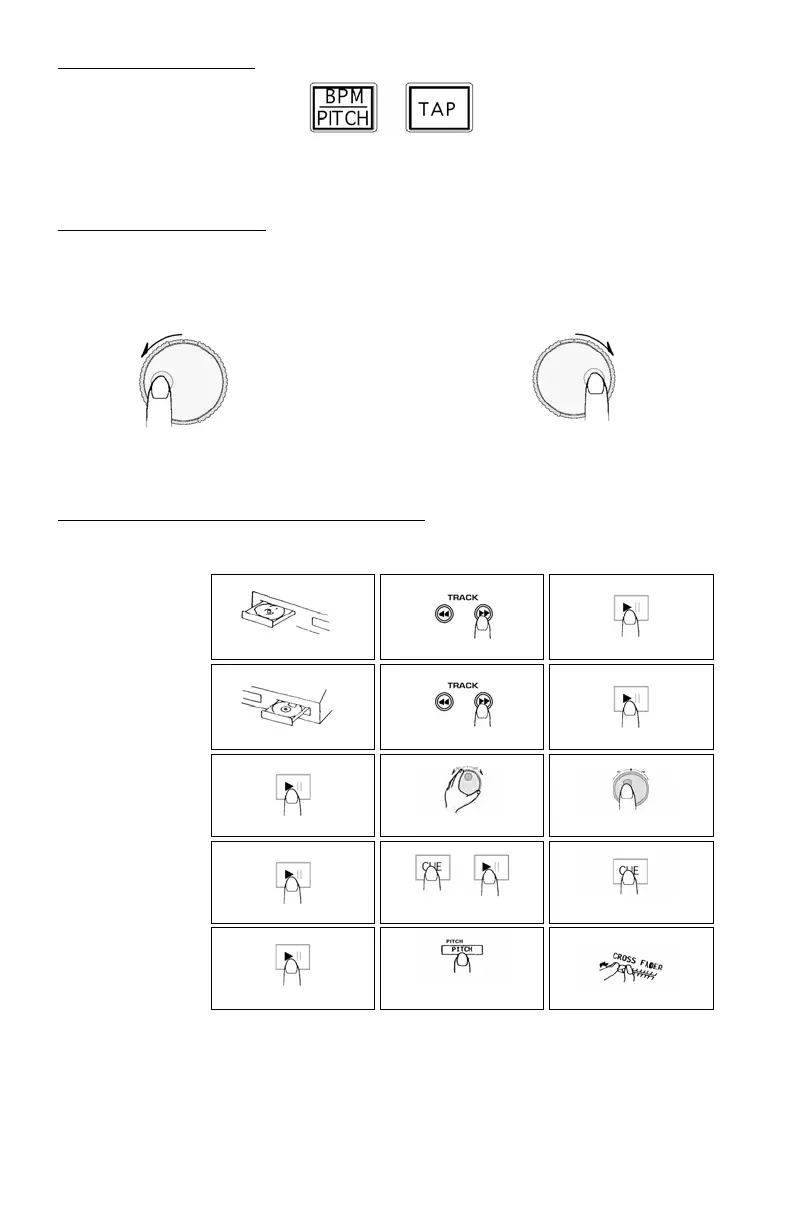
USING THE BPM DISPLAY FEATURE
Press the BPM button to select the BPM feature on the display on the side of the CD player that you wish to set. Tap the Counter
button to the beat of the music.
You will see the BPM number appear in the display. The more times you tap the more accurate your number will be. When you
adjust the pitch slider the display number will change by an equal percentage.
BEAT MATCHING USING PITCH BEND
If you find the BPM’s (Beats Per Minute or Tempos) are the same, however, the drum beats are not matched you will need to
temporarily change the pitch. The illustration below shows how to match the beat of PLAYER 2 to the beat of the music being
played on PLAYER 1. (This procedure can be done on either PLAYER).
After matching the BPM’s adjust the pitch temporarily as follows:
When PLAYER 2 is rotate the jog wheel counter clockwise
When PLAYER 2 is behind rotate the jog wheel clockwise
The pitch changes automatically while the jog wheel is rotated. The faster you rotate the wheel the more you change. Releasing the
wheel results in a return to the original pitch. (So the BPM’s are once again the same.)
EXAMPLE OF MIXING USING BOTH PLAYERS OF YOUR CD PLAYER
While playing a disc on PLAYER 1, load a disc into PLAYER 2 and select your next track, match its pitch to the track playing on
PLAYER1 and when you are ready use the crossfader on your mixer to fade from PLAYER 1 to PLAYER 2.
PLAYER 1
Load a disc and press the
OP EN/CLOS E button .
PLAYER 2
Load a disc and press the
OP EN/CLOS E button .
PLAYER 2
Press the Pause button of PLAYER 2.
PLAYER 2
Lis te n with the monitor a nd
press the play button.
PLAYER 2
With a matching downbeat from
Player 1 press the play button.
PLAYER 1
Se le ct the track to be played.
PLAYER 2
Se le ct the track to be played.
PLAYER 2
Rapidly search for a cue point using
the ou te r whe e l
PLAYER 2
Press the cue button then play to be
sure of the s et cue point.
PLAYER 2
If you are beat mixing, turn on your
P itch a djust a nd follow the directions
for beat matching.
Load a disc in PLAYER 1 and
select the track and press PLAY.
Load a disc in PLAYER 2 and
select the track then play.
Set and edit a start cue point on
PLAYER 2
Check your new cue point
Do a MIX!
PLAYER 1
P re s s the PLAY button
PLAYER 2
P re s s the PLAY button
PLAYER 2
Slowly set the right cue point
using the inner wheel
PLAYER 2
Re s e t the playe r to the Cue point
by pressing Cue
MIXE R
Whenyouarehappywithyourmix
move the cros s fa de r a ccordingly.


 To Next Page
 Loading...