9
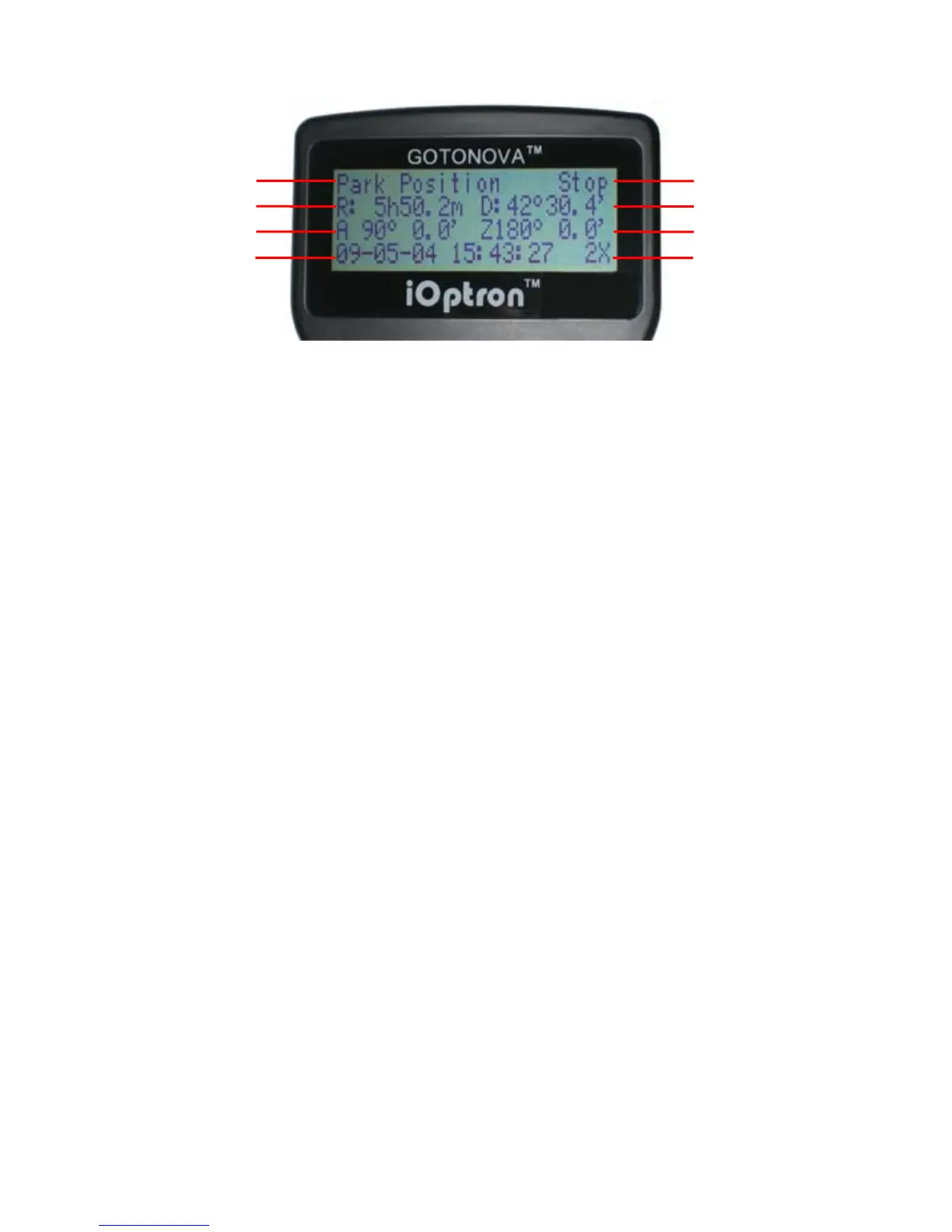
Figure 2. #8405 Hand Controller LCD Information Screen
1. Target Name: displays the name of the
target that telescope is currently pointed to.
• Park Position: A default position
when the mount is turned on, i.e., the
telescope is pointed to zenith (altitude is
90º) and the mount is facing south
(azimuth is 180º);
• An object name, such as “Mercury”
or “Andromeda Galaxy”: Name of the Star
or celestial object currently that is
currently slewing, gotoing or tracking;
• LandMark #: The telescope is
working in Land mode and is pointing to a
land mark # (note: telescope does not
track in land mode)
• User Position: The mount has been
manually slewed to an object; or an R.A
and DEC value of an object was manually
entered; or a goto or tracking process has
been interrupted.
2. Mount/GPS Status: display current
status of the mount. If the mount equipped
with a GPS (integrated GPS receiver or
external GPS module), it also indicates GPS
status, when the mount is turned on.
Stop (Mount Status): the telescope is in a
standby position;
• Slew (Mount Status): the telescope
is manually slewing to the target;
• Goto (Mount Status): the telescope
is going to the target;
• Track (Mount Status): the telescope
is tracking a target;
• Align (Mount Status): the telescope
is in align mode;
• G-ON (GPS Status): GPS is on and
trying to lock on to a satellite;
• G-OK (GPS Status): The connection
between GPS receiver and satellites has
been established (This status will be
replaced by Mount Status after a few
minutes).
3. R: Right Ascension of the telescope, or
R.A.
4. D: Declination of the telescope, or DEC.
5. A: Altitude of the telescope (zenith is
90º).
6. Z: Azimuth of the telescope (north is 0º,
east 90º, south 180º, and west 270º).
7. Local Date and Time: display local time
in a format of YY-MM-DD HH:MM:SS.
8. Slew speed: There are 5 speeds: 2X,
8X, 64X, 256X (1º/sec), MAX(4º/sec). Press
the SPEED key to change the speed while
slewing.
Target Name
Right Ascension
Altitude
Local Date and Time
Mount/GPS Status
Declination
Azimuth
Slew Speed


 To Next Page