ENGLISH
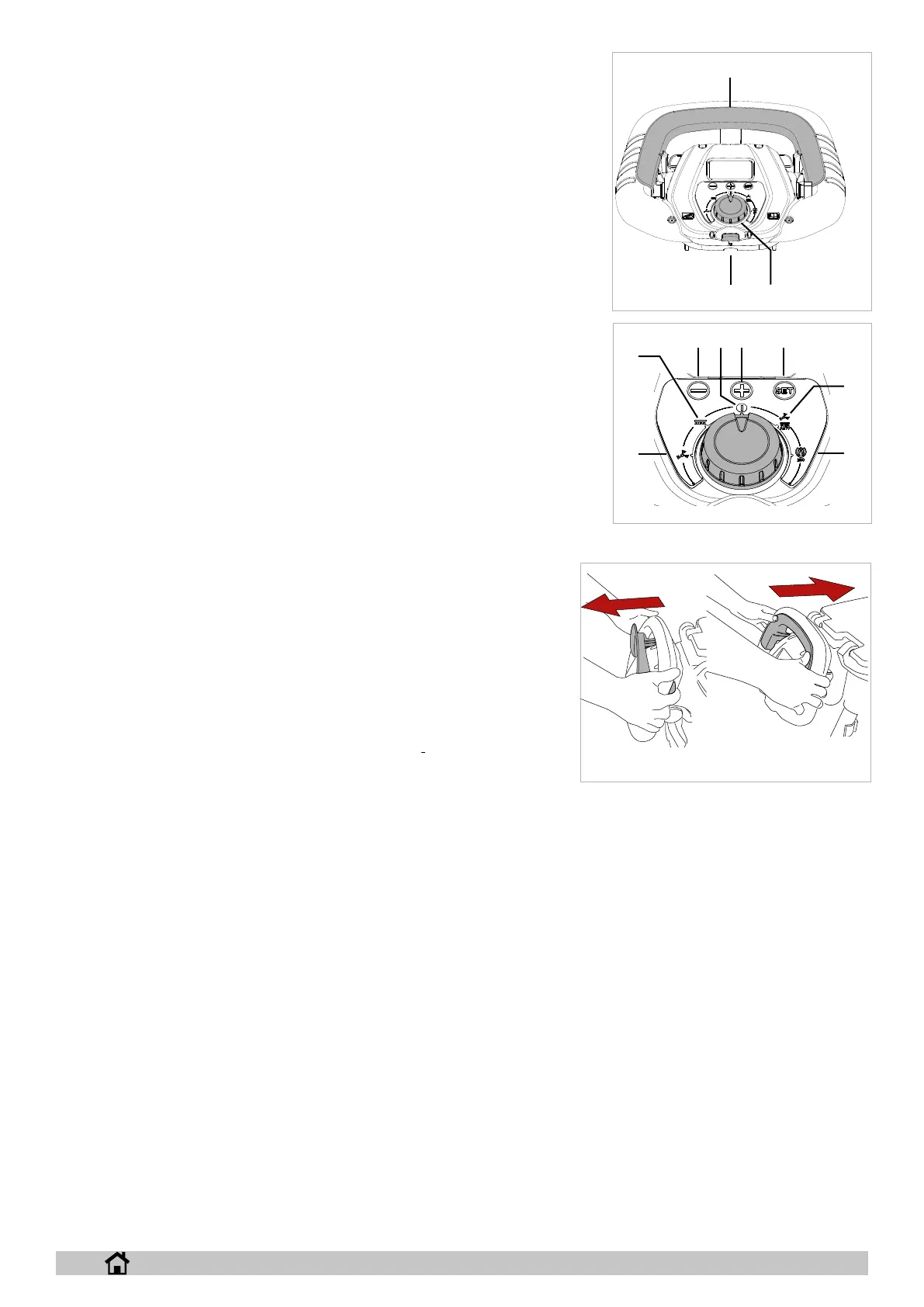
► Electronic key (g. 8-ref. 1): inserting the key enables operation of the machine, remove the
key to completely switch o the machine in an emergency.
► Operation selector (g. 8-ref. 2): turn to select the machine operating program:
► OFF (Fig.9-Ref.3): in this position the electric drive is enabled (where featured), the
speed can be adjusted using the “-” and “+” buttons. Press the “SET” button to man-
age the following functions:
► pressing the “SET” button once accesses the attach/release brush menu, press-
ing the “-” button enables brush release, pressing the “+” button enables brush
attachment on machines tted with actuator.
► pressing the “SET” button twice accesses the “Technical menu”, to enter the
menu press “-” and “+” together.
► Suction motor (g. 9-ref. 4): in this position the suction motor is activated and the
electric drive is enabled (where featured), the speed can be adjusted using the “-”
and “+” buttons . The suction motor starts by activating the drive lever, in the version
with electric drive the suction motor starts by activating the drive lever after having
lowered the squeegee lift lever (g. 10-ref. 3). Press the “SET” button to manage the
following function:
► pressing the “SET” button once accesses the remote suction menu, pressing
the “+” button starts the suction motor, pressing the “-” button stops the suction
motor, is the suction motor can also be stopped by operating the drive lever.
► Brush (g. 9-ref. 5): in this position the suction motor is activated and the electric
drive is enabled (where featured), the speed can be adjusted using the “-” and “+”
buttons. Press the “SET” button to manage the following functions:
► pressing the “SET” button once accesses the detergent delivery menu, delivery
can be adjusted using the “+” and “-” buttons.
► pressing the “SET” button twice accesses the scrubber head pressure
menu, the pressure can be adjusted using the “+” and “-” buttons on mod-
els equipped with actuator.
► pressing the “SET” button three times accesses the Chem Dose menu,
detergent delivery can be adjusted using the “+” and “-” buttons, on mod-
els equipped with Chem Dose.
► Auto (g. 9-ref. 6): in this position all of the machine’s functions are activated,
the head pressure value on models equipped with actuator and the detergent
delivery value are pre-set by the manufacturer, these can be modied in the
“Technical menu” (see chapter “Technical menu”), the electric drive is ena-
bled (where featured), the speed can be adjusted using the “-” and “+” buttons.
Press the “SET” button to manage the following functions:
► pressing the “SET” button once accesses the detergent delivery menu,
delivery can be adjusted using the “+” and “-” buttons.
► pressing the “SET” button twice accesses the scrubber head pressure menu, the pressure can be adjusted using the “+” and “-”
buttons on models equipped with actuator.
► pressing the “SET” button three times accesses the Chem Dose menu, detergent delivery can be adjusted using the “+” and “-”
buttons, on models equipped with Chem Dose.
► Eco (g. 9-ref. 7): in this position all of the machine’s functions are activated, the head pressure value on models equipped with
actuator and the detergent delivery value are pre-set by the manufacturer, these parameters cannot be modied, the electric drive is
enabled (where featured), the speed can be adjusted using the “-” and “+” buttons,
► Drive lever (g. 22): pulling the lever towards the operator engages reverse gear, pushing the lever forwards engages forward gear, to
change speed press the “+” and “-” buttons.
38 9
10
4
5
6
7
9
22
2
11
1
8
15


 To Next Page
 Loading...