0
)
0
' '
'~'
_.,t=11-1--:
J t __
I I
~; ;.J
Get Started
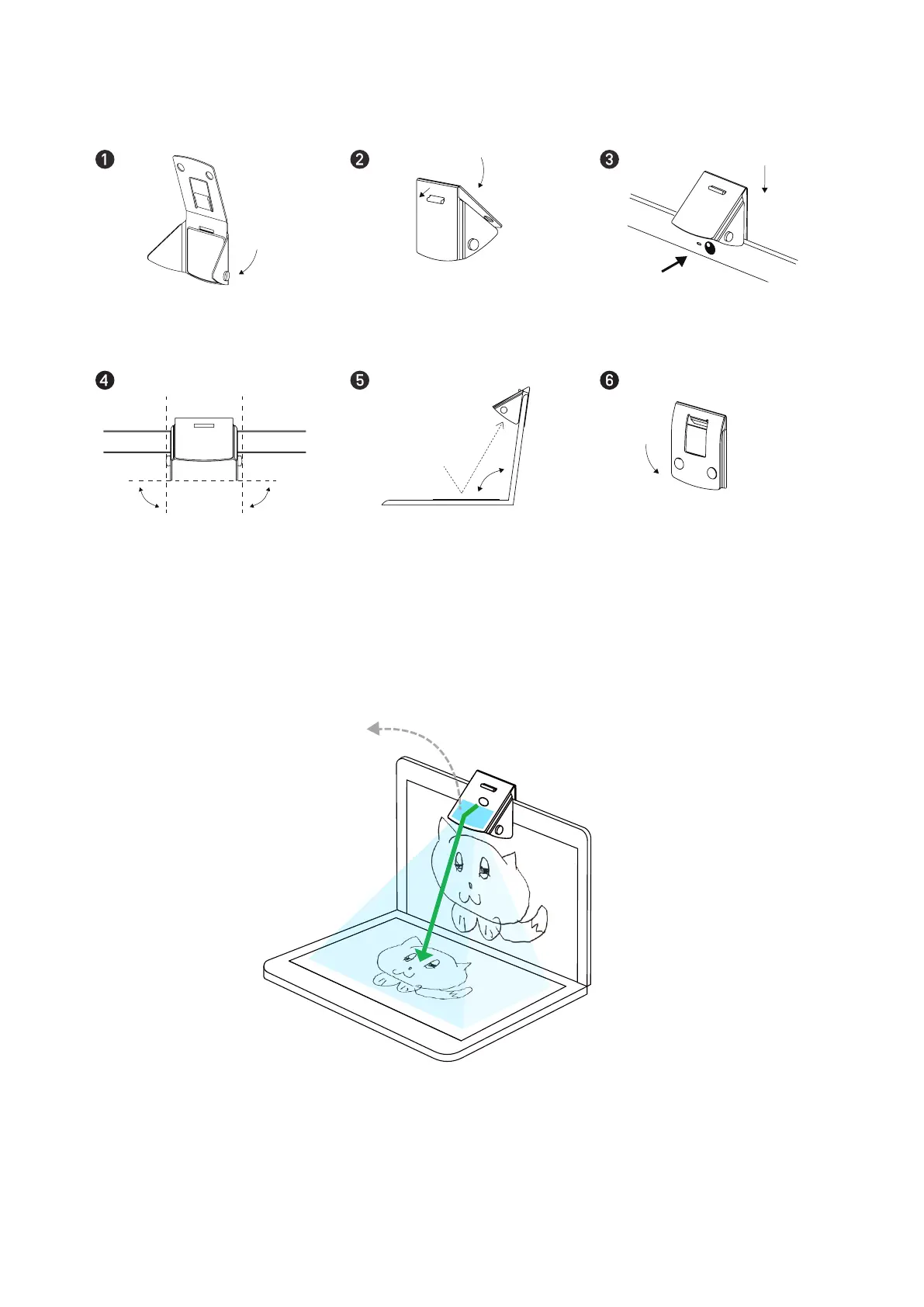
Fold up the corner aps, followed
Snap to secure the top and
by the top part of Mirror-Cam
bottom parts of Mirror-Cam
Attach Mirror-Cam over the top of
display screen, right above the camera
90°
90°
Make sure the corner aps are
perpendicular to the display screen
Adjust the screen so that Mirror-Cam
To keep Mirror-Cam at for storage,
points at just the right angle
interlock the studs and holes
See how it works:
Mirror
* Image resolution produced by Mirror-Cam
varies depending on the laptop camera
The mirror, which is inside of Mirror-Cam, reects the keyboard area of your laptop and
simultaneously allows your webcam to capture perfectly the reected image.


 To Next Page