EasyManua.ls Logo

Ipevo Mirror-Cam - User Manual

Ipevo Mirror-Cam
3 pages
Print Icon
To Next Page IconTo Next Page
Loading...
IPEVO
www.ipevo.com
IPEVO Mirror-Cam
Free the Doc Cam in your Laptop
Quick Start Guide
Copyright© 2020 IPEVO Corp. All rights reserved
Customer Service
Email:cs@ipevo.com
Tel: +1408-490-3085(USA)
The Basics
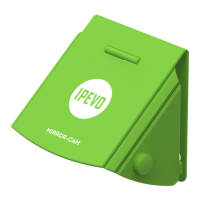
Mirror-Cam projects anything onto your laptop screen in real-time. Just attach Mirror-Cam to
the built-in webcam of your laptop and see everything that happens over the laptop keyboard
instantly streamed to the screen.
Mirror-Cam gives you an overhead view to create a showcase space where students can take
notes, create a sketch, solve a math problem, explain materials, do read-alouds, and many other
things. Be it online or oine, Mirror-Cam is a great interactive tool for distance learning.
Using your Mirror-Cam
Mirror-Cam is pocket-size, lightweight and extremely easy to use. MirrorCam has exible aps that
are adjustable and t a wide range of laptops & Chromebooks, and can also easily be folded into a
at position to take it wherever you go.
The packaging of Mirror-Cam has more than just one use. With a simple ip, turn it into a
whiteboard and place it over your laptops keyboard, white side up. Now you can write and draw on
it, as on any other whiteboard. Just make sure to use whiteboard markers so you can easily erase
what you have already shared and start anew.
The Package
One package of Mirror-Cam includes 6 units for your utmost convenience. Each unit of Mirror-
Cam comes attached to a cardboard that shows quick set-up instructions and can serve as
a whiteboard or a board to place on top of your laptop keyboard when using the Mirror-Cam
showcase area.
Question and Answer IconNeed help?

Do you have a question about the Ipevo Mirror-Cam and is the answer not in the manual?

Summary

The Basics

Using Your Mirror-Cam

The Package

Get Started

Complete with IPEVO Visualizer Software

Overview

The IPEVO Mirror-Cam is a compact and lightweight accessory designed to transform a laptop's built-in webcam into a document camera, effectively "freeing the doc cam in your laptop." This innovative device allows users to project anything placed on their laptop's keyboard area onto the screen in real-time, creating an overhead view for various interactive and educational purposes.

Function Description

At its core, the Mirror-Cam utilizes a strategically placed mirror to reflect the keyboard area of the laptop. When attached to the laptop's display, directly over the built-in webcam, this mirror enables the webcam to capture the reflected image of whatever is positioned on the keyboard. This setup creates a "showcase space" where physical objects, documents, or handwritten notes can be displayed and shared digitally.

The primary function of the Mirror-Cam is to facilitate real-time sharing and interaction. It allows users to:

  • Display physical content: Show physical documents, books, or small objects directly on the laptop screen.
  • Facilitate interactive learning: Create a dynamic space for students to take notes, draw sketches, solve math problems, or explain materials during online or offline sessions.
  • Enhance presentations: Incorporate physical examples or handwritten annotations into virtual meetings or presentations.
  • Support read-alouds: Easily display a book or text for shared reading experiences.

The Mirror-Cam is particularly useful for distance learning, providing an interactive tool that bridges the gap between physical and digital content sharing.

Usage Features

The Mirror-Cam is designed for ease of use and portability, offering several practical features:

  • Pocket-size and Lightweight: Its compact design makes it highly portable, allowing users to carry it wherever they go without added bulk.
  • Adjustable Flaps: The device features flexible flaps that are adjustable to fit a wide range of laptops and Chromebooks, ensuring compatibility with various models.
  • Foldable Design: The Mirror-Cam can be easily folded into a flat position, further enhancing its portability and making it convenient for storage.
  • Simple Attachment: The attachment process is straightforward: users fold up the corner flaps and the top part of the Mirror-Cam, snap the top and bottom parts together for security, and then attach it over the top of the laptop's display screen, right above the camera.
  • Perpendicular Alignment: Users are instructed to ensure the corner flaps are perpendicular to the display screen for optimal setup.
  • Screen Adjustment: The laptop screen can be adjusted to ensure the Mirror-Cam points at the correct angle, optimizing the captured image.
  • Storage Configuration: For flat storage, the studs and holes on the device can be interlocked, keeping it compact and protected.
  • Multi-functional Packaging: The packaging of the Mirror-Cam serves an additional purpose. With a simple flip, it can be transformed into a whiteboard. When placed over the laptop's keyboard with the white side up, it provides a surface for writing and drawing using whiteboard markers. This feature extends the utility of the product beyond just the camera accessory itself, offering a convenient, erasable surface for quick notes or demonstrations within the showcase area.
  • Bundled Units: Each package of Mirror-Cam includes six units, providing convenience for users who might need multiple devices or replacements. Each unit comes attached to a cardboard piece that not only shows quick set-up instructions but also serves as the aforementioned whiteboard or a protective board for the laptop keyboard when utilizing the Mirror-Cam's showcase area.

Maintenance Features

While the Mirror-Cam is a relatively simple device, there are a few considerations regarding its maintenance and longevity:

  • Software Integration: To optimize the view and functionality, IPEVO recommends using their Visualizer Software. This software allows users to:
    • Rotate or Mirror the image: Correct the orientation of the captured image.
    • Use Vertical Keystone Correction: Digitally align the projected image at the top or bottom, ensuring a clear and straight view.
    • Capture and Share: Take snapshots, record videos, and save or share the best parts of their work. The software can be downloaded from the IPEVO website.
  • Mirror Integrity: A crucial aspect of the Mirror-Cam's functionality is the integrity of its internal mirror. Users are explicitly advised to "Stop using and discard the product if its mirror breaks." This highlights that the mirror is a critical component, and damage to it renders the device unusable. There are no user-serviceable parts or repair instructions provided for a broken mirror, indicating that replacement of the entire unit is the recommended course of action in such a scenario.
  • Cleaning: Although not explicitly detailed, as with any optical device, gentle cleaning of the mirror surface would likely be beneficial to maintain image clarity, using appropriate materials that do not scratch the mirror. However, specific instructions are not provided in the manual.

In summary, the IPEVO Mirror-Cam is a user-friendly, portable, and versatile accessory that leverages existing laptop hardware to create an effective document camera solution, particularly valuable for educational and interactive sharing contexts. Its design emphasizes ease of setup, adaptability, and the integration of multi-functional components like its packaging, while also providing clear guidance on software enhancement and product longevity.

Ipevo Mirror-Cam Specifications

General IconGeneral
Camera TypeDocument Camera
ConnectivityUSB
InterfaceUSB 2.0
CompatibilitymacOS, Windows, ChromeOS
MicrophoneBuilt-in
SensorCMOS
FocusAutofocus
Frame Rate30 fps

Related product manuals