2600 N. Central Expressway Suite 950
Richardson, TX 75080
© Copyright 2014, iPhotonix
UPS port
USB port
port
port
the production line. All products for North America
the channels 12 & 13.
the factory. Customers have no way to choose
were programmed with the correct Channels at
software and was done before the product came off
channel 1-11. This channel limit can be only set by
Page 6
214-575-9300
Page 1
Page 7
FCC
N
o
t
i
c
e
-1
This device complies with part 15 of the FCC
Rules. Operation is subject to the following two
conditions: (1) This device may not cause harm-
ful interference, and (2) this device must accept
any interference received, including interference
that may cause undesired operation.
This equipment has been tested and found to
comply with the limits for a Class B digital
device, pursuant to part 15 of the FCC Rules.
These limits are designed to provide reasonable
protection against harmful interference in a resi-
dential installation. This equipment generates,
uses and can radiate radio frequency energy, and
if not installed and used in accordance with the
instructions, may cause harmful interference to
radio communications. However, there is no
guarantee that interference will not occur in a
particular installation.
If this equipment does cause harmful interference
to radio or television reception, which can be
determined by turning the equipment OFF and
ON, the user is encouraged to try to correct the
interference by one or more of the following
measures:
• Reorient or relocate the receiving antenna
• Increase the separation between the equip-
ment and receiver
• Connect the equipment to an outlet on a cir-
cuit different from that to which the receiver
is connected
• Consult the dealer or an experienced radio/
TV technician for help
The manufacturer is not responsible for any radio
or TV interference caused by unauthorized modi-
fications to this equipment. Such modifications
could void the user’s authority to operate the
equipment.
FCC RF Safety Caution Statement
To satisfy FCC RF exposure requirement for
mobile and base station transmission devices, a
separation distance of 20cm or more should be
maintained between the antenna of this device
and persons during operation. To ensure compli-
ance, operation at closer than this distance is not
recommended. The antenna(s) used for this trans-
mitter must not be co-located or operating in con-
junction with any other antenna or transmitter.
GPON SFU ONT
Quick Install Guide
FCC
N
o
t
i
c
e
-2
This device is intended to be attached to a receiver
that is not used to receive over-the-air broadcast sig-
nals. Connection of this device in any other fashion
may cause harmful interference to radio communica-
tions and is in violation of the FCC Rules, part 15.
The 72xxG North America edition is limited using
OVERVIEW
The 72xx SFU residential ONT delivers high
quality VoIP voice service, Ethernet data service
for high-speed internet access and IPTV broad-
cast video plus video on demand services. They
provide the following user features: (see Model
List for exact features)
– 2 POTS ports - voice telephone service
– 2 LAN ports - Ethernet
c
onn
e
c
t
i
v
i
t
y
– WiFi - WiFi
c
onn
e
c
t
i
v
i
t
y
– CATV
-
–
-
data backups
s
e
rv
i
c
e
– -
UPS
s
e
rv
i
c
e
INSTALLATION
The 72xx SFU ONT can be mounted vertically or
horizontally on any flat surface.
Unpack
Unpack the unit and verify that it is free from
shipping damage.:
Desk Mount
1.) Set the unit on a flat surface considering the
following:
– within reach of the power source
– no thermal obstructions
– not in direct sunlight
– user ability to monitor/operate the unit
Wall Mount
1.) Use wall anchors or wood screws (if mounting
to plywood mounted on a wall), spaced 5.709”
apart center to center for horizontal mounting or
3.543” apart center to center for vertical mount-
ing.
CATV, Return and HPNA services
Model List
Model Functions Select
2POTS+2GE+HPNA+CATV+Return+WiFi7269G
2POTS+2GE+HPNA+CATV+WiFi
7268G
2POTS+2GE+HPNA+CATV+Return
7267G
2POTS+2GE+HPNA+CATV
7263G
2POTS+2GE+HPNA+WiFi
7262G
2POTS+2GE+HPNA
7261G

 Need help?
 General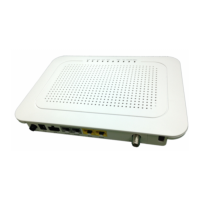

 To Next Page
