User’s Guide
www.zioncom.net
Conn. Type: BROADBAND ROUTER current connection type, Dynamic
IP is default value.
Conn. Status: Broadband Router current connection Status
WAN IP: BROADBAND ROUTER WAN current IP address
Connected PC: IP address of the computer which connects to
BROADBAND ROUTER.
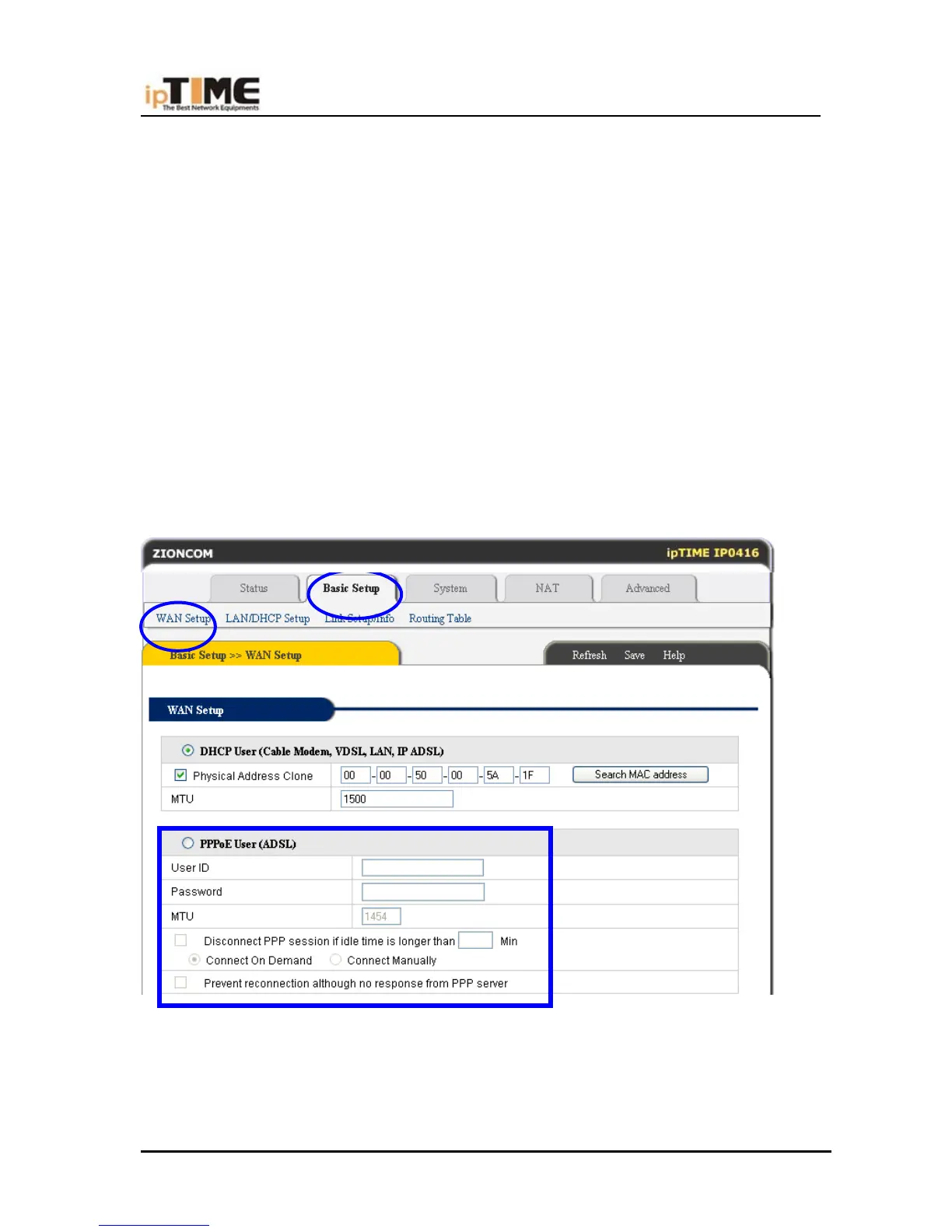
PPPoE(ADSL) USER SETUP
This connection way is suitable for virtual dial-up Internet connection.
Open external ADSL Modem and check the WAN LED of BROADBAND ROUTER.
If WAN LED is off, check the network cable between external modem and WAN port.
Click “Basic setup “-> “WAN setup”, as follows:
Select “PPPoE User (ADSL)” radio button.
Key in the “User ID” and “Password” provided by your Internet service provider.
Click the “Apply” button.
-5-



 To Next Page