The provided document is a user guide for the IQOS ILUMA PRIME™ device, a tobacco heating system. It outlines the device's components, how to use it, quick tips for troubleshooting, safety warnings, and technical specifications.
Function Description:
The IQOS ILUMA PRIME™ is a tobacco heating system designed for adult use, specifically for individuals who would otherwise continue to use tobacco or nicotine-containing products. It works by heating specially designed tobacco sticks called SMARTCORE STICKS™ without combustion, thereby producing an aerosol rather than smoke. The device consists of two main components: the IQOS ILUMA PRIME™ Pocket Charger and the IQOS ILUMA™ Holder. The Pocket Charger is used to store and recharge the Holder, which is the part of the device that holds the SMARTCORE STICK™ and heats it for use. The system aims to provide a tobacco experience by heating, rather than burning, tobacco.
Important Technical Specifications:
- Holder (IQOS ILUMA™ and IQOS ILUMA PRIME™ - Model C1402):
- Battery type: Li-ion rechargeable battery
- Input: 5V ⎓ 1.6 A
- Pocket Charger (IQOS ILUMA PRIME™ - Model M0017):
- Battery type: Li-ion rechargeable battery
- Input: 5V ⎓ 2 A
- Pocket Charger (IQOS ILUMA™ - Model M0018):
- Battery type: Li-ion rechargeable battery
- Input: 5V ⎓ 2 A
- Power Adaptor (Models: S52A21, S21A20, S21A22, S21A23, S21A25, S21A27, S82A40, S82A41, S82A42, S82A43, S82A45, S82A46):
- Input: 100 V-240 V~50-60 Hz 0.3 A
- Output: 5V ⎓ 2A
- Output power: 10.0 W
- Average active efficiency: 79.0%
- No load power consumption: <0.09 W
- Operating Temperature Range: The device can only be operated between >0°C and <40°C.
- Charging Time: Approximately 135 minutes for a full charge of the Pocket Charger.
Usage Features:
- Getting Started:
- Turning On: Press and hold the Pocket Charger Button for 4 seconds, then release. Both Pocket Charger Status Lights and Holder Status Lights will illuminate slowly.
- Charging Holder: Insert the Holder into the Pocket Charger and close the wrap to initiate charging. The Holder Status Light will indicate the Holder's battery level.
- Charging Pocket Charger: Before first use, fully charge the device using the Power Adaptor and Charging Cable (approx. 135 minutes).
- How to Use:
- Insert SMARTCORE STICK™: Insert the SMARTCORE STICK™ into the Holder up to the line on the filter until the Holder vibrates and its light(s) pulse. Heating starts automatically, or by pressing the Holder button for 1 second.
- Begin Use: Once the Holder vibrates and its lights remain fixed, the device is ready for use.
- Nearly Complete: To signal the last 30 seconds or the last 2 puffs, the Holder will vibrate, and its light(s) will pulse white.
- Remove SMARTCORE STICK™: After use, remove the SMARTCORE STICK™ and dispose of it according to safety warnings and instructions.
- Recharge Holder: Insert the Holder back into the Pocket Charger for recharging.
- Quick Tips / Status Indicators:
- Check Holder Status: Tilt the Holder or short press its button; Holder Lights indicate battery level (e.g., 2 lights for 2 uses, 1 light for 1 use).
- Check Holder Status on Pocket Charger: Short press the Pocket Charger Button; the Holder Status Light will turn on to show the Holder's battery level.
- Check Pocket Charger Status: Short press the Pocket Charger Button; Pocket Charger Status Lights will turn on to indicate the battery level.
- Autostop: During use, the experience will stop if the SMARTCORE STICK™ is moved or removed from the Holder.
- Light Blinks Yellow: Indicates battery depletion, requiring a charge.
- Lights Blink White Twice: Indicates the IQOS ILUMA PRIME™ is outside the optimal operating temperature range (0°C~40°C).
- Light Blinks Red: Indicates a need to reset the Pocket Charger. If blinking persists, contact Customer Care.
- To Reset: Place the Holder in the Pocket Charger, press the Pocket Charger Button for 10 seconds, then release. All Status Lights will turn OFF and then ON to confirm a reset.
Maintenance Features:
- Cleaning: Do not clean the device with any cleaning agent. Periodically clean the USB charging port of both the IQOS ILUMA™ and IQOS ILUMA PRIME™ to prevent accumulation of foreign matter (like dust) and inspect the USB port before connecting a USB connector.
- Charging: Only charge the device indoors using a manufacturer-approved Charging Cable and Power Adaptor. The product must only be charged using Safety Extra Low Voltage.
- Storage: Store the device in a clean, dry, and cool place, not exceeding 60°C, and out of reach of children.
- Disposal: The product and its individual parts (including batteries) must not be disposed of with household waste. Instead, they should be taken to a designated collection point for recycling of waste electrical and electronic equipment. Waste batteries can be returned free of charge at the point of sale.
Safety Warnings and Instructions (Key Points):
- Intended Users: For adult use only. Not for children, adolescents, or persons with reduced physical, sensory, or mental capabilities unless supervised.
- Tobacco and Nicotine: SMARTCORE STICKS™ contain addictive nicotine. IQOS ILUMA™ devices are not risk-free; quitting tobacco and nicotine is the best way to reduce health risks. Nicotine is naturally present in SMARTCORE STICKS™.
- Health Effects: Some users may experience adverse effects like abdominal pain, cough, dizziness, etc. Nicotine-containing products should not be used by individuals with heart diseases, diabetes, epilepsy, or during pregnancy/breast-feeding.
- Choking, Ingestion, and Handling Hazard: Keep devices and SMARTCORE STICKS™ out of reach of children and pets. SMARTCORE STICKS™ contain small metal parts with sharp edges, posing choking and ingestion hazards. If swallowed, seek immediate medical attention. Do not disassemble SMARTCORE STICKS™.
- Electrical and Battery Hazards: Failure to follow warnings can result in fire, explosion, electric shock, injury. Do not use where electronic devices are prohibited. Do not use if damaged, tampered with, broken, or if the battery is leaking. Do not expose to liquids.
- Compatibility: IQOS ILUMA™ and IQOS ILUMA PRIME™ Pocket Chargers and Holders are not compatible with previous IQOS generations (IQOS 2.4, IQOS 2.4 PLUS, IQOS 3, IQOS 3 DUO). Do not attempt to charge components across different generations.
- Product Integrity: Contains no user-serviceable parts. Do not attempt to open, modify, service, disassemble, or repair. Do not insert any object into the heating chamber other than SMARTCORE STICKS™.
- SMARTCORE STICKS™ Use: Only use SMARTCORE STICKS™ specifically designed for IQOS ILUMA™ devices. Never use with cigarettes or previous IQOS device generations. Do not modify SMARTCORE STICKS™ or add any substance to them. SMARTCORE STICKS™ are single-use only and should never be re-used or lit with a flame source.
- Hot Aerosol Risk: Under hot and humid conditions, the aerosol may feel very hot. Store SMARTCORE STICKS™ in a clean, dry, cool place and avoid exposure to excessive heat or moisture.
- Allergic Reaction Risk: May cause allergic reactions. Stop use and seek medical attention if symptoms occur.

 Need help?
 General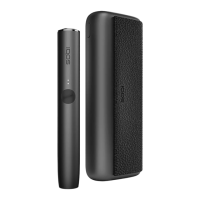

 To Next Page