3
Operator Controls
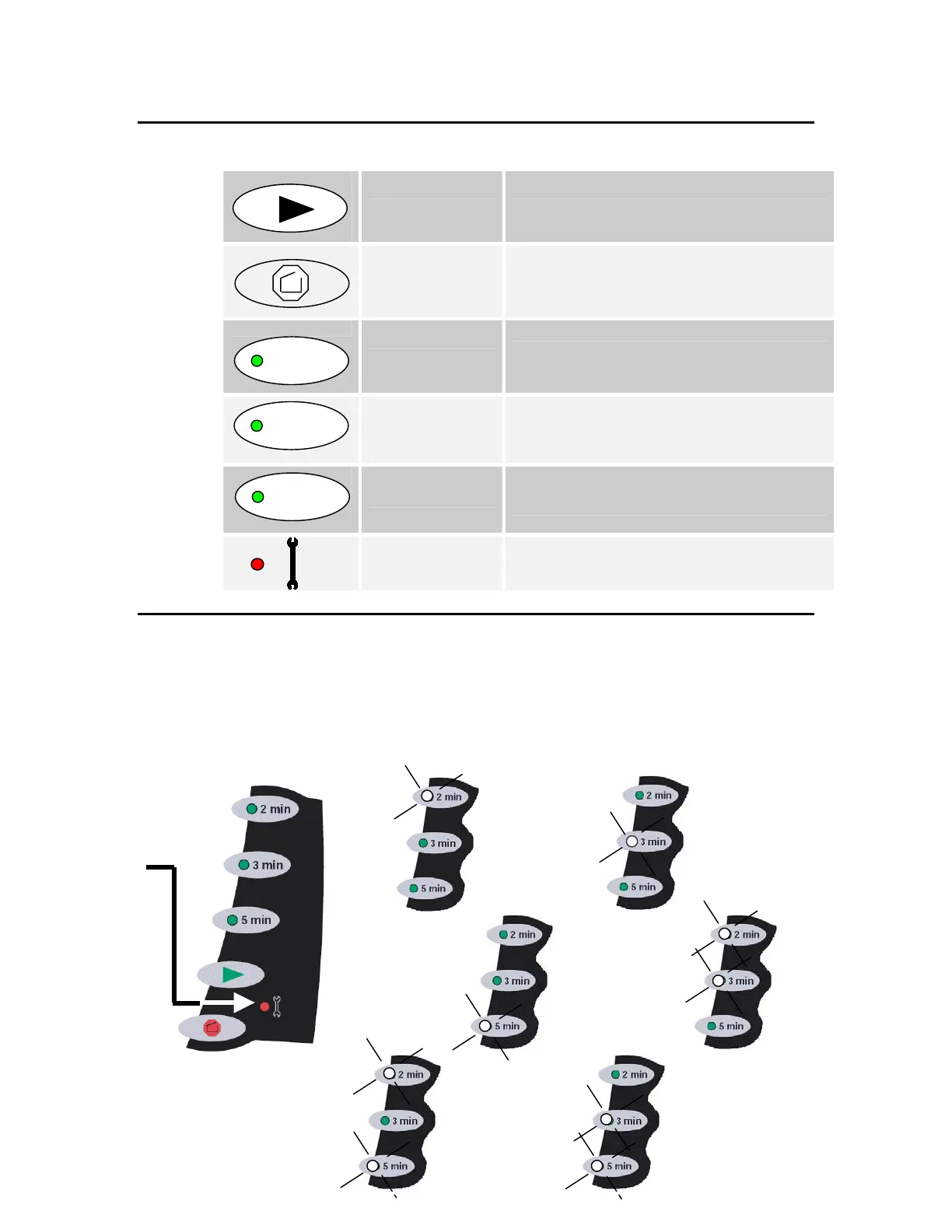
Start The Start button initiates the selected cycle.
Stop/Open
The Stop/Open button interrupts the cycle and
releases the cover when the rotor has stopped.
2 Minute Cycle
The 2 min button selects a cycle of two minutes at
7200 rpm.
3 Minute Cycle
The 3 min button selects a cycle of three minutes at
7200 rpm.
5 Minute Cycle
The 5 min button selects a cycle of five minutes at
5600 rpm.
Error/Service
The red indicator with an adjacent wrench symbol
flashes to signal an error condition or remains
continuously illuminated when service is needed.
Error Indicators
Express 3 error conditions are signaled by a flashing red Error/Service indicator on the control panel.
The cause of the error condition can be identified by the combination of green cycle time indicators
that are also flashing.
Error/Service
light flashing
Rotor failed to
reach full speed
in 30 seconds.
Cover not
latched
Rotor
over-speed
Rotor
out-of-balance
Unable to
maintain rotor
speed
Locked roto
2 min
3 min
5 min


 To Next Page
 Loading...