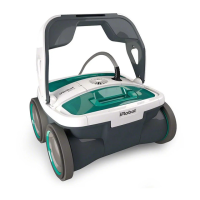
The iRobot Mirra 530 is an automatic pool cleaning robot designed to efficiently clean swimming pools. It operates autonomously, navigating the pool's surfaces to remove dirt and debris, thereby reducing the need for manual cleaning. The robot is intended for use exclusively in swimming pools and requires proper setup and maintenance to ensure optimal performance and longevity.
Function Description
The Mirra 530 is a robotic pool cleaner that uses a combination of suction, filtration, and brushing to clean pool surfaces. It is equipped with a floating cable that connects to an external power supply, which provides low voltage to the cleaner. Once immersed in water and activated, the robot begins its cleaning cycle, moving across the pool floor and walls. Its design includes intake valves that draw in water and debris, which are then passed through a filter system. A rolling brush helps to dislodge stubborn dirt and algae from surfaces, ensuring a thorough clean. The robot's internal propulsion system allows it to maneuver effectively within the pool. After completing a cleaning cycle, the robot automatically enters a standby mode.
Usage Features
To begin using the Mirra 530, the power supply (transformer) must be placed at least 3.6 meters (11.8 feet) from the pool and at least 12 cm (4.7 inches) above the surface. The cable is then uncoiled and plugged into the power supply, ensuring the key on the plug aligns with the key slot on the socket. The power supply itself must be plugged into a grounded outlet. Before placing the robot in the water, it's crucial to ensure the electric outlet is properly grounded and protected by a Ground Fault Current Interrupter (GFCI) or Residual Current Device (RCD) to prevent electric shock.
Once the power supply is connected, the robot is placed into the pool. It's important to turn the unit side to side in the water to allow any trapped air to escape from its body, enabling it to sink to the bottom. The floating cable should then be spread evenly over the pool surface to prevent tangling. The robot is activated by pressing the "CLEAN" button on the power supply, which will illuminate a blue LED, indicating that the system is "ON" and the cleaning cycle has started. The blue LED will flash when the power supply is in standby mode and light continuously when the pool cleaner is operating. If the user wishes to stop the cleaning cycle prematurely, pressing the "CLEAN" button once will cause the LED to flash, indicating the machine has stopped running.
The robot's turning behavior can be adjusted by modifying the amount of float blocks within its filter canister. This allows users to fine-tune how the robot navigates and turns, ideally aiming for a 90-degree turn on the first turn of a new cleaning cycle. The intake valves can also be adjusted to optimize suction on the ground and ensure proper clearance.
Maintenance Features
Regular maintenance is essential for the Mirra 530's performance and longevity. After each working cycle, it is highly recommended to clean the filter. This involves accessing the filter canister, removing it, and cleaning out accumulated debris. The filter access is typically secured by a lock lever.
The rolling brush should also be checked periodically. If it becomes worn or damaged, it can be replaced. The manual provides instructions on how to access and change the rolling brush, which is crucial for effective scrubbing of pool surfaces.
Another key maintenance task is cleaning the propeller, especially if the robot experiences poor suction. Before performing this action, it is critical to disconnect the robot from the power supply. The propeller is located within the unit and can be accessed for cleaning to remove any hair, string, or debris that may obstruct its movement.
The PVA wheels, which are designed for optimal grip and movement, may require soaking after extended periods of storage to maintain their effectiveness.
General maintenance tips include:
- Always shut off and unplug the power supply every time the cleaner is removed from the water.
- Periodically straighten out the floating power cord to prevent tangles.
- Store the cleaner in its original packaging for off-season storage or if service is required.
- Avoid leaving the cleaner in direct sunlight when not in use.
- Never leave the power supply in direct sunlight or exposed to rain.
- Occasionally rinse the cleaner in clean, fresh water to extend its service life.
- The robot should be stored at temperatures between 10°C and 40°C (50°F and 104°F) to protect its motors, plastics, and seals.
- The robot can operate in water temperatures ranging from 13°C to 35°C (55°F to 95°F), with an optimal range between 22°C and 32°C (72°F and 90°F).
Troubleshooting guidance is provided for common issues such as the unit not pumping water or moving, slow pumping, lack of movement despite pumping water, inability to climb walls, failure to pick up dirt, incomplete pool coverage, and debris coming out when removed from the pool. These troubleshooting steps often involve checking power connections, cleaning filters and propellers, adjusting intake valves, and ensuring the floating cable is untangled. If issues persist after following these steps, users are advised to visit the iRobot website for further assistance.


 To Next Page
 General