Roomba Combo® j7+ Owner’s Guide 4
EN
Cleaning
Mopping
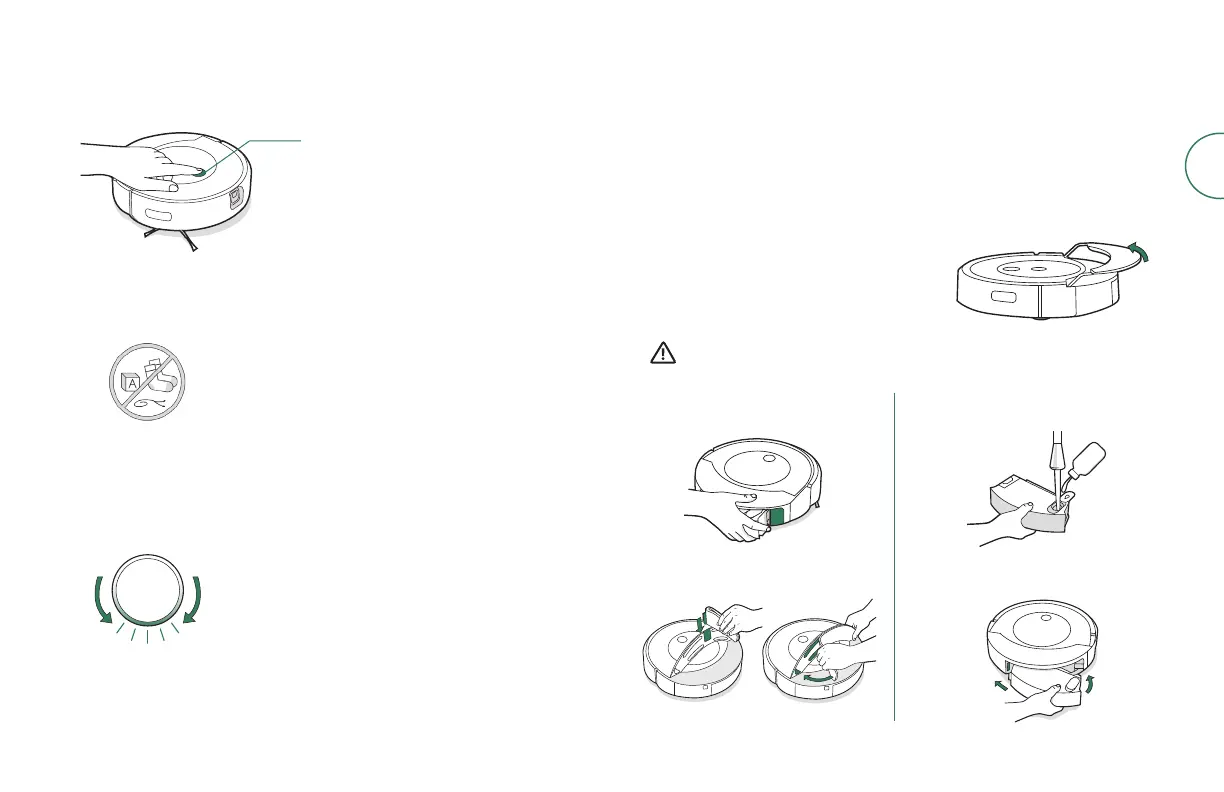
• Your robot is able to both vacuum and mop at the same time. To start
a vacuum and mop cleaning job from your robot, fill the Tank, attach
a Mopping Pad and press the clean button.
• When your robot encounters carpet during its cleaning job, it will lift
and tuck the Mopping Pad away.
• After completing your vacuum and
mop cleaning job, make sure that you
empty the Water Tank and replace the
Mopping Pad.
Your robot is able to recognise and avoid
objects. However, it is still recommended that
you remove excess clutter before cleaning.
Just press the clean button
Tap to Start/Pause/Resume
Hold for two to five (2–5) seconds
to end a job
Attach the Mopping Pad.
Press the Bin Release
Button to remove the Bin.
1
2
WARNING: To prevent damaging your robot, do not manually stow the
Mopping Pad Plate on the Pad Shelf.
Place the Bin back in
therobot.
4
Fill the Tank with water and
acompatible cleaning
solution.
3
When your robot senses that its Bin needs to be
emptied, the light ring indicator will illuminate
in a red sweeping motion towards the rear.
• Your robot will automatically explore and clean your home in neat
rows, avoiding obstacles using its front-facing Camera. It will return
to the Charging Station at the end of a cleaning job and whenever it
needs to recharge.
• To end a job and send the robot back to its Charging Station, hold the
clean button down for between two to five (2–5) seconds. A blue light ring
pattern will indicate that the robot issearching for the Charging Station.
• When your robot detects an especially dirty area, it will engage Dirt
Detect™ mode, moving in a forwards/backwards motion to clean the
area more thoroughly. The light ring indicator will flashblue.
Vacuuming
• To start a vacuum-only cleaning job from your robot, empty the Tank
or detach the Mopping Pad before pressing the cleanbutton.



 To Next Page