13Roomba Combo® 10 Max + AutoWash dock Owner’s Guide
EN
Charging
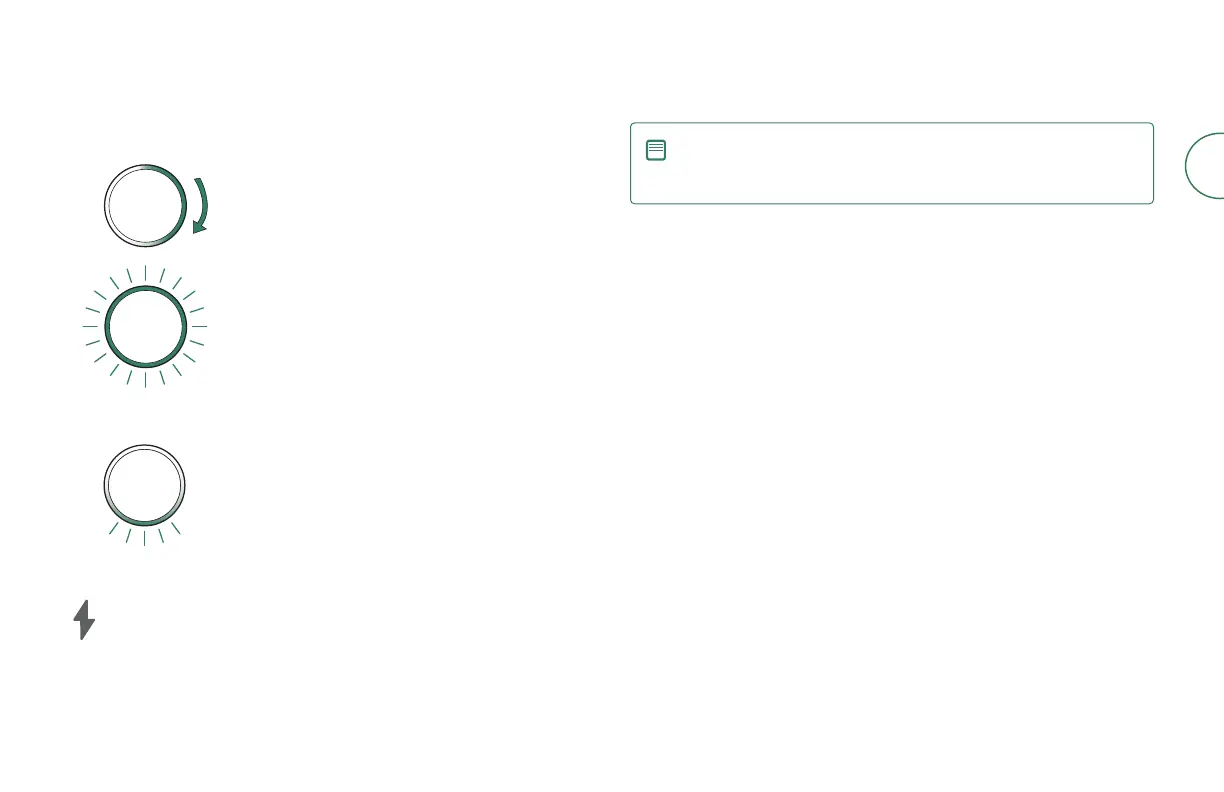
Light Ring: Charging in progress
Sweeping white: charging
• Percentage charged is indicated by the size of the
solid white
• For example, if half the light ring is solid, it’s
50% charged
Pulsing red: charging, low battery
Light Ring: Charging complete
Solid white: fully charged
Pulsing white at rear: fully charged and asleep
Dock Charging LED indicator
On: Robot on dock charging
O: robot not on dock, robot not charging, or dock is asleep
NOTE: After 60 seconds, the dock will sleep and the Charging LED
indicator will turn o. To check the status, tap the Clean button on
your robot or visit the iRobot Home app.
Charging during a cleaning job
You robot will return to the dock whenever it needs to recharge. Once the robot is
suciently charged, it will then resume the cleaning job where it left o.
Standby mode
The robot uses a small amount of power whenever it is on the dock. You can put
the robot in a further-reduced power state when not in use. For instructions and
more details on this Reduced Power Standby Mode, refer to the FAQ page on
our website.
Storing your robot
For long-term storage, turn o the robot by removing it from the dock and holding
down the clean button for 3 seconds with one wheel o the ground. Store the
robot in a cool, dry place.



 To Next Page