For more information, visit global.irobot.com14
EN
Cleaning
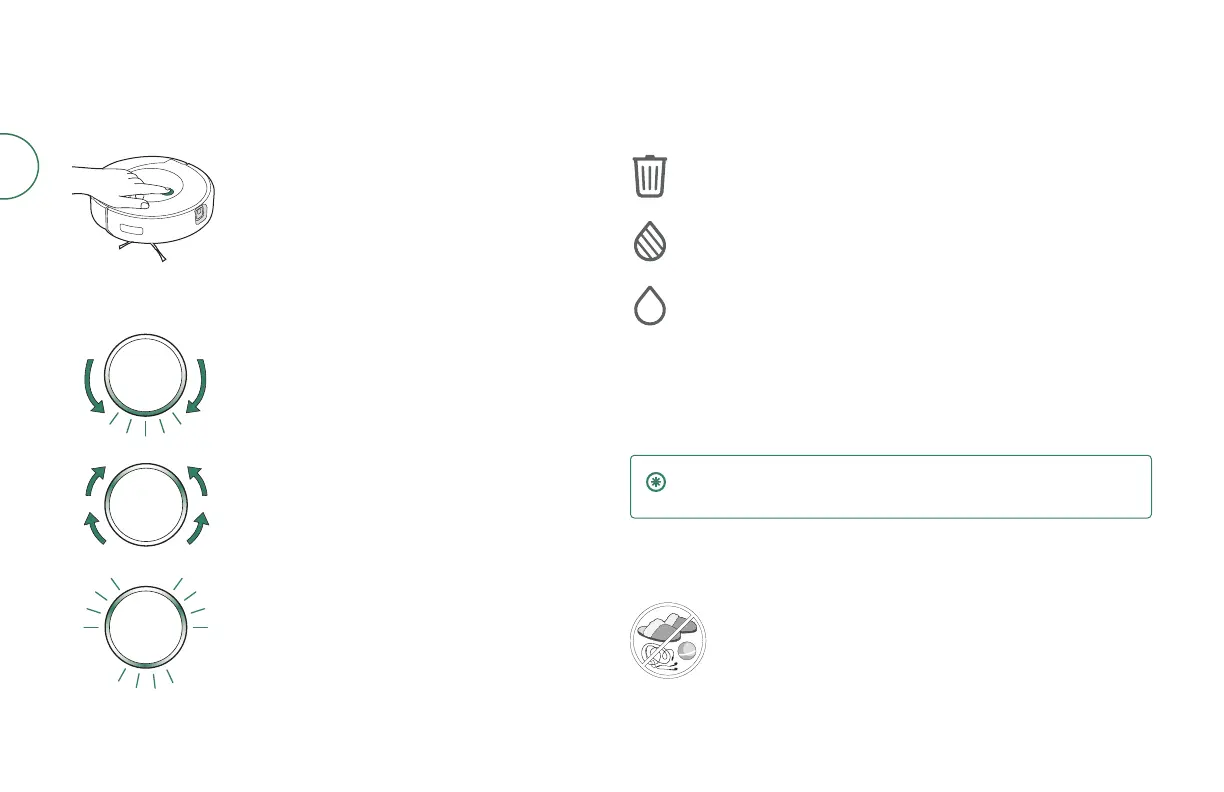
Clean button controls
Tap to Start / Pause / Resume a job
Hold for 2-5 seconds to end a job and send the robot
back to its dock
Light Ring: Cleaning
Sweeping red toward rear: robot bin needs to
be emptied
Blue marching forward: robot seeking dock
Flashing blue: Dirt Detect™ mode engaged
Dock LED Indicators while cleaning
Solid red: bag full, missing, or improperly installed
Solid red: dirty tank full, missing, or improperly installed
Solid red: clean tank empty, missing, or improperly installed
Cleaning pattern
Once your robot creates a map of your home, it will automatically explore and
clean in neat rows, avoiding obstacles by using its front-facing camera.
IMPORTANT: The robot is unable to navigate in complete darkness.
Turn on lights or open blinds to help the robot navigate.
You robot will return to the dock. You robot will return to the dock at the end of a
cleaning job and whenever it needs to empty the bin, ll the water tank, wash the
pad, or recharge. Once complete, it will resume the cleaning job where it left o.
Your robot is able to recognize and avoid objects. However, it is still
recommended to remove excess obstacles before cleaning.



 To Next Page