23Roomba Combo® 10 Max + AutoWash dock Owner’s Guide
EN
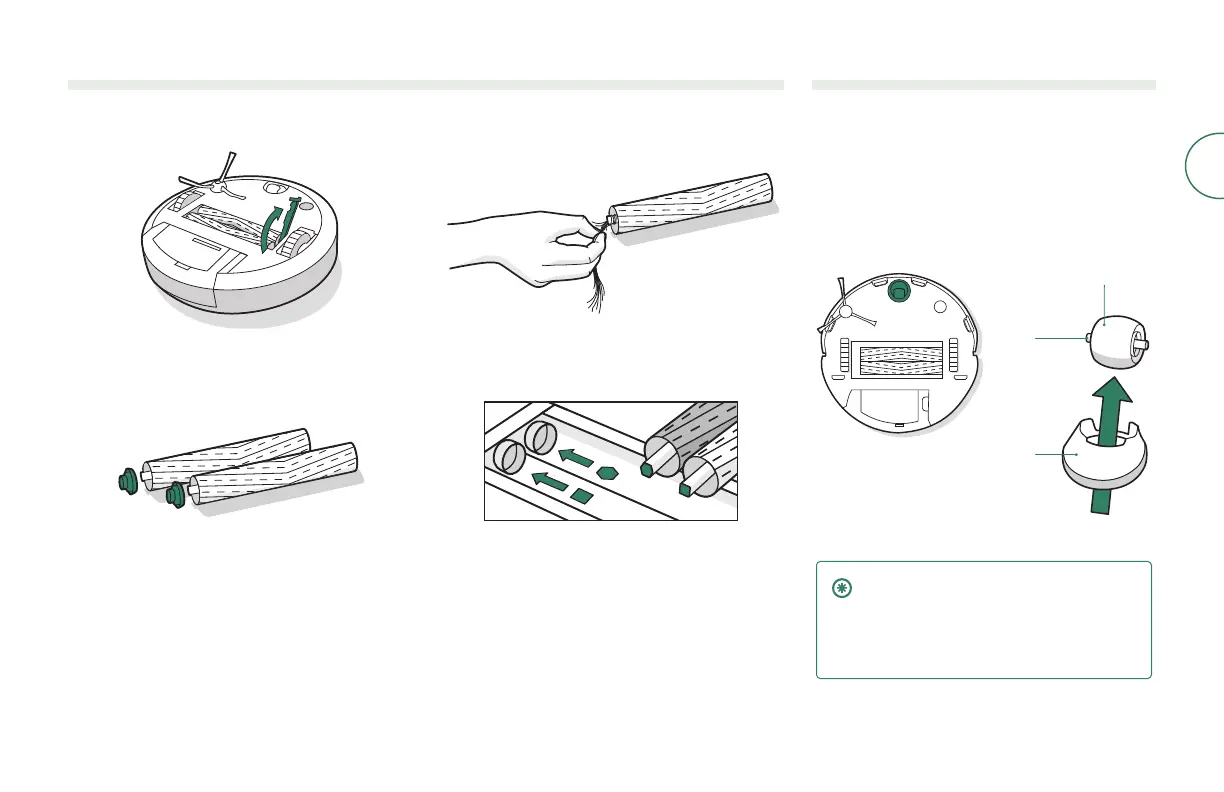
Cleaning the dual Multi-Surface Brushes
1
Pinch the brush frame release tab, lift the tab,
and remove any obstructions.
2
Remove the brushes from the robot. Remove the
end caps from the ends of the brushes. Remove
any hair or debris that has collected beneath the
caps. Reinstall the brush caps.
3
Remove any hair or debris from the square and
hexagonal pegs on the opposite side of the
brushes. Replace end caps.
4
Reinstall the brushes in the robot. Match the
shape of the brush pegs with the shape of the
brush icons in the cleaning head module.
Cleaning the front caster wheel
1
Pull rmly on the front wheel module to remove it
from the robot.
2
Pull rmly on the wheel to remove it from
its housing.
3
Remove any debris from inside the wheel cavity.
4
Reinstall all parts when nished. Make sure the
wheel clicks back into place.
Wheel
Axle
Housing
IMPORTANT: A front wheel clogged with
hair and debris could result in damage
to your oor. If the wheel is not spinning
freely after you have cleaned it, please
contact Customer Care.



 To Next Page