
 Need help?
Do you have a question about the IRULU F20 and is the answer not in the manual?
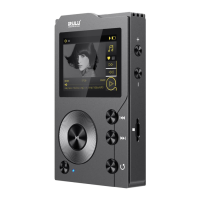
Covers power, screen on/off, play/pause, next/previous song, and fast forward/backward functions.
Includes scroll wheel, M button for menu access, and back button for navigation.
Details volume adjustment, earphone jack, USB/OTG, line-out, and Micro SD card slot.
Instructions for charging the player and turning it on/off.
Options for song collection, play mode, EQ, Bluetooth, and wallpaper.
Adjusting Gain, Replay Gain, and Balance for optimal sound.
Key specifications including dimension, weight, display, power, and audio formats.
 General
| Screen Size | 2.4 inches |
|---|---|
| Memory | 8GB |
| FM Radio | Yes |
| Voice Recording | Yes |
| Battery | Built-in rechargeable lithium battery |
| Expandable Memory | Up to 128GB |
| Audio Formats Supported | MP3, WMA, APE, FLAC, WAV |
| Video Formats Supported | AVI |
| Bluetooth | Yes |
| Display | TFT |
| Expandable Storage | Up to 32GB via MicroSD |

 To Next Page