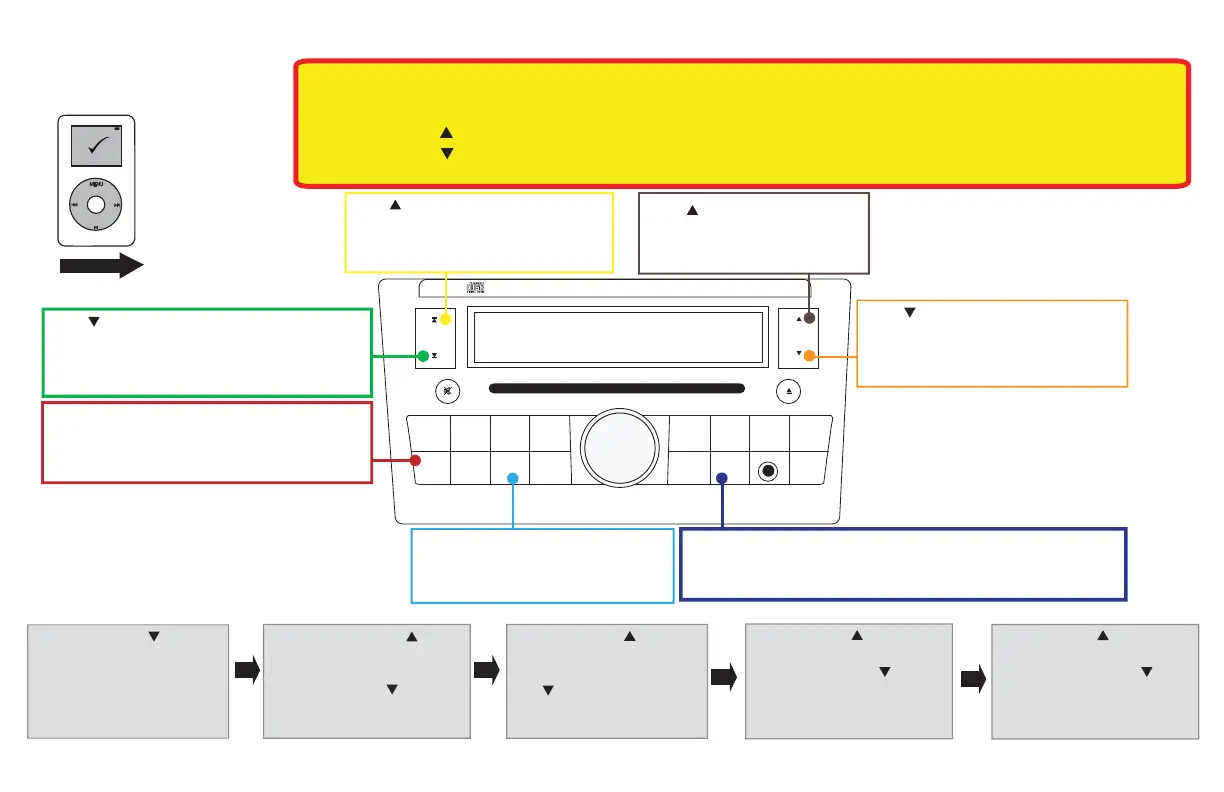
Tune – Press to go back one
step while in the browse menu
SEEK
TRACK
1
2 3 4 5 6
FF•REW
PRESET
A•B•C
TUNE
AUDIO
AUX
RADIOCD
DISP
CLOCK
PWR
VOL
PUSH
AUX IN
SCAN
RDM
RPT
C AT
CH
NISSAN
(Actual Radio Appearance may differ from representation.)
OK to Disconnect
MENU
iPod
Seek
• Press to advance to the next track
• Press to advance to the next option
in the browse menu
Radio Button – Press to enter into
satellite mode or to switch between
modes within the Media Gateway
Scan
• Press to exit browse menu
• Press while listening to iPod to toggle through random modes.
Display Button – Press to toggle
through display modes.
Seek
• Press to go back to the previous track
• Press to go back to the previous option in the
browse menu
Tune
• Press to enter into the browse menu
• Press to make a selection while in
the browse menu
Browsing Example:
To select the song "Star-Spangled Banner" through the Artist category
1) Press the Tune button to
enter into the Browse menu.
The radio will display “PL:List”
2) Press the Seek
button until radio
displays “AR:Artist”.
Press the Tune button
to slect. Radio will
display “AR:All”
3) Press the Seek button
until radio displays “AR:
Francis Scott Key”. Press the
Tune button to select.
Radio will display “AL:All”.
4) Press the Seek button until
radio displays “AL:Patriot Hits
Vol.1”. Press the Tune button to
select. Radio will display “TR:All”.
7) Press the Seek button until
radio displays “TR:Star- Spangled
Banner”. Press the Tune button
to select. Song will begin to play
and the display will show track
info.
QRC020
**READ THIS FIRST**
Altima/Rouge 2007-2008
• Press the “Radio” button until “Sat” is displayed.
• Press the “Seek ” button until the source you want is displayed.
• Press the “Tune ” button to select the source.
Changing Sources (iPod, HD Radio, *Satellite Radio, AUX)
*if available


 To Next Page