1.Make sure the skateboard and the remote are fully charged before operation. Power
on the skateboard and the remote.
2.Step on the deck. Push and hold the accelerator switch slowly to accelerate. Release
the accelerator slowly to slow down. Pull back the switch to stop the device. It works the
same way in both direction modes.
3.Slide the speed switch to adjust speed of the skateboard. It's suggested to use the low
speed mode for beginners.
4. Power off the skateboard and the remote when they are in use. If you don't switch
device off, it will stay on for 10 minutes so that when you step on it again, you can
continue riding without
engaging on / off switch. If not used within that period, it will automatically switch off
after the time period is up.
■ The range of this device depends on many factors, the following factors may shorten
the range: Uneven ground will shorten the range.
■ Weight of the rider.
■ Extreme temperatures. The battery performance decreases quickly in cold conditions.
■ Maintenance. Proper handling, charging, etc. will optimize the range.
■ Distance and speed. Moderate, economic riding speed will optimize distance, while
frequent starts, stops, and speed changes will shorten the range.
Range (Cruise distance on one charge)
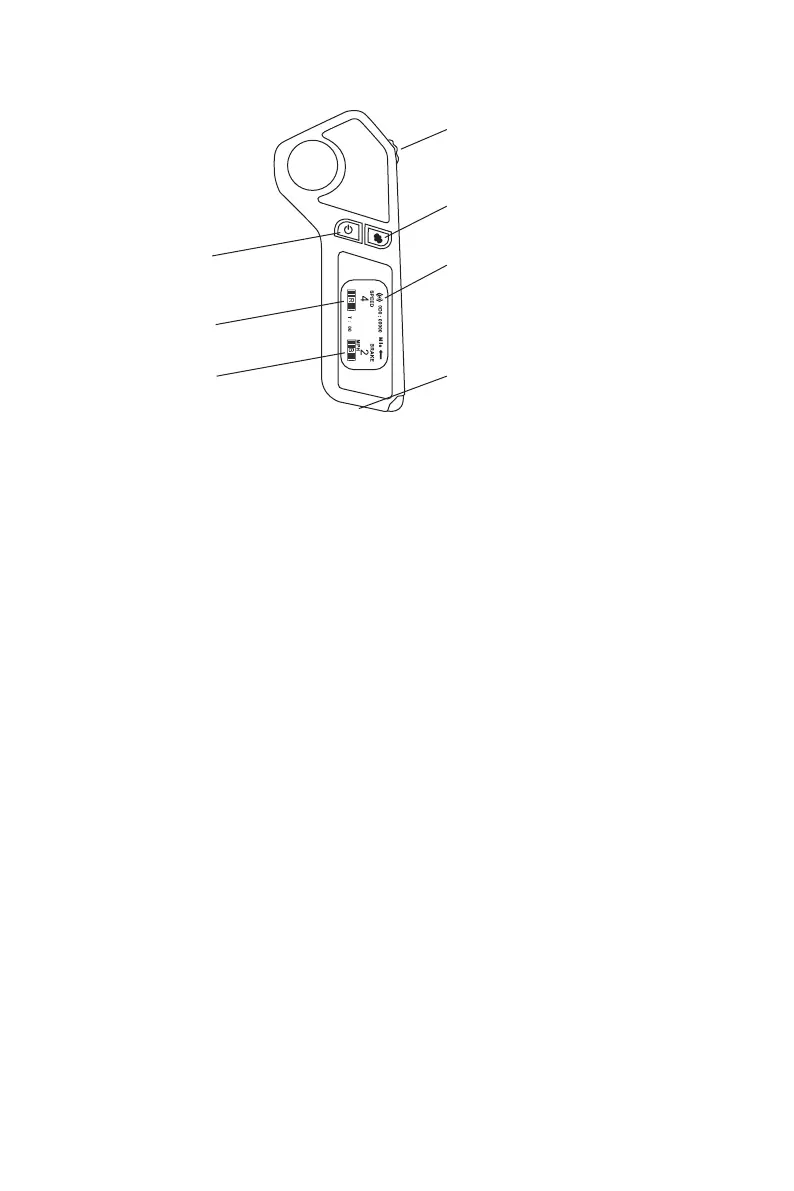
Remote
OPERATION
Power Switch
Skateboard
battery indicator
Remote
battery indicator
Acceleration/Brake Switch
Mini USB Charging Port
Reverse
Signal Light
05


 To Next Page