12-
5.3 iSolution Operation
i Consistent DMX configuration enable iMove to be linked together with iRock and iShow
and controlled at the same time.
i DMX address can be set remotely by iLead controller ( please refer to the user manual of
iLead controller ). No need to calculate the DMX channels of each fixture in the chain.
i Automatic switching between DMX function and built-in stand alone programs.
5.4 DMX Controller
An universal DMX controller to control the units, you have to set DMX address from
1 to 512 channel so that the units can receive DMX signal.
Press the MENU button up to when the is showing on the display. Pressing ENTER
button and the display will blink. Use DOWN and UP button to change the DMX512 address.
Once the address has been selected, press and keep ENTER button pressed up to when
the display stops blinking or storing automatically 8 seconds later. To go back to the
functions without any change press the MENU button again. If you use please refer to the
following diagram to address your DMX512 channel for the first 4 units.
DMX address can be setting remotely by IL-0824 controller. No need to calculate the DMX
channels of each fixture in the chain.
13-
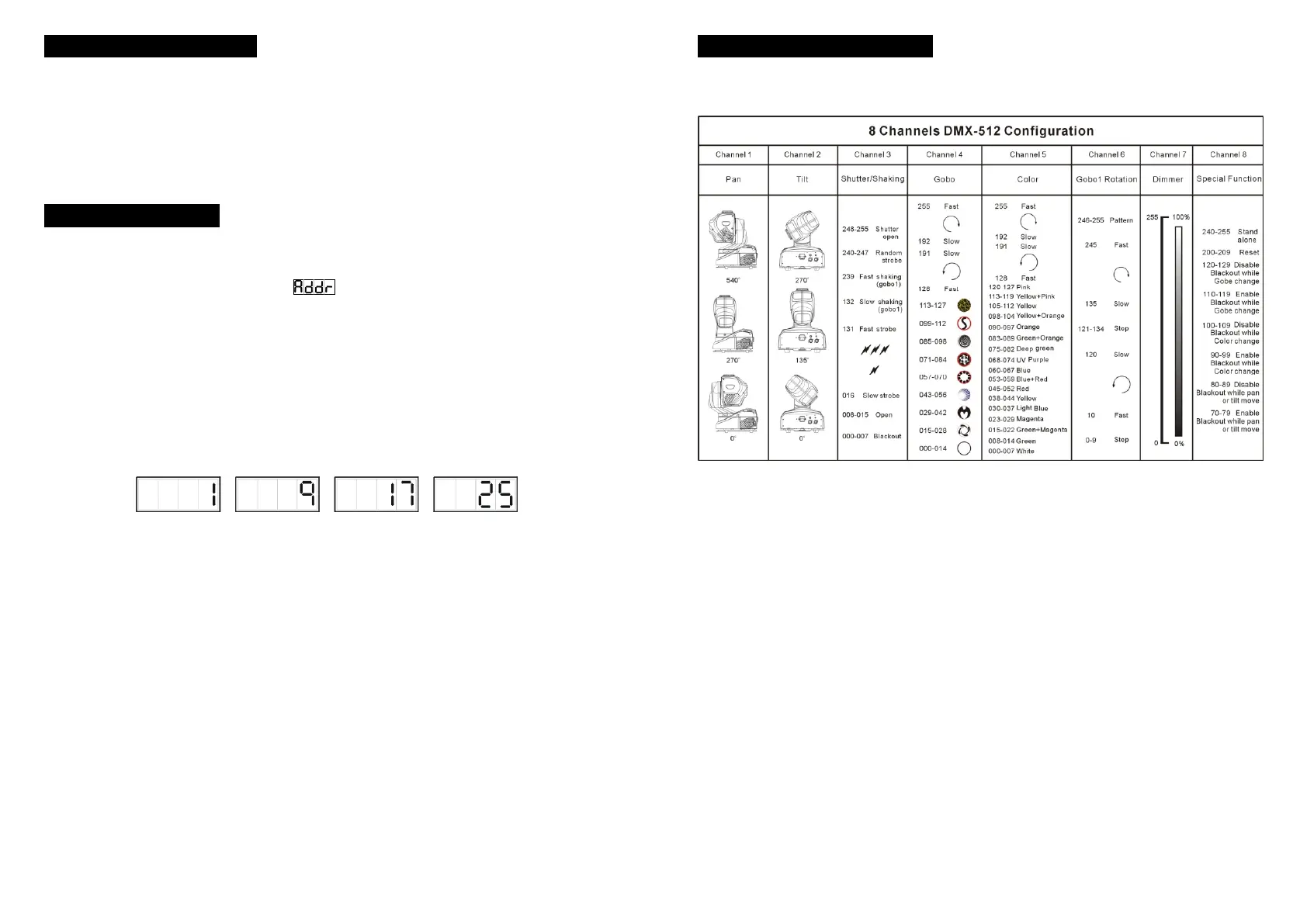
6. DMX 512 Configuration


 To Next Page