mode, in which case a program or bank change on any
channel will be acted on.
R) TUNER Function
The TUNER Function is accessed at any time by pressing and holding the
TUNER switch for a few seconds. This is the only way to access the Tuner, it
cannot be reached via the FUNCTION knob. Activating the Tuner will mute
the outputs! To deactivate the Tuner and restore the signal, press any of the 6
switches.
The Tuner is a basic chromatic tuner, with a range from A0 (27.5 Hz) to F4
(349.23 Hz). The reference frequency can be shifted by -25 to +25 cents via the
Global TUNER REF parameter explained above. A shift of 25 cents is
approximately 3 Hz at 220 Hz.
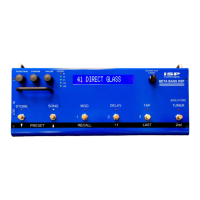
When the Tuner is on, the display will look like the following:
TUNE >>> A# <<< 0c
Not all the arrows will be on at the same time, as they indicate the relative flat or
sharp tune of the detected note. The leftmost arrow indicates the note is 20 or
more cents flat of the indicated letter value, the next arrow indicates the note is
10 or more cents flat, and the 3rd arrow indicates 5 or more cents flat. The right
side arrows indicate corresponding amounts of sharp tuning. So the goal is to
tune the string so that all the arrows turn off. When a string is first plucked,
even if it is in tune, the sharp or flat indicators may flash on momentarily until the
vibrations in the string settle down. As the level of the note decays below -40 dB
relative to input clipping, the displayed value will be frozen. The reference offset
is shown on the right side of the display to remind you if it has been changed.
SONG MODE:
To enter SONG MODE, press 2
nd
, then SONG (the second switch from the left).
The blue SONG led will light, the 2
nd
function will turn off, and the first song title
will be displayed. You can then use the RECALL 1, 2, or 3 switches to recall a
preset programmed as grouped within that song. As soon as one of the 3
RECALL switches is pressed, that preset will be recalled and the preset’s title will
be displayed. Pressing the down or up switches (the first two from the lower left)
will que up the next song and display the title of that song. The title will flash,
letting you know it has not been recalled yet. Hitting one of the 3 recall switches
will then recall a preset within that song. It would be logical to assign the


 To Next Page
 Loading...