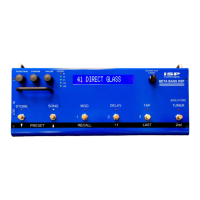
RECALL 1 switch to correspond to the first preset you would like to use within
that song, assign RECALL 2 to correspond to the next preset you would like to
use within that song, etc. It is not necessary to assign a preset to all 3 switches,
but the default programming assigns presets 1 to 3 to switches 1 to 3 in all 124
songs, so if you accidently press RECALL 3 and you haven’t programmed it, you
will jump to Preset 3. Turn the FUNCTION knob clockwise to access the
following two functions:
Song Title Edit Function
This displays the song title. Song titles are distinguished by the > character
which follows the song number and preceeds the title, whereas preset titles do
not have this character. The PARAM knob selects the character position to be
edited, which moves the cursor under the character selected. There are 16
character positions. The VALUE knob then selects the particular letter, number,
or symbol. When you are finished editing the title, don’t forget to press 2
nd
, then
STORE to save it, but you can wait until after you have edited the preset
mapping to do this save. The STORE led lights if any changes have been made
to remind you to save it.
Preset Mapping Funtion
Turning the FUNCTION knob one more detent clockwise accesses this
function. The led above the RECALL 1 switch will light, and the preset that is
mapped to that switch will be displayed. Turning the VALUE knob will allow you
to select which preset you would like mapped to RECALL 1. Note the presets
will be immediately recalled so you can audition them to aid in your selection.
Turn the PARAM knob clockwise one detent will then light the led above the
RECALL 2 switch, and the preset that is mapped to that switch will be displayed.
You can then turn the VALUE knob to select that preset to map to RECALL 2.
You can then repeat this process for the RECALL 3 switch. When complete,
press 2
nd
, then STORE to save the changes to the current song. Turning the
FUNCTION knob fully counterclockwise will then display the song title, and
pressing one of the RECALL switches will recall the mapped preset and display
it’s title.
Song Copy
To copy a Song to a different location, first ‘fully’ recall the song by
pressing one of the RECALL 1 to 3 switches. Then scroll to the desired new
location by using the PRESET down or up switches, or the VALUE knob (if
FUNCTION is set fully counterclockwise). Note that the Song titles will flash,
meaning the Song is not fully recalled. Then press 2
nd
, STORE to store the last


 To Next Page
 Loading...