915/ 965 MOTHER BOARD WITH A 9500 VIDEO CARD GUIDE
915/965 MOTHERBOARD WITH A 9500 VIDEO CARD CONNECTION GUIDE
Golden Tee LIVE™ www.itsgames.com 847.870.7027 8/20/09 4 | Page
©2009 Incredible Technologies, Inc. All Rights Reserved. Non-IT trademarks are the properties of their owners and used for illustration only.
All information herein is Confidential. Unauthorized duplication or disclosure may violate applicable laws or agreements.
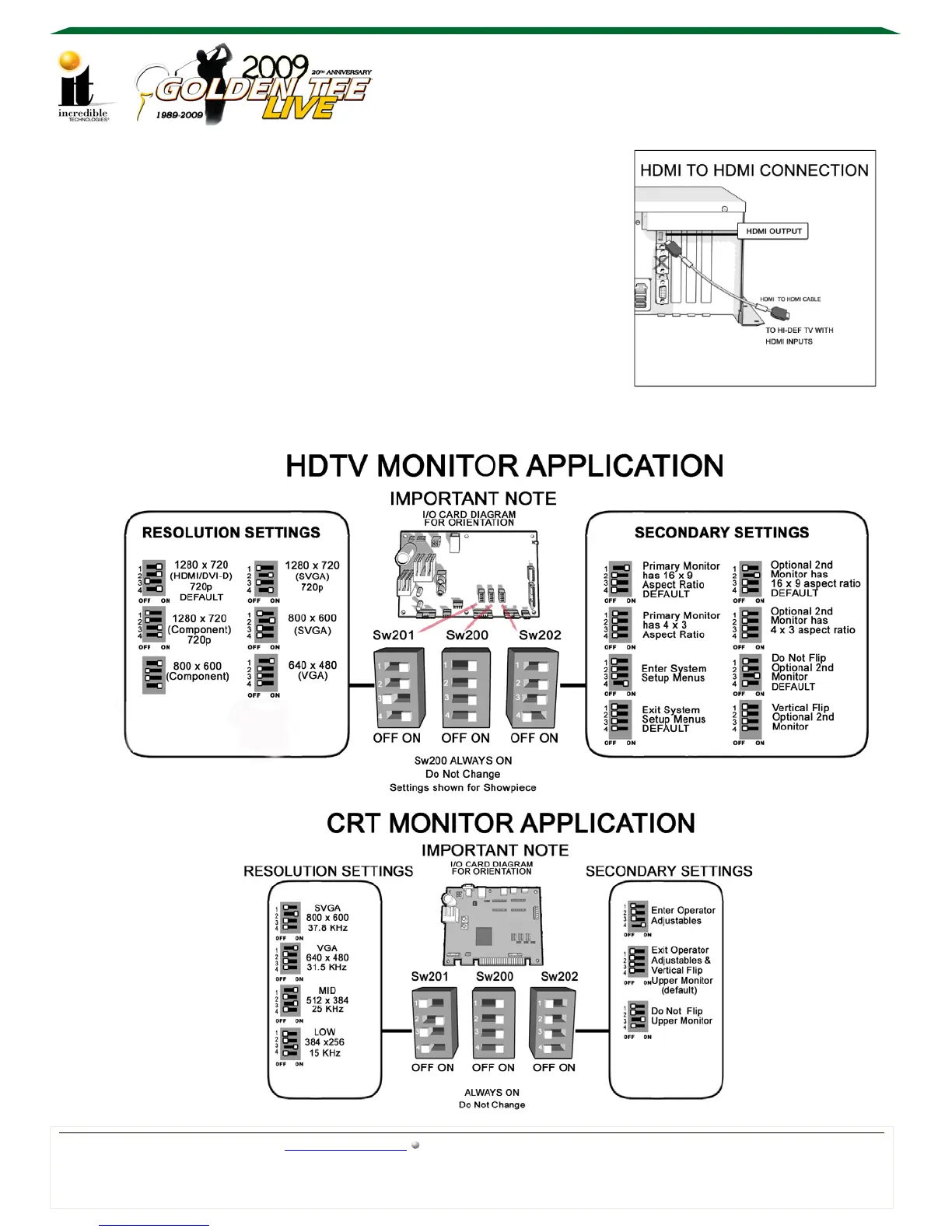
HDMI to HDMI (This will allow for ONE monitor only)
VIDEO: Connect the HDMI cable from the system box to the
HDMI input on the HDTV. Select the proper input on the
HDTV.
AUDIO: Using a 2-wire RCA cable (red and white) connect
the RCA audio out on the system box to the RCA audio in on
the I/O board with cabinet speakers connected to the I/O
board. See Audio Connections for details.
The DIP switches on the I/O board must be set appropriately for the desired resolution.



 To Next Page