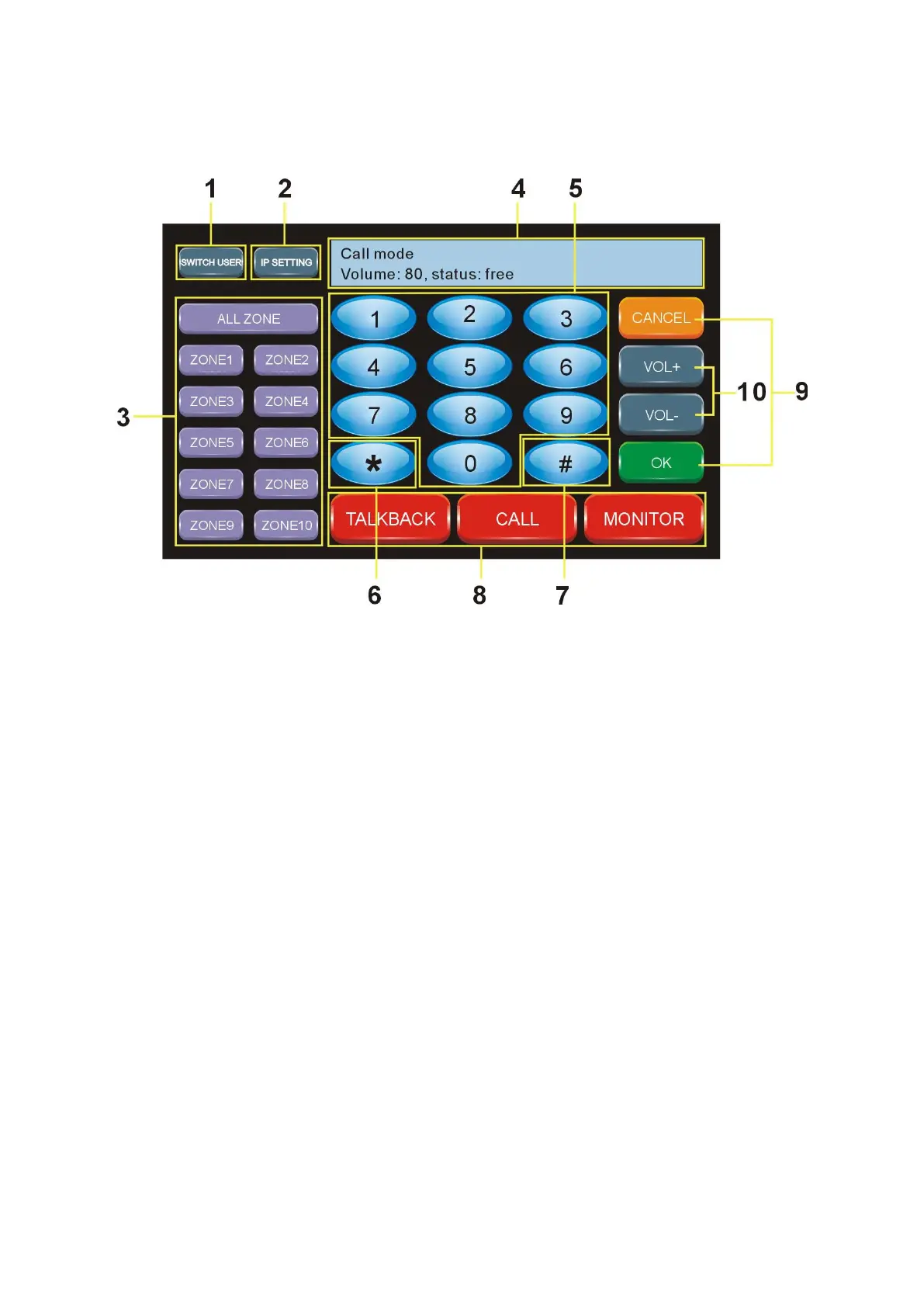
Introduction for Screen and Buttons
The standby screen show as below after start-up:
① Login: When the server is succeed to connect with the terminal, it will show
”
Connected
”
,
When the server is out off connection with the terminal, it will show: “not connected”
② IP setting: It is mainly used for look up terminal information, such as terminal IP address,
subnet mask, gateway and the server address, if you need configure the terminal IP, please
configure on the PC software on the server.
③ Partition public address button: Please set the corresponding group in the IP software
before operating this button (The machine support 10 group only), then enter into “shortcut
key” to fill the corresponding group on the terminal configuration, restart the IP software.
Then you will see the corresponding group name. Press the group button, then press “#”
button, then OK button to speak to zones or all zones.
④ Status: When it is free, it will show the wake-mode, the volume of terminal and the
working status (according to terminal configuration). When the machine operate other
functions, it will show the content correspondingly.
⑤ 0-9 number button: It is mainly used with other function keys, such as modifying the
address, calling a terminal, monitoring a terminal and so on.
⑥
“
*
”
button: under the coding status, press this button to return cancel.



 To Next Page