EasyManua.ls Logo

ITE K-3000 - Overcurrent Trip Device Adjustments; Short Time Delay and Long Time Delay Adjustments; Pick-Up Setting and Armature Trip Travel Adjustments

Default Icon
14 pages
Print Icon
To Next Page IconTo Next Page
To Previous Page IconTo Previous Page
Loading...
IB
-
9.1
.
7
-
4
LOW
-
VOLT
AGE
POWER
CIRCUIT
8
REAKERS
PAGE
14
'
CTRO
-
MECHANICAL
ERCURRENT
TRIP
DEVICE
ADJUSTMENTS
up
with
the
desired
pick
-
up
point
line
.
NOTE
:
The
top
line
corresponds
to
the
top
pick
up
point
,
the
second
line
from
the
top
corresponds
lo
the
second
pick
up
point
from
the
top
,
etc
.
Armature
Trip
Travel
Adjustment
CAUTION
:
Keep
hands
clear
of
all
moving
parts
.
The
circuit
breaker
will
trip
to
the
OPEN
position
while
checking
or
adjusting
the
armature
trip
travel
.
The
overload
device
trip
travel
is
set
at
the
factory
;
however
,
if
trip
travel
readjustment
is
required
due
to
replacement
of
overloads
or
other
ports
,
then
readjust
n
%
f
<
dl
\
hijiH
*
10
)
H
«
i
<
k
'
ml
on
the
l
*
VIJ
l
<
»
p
odjuslaxj
saews
until
the
screws
are
engaging
the
nut
b
,
uppioxi
finitely
lw
«
ti rinv
b
.
Charge
springs
rind
close
circuit
breaker
c
.
Using
a
one
foot
long
(
approximate
)
stick
,
push
up
on
long
time
armature
,
thick
armature
at
point
A
\
and
hold
it
tight
against
the
magnet
.
Turn
in
screw
marked
Right
until
the
breaker
just
trips
.
Continue
to
turn
the
screw
in
an
additional
I
Vi
turns
.
f
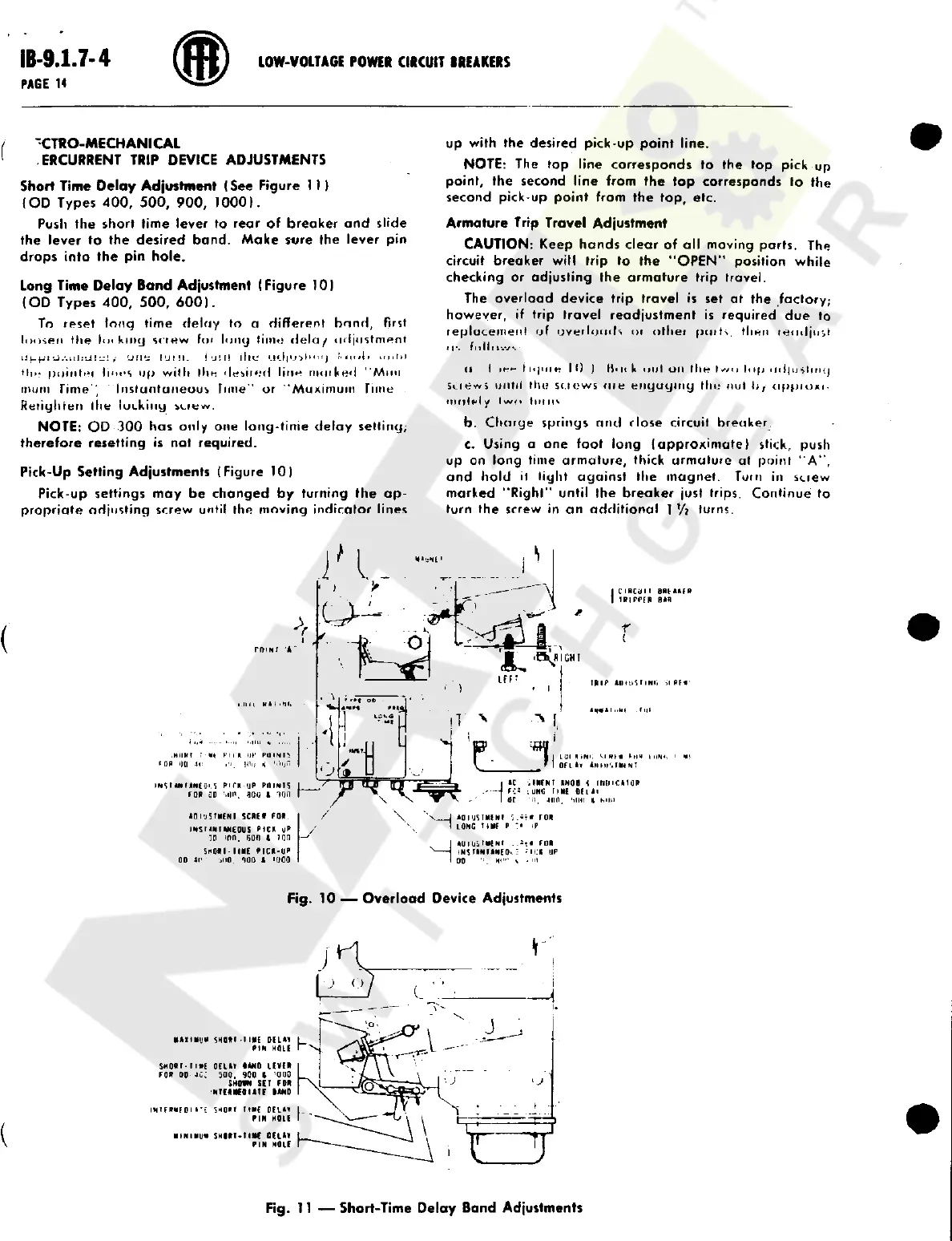
Short
Time
Delay
Adjustment
(
See
Figure
1
11
(
OD
Types
400
,
500
,
900
,
1000
)
.
Push
the
short
time
lever
to
rear
of
breaker
and
slide
the
lever
to
the
desired
band
.
Make
sure
the
lever
pin
drops
into
the
pin
hole
.
Long
Time
Delay
Band
Adjustment
(
Figure
10
)
(
OD
Types
400
,
500
,
600
)
.
To
reset
tong
time
delay
to
a
different
bond
,
First
loosen
the
hn
king
screw
for
long
lime
delay
adjustment
ij
!
i
!
ilie
adjust
i
>
*
.
v
!
ii
i
<
11
u n t i l
oupijj
.
-
.
itiiiii
"
i
i
uii
'
j
IUMI
.
HIM
point
'
ll
linos
up
with
th e
desired
line
marked
"
Mini
mum
Time
Instantaneous
time
or
"
Maximum
Time
M l
!
I
Reiighren
the
lucking
screw
.
NOTE
:
OD
300
has
only
one
long
-
time
delay
setting
;
therefore
resetting
is
not
required
.
Pick
-
Up
Setting
Adjustments
(
Figure
10
)
Pick
-
up
settings
may
be
changed
by
turning
the
ap
-
propriate
adjusting
screw
until
the
moving
indicator
lines
CiBCi
)
l
I
BBMM
&
rniPPFB
(
Mfl
4
r
(
i
i
roim
A
T R I P
AI MU SH N I
;
,
IP M
II I
l
K
*
I
'
W
.
tilt
.
.
.
.
Mi l l
*
.
MILKT
;
hn
u
+
'
Ptnim
ri
,
)
lii
/
<
1
"
MJN
LU I
H
>
Ni
.
»
rl H
|
OF
L
All
'
.
I
Hr
NT
t
ON
0
(
1
II
!
J
I
AC
,
IMFNT
RNOB
t
llllHCA
1
<
JR
-
-
J
F
-
;
S
;
UHU
one
ofi
Ai
I
or
'
it
.
mo
.
'
iim
A
Mm
/
IMS
r
UUANCQ
'
.
S
Pi
f
A
UP
P
0
IN
1
S
FOR
GD
'
mo
.
noo
t
ion
Y
>
/
\
X
j
AOI
JSTMCNI
SCRE
*
FOR
rnsriniANCOUS
RICK
UR
in
ion
.
son
i
run
SnOR l
-
MME
RIC K
-
UP
00
At
'
JIIO
.
<
>
00
1
'
1100
AoriStMfNi
roR
LONG
t
*
nf
P
:
"
IP
/
.
I
AU lU iM HN f
.
.
!
«
FOR
N
IN ST AN IA NC
0
-
.
:
*
i
!
K
UP
I
00
\
.
HI
Fig
.
10
Overload
Device
Adjustments
MA XI MUM
SN Q ft l
1
I
ME
Of
LA I
PIN
HOLE
SMORr
-
riME
OELAT
IAN
0
LfVfR
FOR
0
D
4
CJ
500
,
900
l
'
000
SHORN
SET
FOR
NURMCOIATF
MND
INTFRMFOI
»
SHORT
TtMf
Dll
*
*
PIN
HOLE
MINIMUM
SHIRT
T
INC
0
(
UT
PIN
MOLE
Fig
.
11
Short
-
Time
Delay
Band
Adjustments
Courtesy of NationalSwitchgear.com

Related product manuals