EasyManua.ls Logo

iTechworld GoFurther - User Manual

iTechworld GoFurther
8 pages
Print Icon
To Next Page IconTo Next Page
Loading...
14
a miniumum of
It is not reccomended jumpstarting with the
Question and Answer IconNeed help?

Do you have a question about the iTechworld GoFurther and is the answer not in the manual?

Summary

Important Safety Instructions

Overview of the GoFurther Power Station

Getting Started with GoFurther

Prepare Battery Box Base

Instructions on preparing the battery box base with pre-installed non-slip silicone pads.

Install Battery into Box

Guidance on correctly placing the battery inside the battery box base onto the non-slip pads.

Secure Battery with Strap

Steps to secure the battery within the box using the provided velcro strap.

Connect Battery Terminals

Instructions for connecting the battery cables to the correct positive and negative terminals.

Close and Secure Lid

How to tuck cables and securely fasten the battery box lid with screws.

DCDC Charger Battery Type Setting

Attention for DCDC charger models on setting the correct battery type, e.g., LiFePO4.

Optional Accessories for GoFurther

Mounting Tray Installation

Steps for installing the optional mounting tray, including drilling and securing.

Attaching Battery Box to Tray

Instructions on how to attach the battery box to the mounting tray using straps.

Inverter Cables

Information on iTECHWORLD Inverter cables for high-current inverter connections.

Switches and LCD Screen

Master Switch Function

Explanation of the Master Switch's function to disconnect devices and prevent battery drain.

LCD Screen Display

Details on the GoFurther monitor screen, its display features, and buttons for battery status.

Connections and Outputs

Output Ports

Details the various output ports: cigarette sockets, USB ports, and high current Anderson plug.

Inputs and Outputs

Information on the 175A Anderson Style Plug, highlighting its high current output capability.

Anderson Style Plugs

Inputs for GoFurther

Alternator Input

Details the 9-32V DC Starter Battery Input for alternator power connection.

MPPT Solar Input

Information on the 50A Anderson Style Plug for connecting unregulated solar panels.

Connecting External Chargers

Typical Connection Diagrams

Connecting DCDC Charger

Connecting to Alternator Input

Connecting to Unregulated Solar

Frequently Asked Questions

Long Term Battery Storage

Guidance on storing the battery for extended periods, including charge level recommendations.

Water and Dust Resistance

Information on the water and dust resistance of the battery, advising against submersion.

Jump Starting Capability

Clarification on whether the device can be used for jump-starting vehicles.

Overview

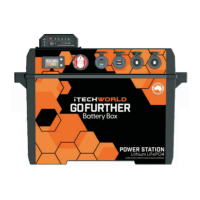
The iTECHWORLD GOFURTHER Power Station is a versatile and robust portable power solution designed for various applications, from outdoor adventures to emergency backup. It functions primarily as a battery box for 12V iTECHWORLD lithium LiFePO4 batteries, offering multiple input and output options for charging and powering devices.

Function Description:

The GOFURTHER Power Station serves as a protective enclosure and power management hub for a 12V iTECHWORLD lithium LiFePO4 battery. It integrates a range of connectors and a DCDC charger, allowing users to charge the internal battery from various sources like alternators, solar panels (regulated and unregulated), and AC chargers. Simultaneously, it provides multiple output ports to power a wide array of devices, including USB-powered gadgets, 12V accessories via cigarette sockets, and high-current inverters. The optional DCDC charger model includes an MPPT regulator for efficient solar charging.

Important Technical Specifications:

  • Battery Compatibility: Designed for 12V iTECHWORLD lithium LiFePO4 batteries.
  • Temperature Range: Operates within -20°C to +60°C.
  • Cigarette Socket Outputs: Maximum 10A output per socket.
  • Dual USB / QC3.0 Outputs: Includes PD+QC 3.0USB and 2x Quick Charge QC 3.0 Ultra High Powered USB Outputs. These ports support fast charging for compatible devices, capable of charging up to 80% in 35 minutes.
  • 175A Anderson Style Plug: High current inverter output, connected directly to the battery. This output is NOT fused or short-circuit protected.
  • 50A Anderson Style Plugs (Input/Output): Four Anderson plugs are arranged in two banks of two, with a maximum input/output of 50A per bank. These are capable of handling various charging and output needs.
  • Alternator Input (DCDC Charger Model): 9-32V DC Starter Battery Input with ignition source connection.
  • MPPT Solar Input (DCDC Charger Model): Minimum Solar Input Voltage: 9V DC, Maximum Solar Input Voltage: 32V DC, Maximum Solar Input Current: 25A. This input is for unregulated solar panels.
  • Material: Constructed from ABS for durability.

Usage Features:

  • Easy Battery Installation: The battery is secured within the box using non-slip pads and a velcro strap. Battery cables connect to the terminal posts, ensuring correct polarity.
  • Master Switch: A main on/off switch disconnects all devices (except the DCDC Charger) to prevent battery drain. The DCDC Charger and Solar Regulator can still charge the internal battery even when the Master Switch is off.
  • LCD Screen: A built-in monitor displays critical battery information, including battery type, battery pack voltage, battery temperature, total capacity, and mutable low battery alarms.
  • Optional Mounting Tray: Allows for secure affixing of the power station in a vehicle or other location using bolts or screws. Straps ensure the power station is held firmly in place.
  • Optional Inverter Cables: High-powered inverter leads (rated for 175A max output) are available for connecting an inverter to the battery box.
  • Multiple Charging Methods:
    • AC Charger: Connects to any in/out Anderson style connector.
    • Regulated Solar Panel: Connects to any in/out Anderson style connector.
    • Alternator (via DCDC Charger): Utilizes the built-in DCDC charger, ideally with the iTECHWORLD Plug & Play Wiring Kit for easy connection and ignition source integration.
    • Unregulated Solar Panel (via DCDC Charger): Connects directly to the dedicated Anderson style plug on the battery box, leveraging the built-in MPPT regulator.
  • Quick Charge Benefits: The USB outputs support Quick Charge 3.0, enabling rapid charging for compatible smartphones and other devices.
  • Safety Breaker: In the event of exceeding the 50A current rating on an Anderson plug bank, a safety breaker will auto-reset.

Maintenance Features:

  • Long-Term Storage: For extended storage periods, it is recommended to charge the battery to a minimum of 70% before switching off the Master Switch. The battery will not enter storage mode if loads are connected or if it is being charged.
  • Non-Slip Pad Cleaning: The non-slip silicone pads can be washed to regain stickiness.
  • Water Resistance: The unit is designed to be resistant to moisture and dust but is not waterproof. It should not be exposed to rain or weather or submerged.
  • Regular Checks: Users should regularly check battery specifications and compatibility, especially when using high-current draw connectors.
  • Firm Connections: Ensure the battery box is shut and screws are tight before powering devices.
  • Lid Closure: The lid must remain shut at all times while charging or powering devices.
  • Avoid Metal Objects: Do not allow metal objects to fall into the battery box or enter any ports.
  • Correct Plug Usage: Only compatible electrical plugs should be inserted into the ports.
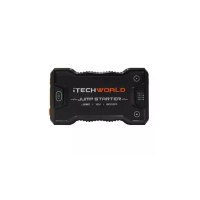
  • No Jumpstarting: It is not recommended to jumpstart a vehicle with this battery box, especially if using an iTECHWORLD lithium battery.
  • Charger Management: Avoid connecting multiple chargers to the battery simultaneously. Do not use an external charger while the DC-DC Charger is operating.
  • Solar Panel Voltage Limits: For unregulated solar input, the open circuit voltage of the solar panel must not exceed 32V DC, and the input current must not exceed 25A. If a solar panel has a built-in regulator, it should be bypassed or connected to the general in/out Anderson ports.

iTechworld GoFurther Specifications

General IconGeneral
BrandiTechworld
ModelGoFurther
CategoryPower Supply
LanguageEnglish