This document describes the Itek 5-in-1 Wireless Headphones, model i58016, a versatile audio device designed for domestic use. The headphones offer multiple functionalities, including wireless audio reception, wired headphone use, and a built-in microphone for communication.
Function Description:
The Itek i58016 headphones are primarily designed for wireless audio reception, utilizing FM modulation to receive signals from a dedicated transmitter. This allows users to listen to audio from various sources without being tethered by cables, offering a range of up to 30 meters in an interference-free environment. The "5 in 1" functionality suggests a broad range of applications, which typically includes:
- Wireless Headphones: For listening to audio wirelessly from a connected source via the transmitter.
- Wired Headphones: Can be connected directly to an audio device (like an MP3 player or computer) using an Aux cable, bypassing the wireless function.
- Wireless Monitor: Allows monitoring of sounds in a room where the transmitter is placed, picking up ambient audio.
- Wireless Chat: Enables two-way communication when connected to a computer/laptop/tablet, using the built-in microphone and the transmitter.
- FM Radio: The headphones can also function as a standalone FM radio receiver, allowing users to scan and listen to local radio channels.
The device includes a transmitter unit that connects to the audio source (e.g., TV, computer, MP3 player) via RCA or Aux cables. The headphones then receive the audio signal from this transmitter. The headphones feature controls for volume, scanning, and power, along with indicators for power and battery status.
Important Technical Specifications:
- Description: 5 in 1 Wireless Headphones
- Model: i58016
- Product Rating: DC 4.5V (adaptor not included)
- Modulation mode: FM
- Transmitter frequency: 86 ± 0.5 MHz
- Transmitter distance: 30m (with no interference)
- Frequency range: 84 - 108MHz
- Reception mode: FM
- Distortion: <2%
- Power supply: 4 x AAA batteries (not included) or DC 4.5V adaptor (not included)
The headphones can be powered by four AAA batteries or an optional DC 4.5V adaptor. The transmitter also requires power, typically from a DC 4.5V adaptor (not included) or batteries.
Usage Features:
Power Options:
- Headphones: Insert 4 x AAA batteries into the battery compartments on the headphones.
- Transmitter: Insert 2 x AAA 1.5V batteries or plug a DC 4.5V adaptor (not included) into the transmitter and then plug into the mains and switch on.
Battery Installation:
- Open the battery cover on the underside of the unit.
- Insert 2 x AAA 1.5V batteries (not included), following the polarity indicated in the compartment.
- Alkaline batteries are recommended for long-lasting use.
- Insert 2 x AAA batteries into the battery compartment on the headphones.
Wireless Headphones:
To connect to an audio device (MP3 player, iPod, etc.):
- Connect the Aux connectors of the included Female RCA to Aux cable to the Audio socket of your Media Device.
- Connect the RCA connections from the fixed RCA cable attached to the transmitter to the Female RCA to Aux Cable outputs. Ensure the red and white connections are attached to each other.
- Move the function switch on the transmitter to the Wireless Headphone position.
- The power indicator on the emitter will illuminate.
- Turn the Power control on the headphones to the On position.
- Press the RESET button and then the SCAN button. The sound sent from the transmitter will be heard.
Note: If a TV set is being used as an audio source, it will often still play audio from the Audio Output or headphone socket even if the TV is muted.
Wireless Audio Chat:
- Connect the Aux connectors of the included Female RCA to Aux cable to the Audio socket of your computer/laptop/tablet.
- Connect the RCA connections from the fixed RCA cable attached to the transmitter to the Female RCA to Aux Cable outputs. Ensure the red and white connections are attached to each other.
- To connect the microphone, use the Aux – Aux Cable. Insert one end into the mic socket on the transmitter, and insert the other end into the mic socket on your computer/laptop/tablet.
- Aim the microphone of the transmitter towards yourself (Fig. 3) and move the function switch on the transmitter to the Audio Chat position.
- The power indicator on the transmitter will illuminate.
- Turn the Power control on the headphones to the On position.
- Press the RESET button and then the SCAN button. The sound sent from the transmitter will be heard.
Wireless Monitor:
- Place the transmitter in the room you wish to monitor, aiming the microphone outwards into the room.
- Move the function switch on the transmitter to the Monitor position.
- Turn the Power control on the headphones to the On position.
- Press the Reset button followed by the Scan button.
- The sound from the transmitter will now be heard.
Radio:
The headphones can be used as an FM radio.
- Press the Scan button once and the headphones will automatically search for and lock onto a radio channel.
- When the highest range is reached, press the Reset button and the radio frequency will return to the lowest range.
- Press the Scan button again and the headphones will search the radio channels, starting from the lowest range.
Wired Headphones:
- To use as wired headphones, use the Aux – Aux Cable.
- Connect one end to the headphone jack on your audio device.
- Connect the other end to the headphone jack on your headphones.
Product Safety Precautions:
- Always check that the voltage of the main circuit corresponds with the rating of the appliance before operating.
- Ensure the appliance is used on a stable, level, and heat-resistant surface.
- DO NOT immerse cords, plugs, or any part of the appliance in water or any other liquid.
- DO NOT leave the appliance unattended while it is operating.
- Close supervision is necessary when any appliance is used by or near children or pets.
- This appliance can be used by children aged from 8 years and above and persons with reduced physical, sensory or mental capabilities or lack of experience and knowledge if they have been given supervision or instruction concerning use of the appliance in a safe way and understand the hazards involved.
- Children shall not play with the appliance.
- Cleaning and user maintenance shall not be made by children without supervision.
- Switch off at the wall socket then remove the plug from the socket when not in use or before cleaning.
- If the supply cord or appliance is damaged, stop using the appliance immediately and seek advice from the manufacturer or its service agent or a similarly qualified person.
- DO NOT let the cord hang over the edge of a table or counter or let it come into contact with any hot surfaces.
- The use of accessory attachments is not recommended by the appliance manufacturer, apart from those supplied with this product.
- DO NOT pull the plug out by the cord as this may damage the plug and/or the cable.
- DO NOT use this product for anything other than its intended use.
- This appliance is for household use only.
- DO NOT carry the appliance by the power cord.
- DO NOT use the appliance outdoors.
- Incorrect operation and improper use can damage the appliance and cause injury to the user.
- Use of an extension cord with this appliance is not recommended. However, if it is necessary to use an extension lead, ensure that the lead is suited to the power consumption of the appliance to avoid overheating of extension cord, appliance or plug point. DO NOT place the extension cord in a position where it can be pulled on by children or animals or tripped over.
- In the unlikely event the appliance develops a fault, stop using it immediately and seek advice from the Customer Support Team.
Maintenance Features:
Cleaning and Care:
- Clean the unit with a soft, damp cloth.
- Never use chemicals or hard abrasives.
- Keep this unit away from wet or damp surroundings.
- Store in a clean, dry place.
- WARNING: DO NOT IMMERSE ANY ELECTRICAL PART OF THE APPLIANCE IN WATER SUCH AS MOTOR UNITS OR PLUGS.
Warranty:
The product is guaranteed for 12 months from the date of original purchase. If any defect arises due to faulty materials or workmanship, faulty products must be returned to the place of purchase. Refund or replacement is at the discretion of the retailer.
Conditions for warranty:
- The product must be returned to the retailer with proof of purchase.
- The product must be installed and used in accordance with the instructions contained in this instruction guide.
- It must be used only for domestic purposes.
- It does not cover wear and tear, damage, misuse or consumable parts.
- RK Wholesale LTD has limited liability for incidental or consequential loss or damage.
- This guarantee is only Valid in the UK and Eire Only.
An extended warranty is available for this appliance by registering online within 28 days of purchase at www.itek-products.co.uk.

 Need help?
 General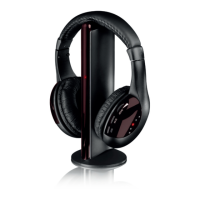

 To Next Page