EasyManua.ls Logo

Itek SOG-4/1987 - User Manual

Itek SOG-4/1987
8 pages
Print Icon
To Next Page IconTo Next Page
Loading...
1
SOG-4/1987
WIRELESS SUNGLASSES
SMART BLUETOOTH SPORT SUNGLASSES
INSTRUCTION MANUAL
PLEASE READ ALL INSTRUCTIONS CAREFULLY
AND RETAIN FOR FUTURE USE
Question and Answer IconNeed help?

Do you have a question about the Itek SOG-4/1987 and is the answer not in the manual?

Summary

Getting Started

Product Description and Usage

Description of Parts

Details the physical components of the Bluetooth sport sunglasses, with numbered labels for identification.

Charging Instructions

Provides guidance on how to charge the built-in rechargeable battery using the provided USB cable.

Turning ON;OFF the Bluetooth Sport Sunglasses

Explains the procedure for powering the sunglasses on and off using the MF button.

Bluetooth Connectivity and Music

Pairing with Bluetooth Devices

Step-by-step instructions on how to connect the sunglasses to a phone or music device via Bluetooth.

Listening to Music

Guidance on wirelessly streaming music through the Bluetooth sport sunglasses after pairing.

Control Function

Details how to control music playback, including pause, play, and track skipping using the MF button.

Advanced Features and Operation

Making a Call

Instructions for answering, rejecting, and ending calls using the Bluetooth sport sunglasses.

Voice Assistant Operation

Enables interaction with Siri or Google Assistant via voice commands through the sunglasses.

Safety, Troubleshooting, and Specs

Dos and Donts

Important precautions and prohibited actions for using the sunglasses to prevent damage or malfunction.

Troubleshooting

Common issues like no sound or poor sound quality and their recommended solutions.

Specifications

Technical details of the sunglasses, including Bluetooth version, working time, and battery capacity.

Warranty and Service

Limited Warranty

Details the warranty duration, coverage, disclaimers, and performance for product defects.

Service and Repair

Contact information and procedures for obtaining service or repairs for the product.

Overview

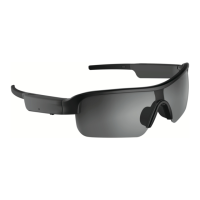
The Itek SOG-4/1987 Wireless Sunglasses are smart Bluetooth sport sunglasses designed for outdoor activities, offering a blend of audio functionality and eye protection. These sunglasses allow users to listen to music and take hands-free calls while on the go, integrating seamlessly with smart assistants like Siri and Google Assistant.

Function Description:

The primary function of these sunglasses is to provide a wireless audio experience combined with sun protection. They feature built-in stereo speakers and a microphone, enabling users to stream music, answer/reject/end calls, and interact with their smartphone's voice assistant. The sunglasses are optimized for outdoor use, making them suitable for various sports and activities where hands-free operation and sun protection are desired.

Important Technical Specifications:

  • Bluetooth Version: 5.0
  • Operation Distance: 27-33 feet (approximately 8-10 meters)
  • Working Time: Up to 4 hours (at moderate volume)
  • Charging Input Voltage: DC 5V
  • Charging Time: 1-2 hours
  • Speaker Power: 1Wx2
  • Built-In Battery: 140mAh rechargeable battery
  • Frame Material: Plastic
  • Lens Type: UV lens
  • Certifications: FDA approved

Usage Features:

  • Power On/Off: Press and hold the MF (Multi-Function) button for 6-7 seconds to turn on, and 5-6 seconds to turn off.
  • Pairing: After turning on, the sunglasses enter pairing mode (blue LED flashes quickly). Activate Bluetooth on your device and select "Sports Sunglasses" from the list. An indication tone confirms successful pairing, and the blue LED turns off. The device remembers previously paired connections.
  • Music Playback:
    • Pause: Short press the MF button.
    • Play/Restart: Short press the MF button.
    • Volume Increase: Press and hold the MF button for 2 seconds (a beep sound will be heard, then release). Volume decrease must be controlled via the connected device.
    • Previous Track: Short press the MF button thrice.
    • Next Track: Short press the MF button twice.
  • Call Management:
    • Answer Call: Short press the MF button twice during an incoming call.
    • Reject Call: Long press the MF button for 2 seconds and release.
    • End Call: Short press the MF button twice after a phone conversation.
  • Voice Assistant Operation: Press and hold the MF button for 4 seconds (a second beep sound will be heard, then release) to activate Siri or Google Assistant. An indication tone precedes the prompt to speak into the sunglasses. This feature allows users to ask questions, set alarms, play music, and get news updates. Google Assistant functionality requires an eligible Android 5.0 device or later with Google Play Services, >1.5GB memory, and 720P or higher screen resolution, with the Google Assistant App downloaded and set as the default voice assistant.
  • Charging: Connect the supplied USB charging cable to a computer USB port or suitable charging source and the magnetic charging contact on the sunglasses. A blue LED indicator turns on during charging and turns off when fully charged.

Maintenance Features:

  • Cleaning: Use the provided cleaning cloth. Do not use abrasive cleaning solvents.
  • Storage: Store in the included storage case to protect from dust, lint, and physical damage.
  • Environmental Protection:
    • Keep away from heat sources, humidity, water, and other liquids.
    • Do not operate if exposed to water or moisture.
    • Avoid extreme high or low temperatures to prevent damage to electronic components and battery life.
    • Do not dispose of in fire.
    • Avoid contact with sharp objects to prevent scratches.
    • Do not drop the device.
  • Repairs: Repairs should only be performed by a qualified electrician. Do not attempt to disassemble the device unless professional, as it may cause damage.
  • General Care: Keep the unit free from dust and lint. Do not use with wet hands. Do not put objects into any openings.
  • Volume Control: Avoid using at excessive volume levels to prevent hearing damage.

The product comes with a limited warranty of ninety (90) days from the original purchase date, covering defective materials or workmanship. For service or repair, contact Midwest Trading Group Customer Service.

Itek SOG-4/1987 Specifications

General IconGeneral
BrandItek
ModelSOG-4/1987
Category3D Glasses
LanguageEnglish