ITOOLCO CANNON 6K USER’S GUIDE
Attaching Conduit Adapters
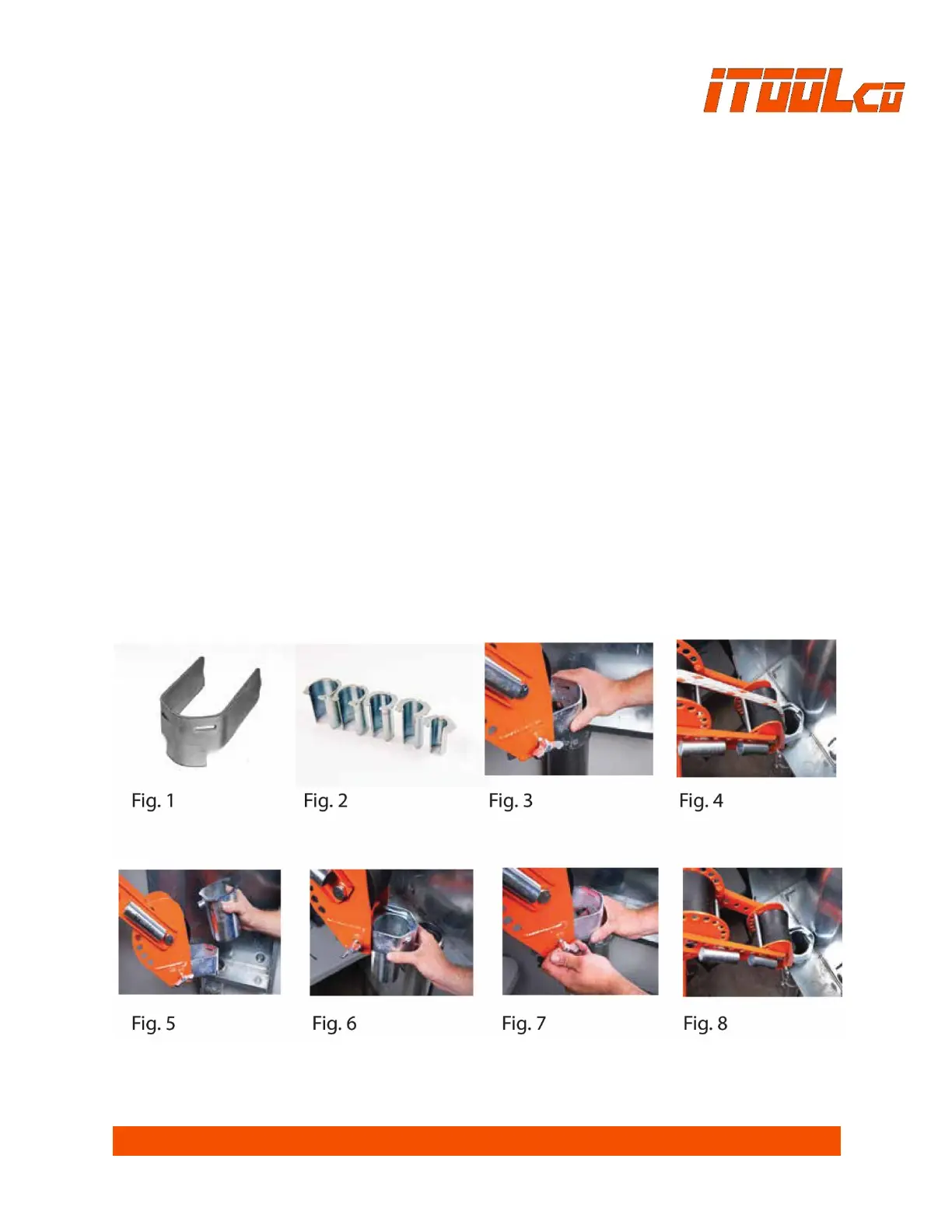
Option 1 - Using the universal adapter
1. Loosen the 1/2” bolt on either side of the front knuckle.
2. Slide the universal adapter in or out to accommodate the appropriate size of conduit, as
shown in Figure 3.
3. Make sure that the adapter engages the conduit as shown in Figure 4.
Note: The universal adapter is to be used for pulling loads under 3,000 lbs. For loads over 3,000 lbs.,
the conduit adapters provided with your puller should always be utilized.
Option 2 - Using the appropriate 2” - 4” adapter (Fig. 2).
1. Place the desired conduit adapter size into the top of the universal adapter. See Figures 5 and 6.
2. Slide the adapters toward the puller until the male pin on the adapter engages the female
opening and stops. Tighten the 1/2” bolt on the side of the front knuckle. See Figure 7.
3. Remove the adjustment hitch pin. Slide the puller into position and place the conduit adapter
into the conduit. See Figure 8.
4. Replace all hitch pins.


 To Next Page