Lifetime Limited Mechanical and Finish Warranty and 1-Year Limited Electronics Warranty Subject to the terms and
conditions of the warranty, IULOCK extends a lifetime limited mechanical and finish warranty and a one-year limited
electronics warranty to the original consumer user (“Original User”) of our IULOCK brand product (“Product”)
against defects in material and workmanship, as long as the Original User occupies the residential premises upon
which the Product was originally installed.See answers www.iulock.com for specific warranty details and limitations
Warranty
Important Safeguards
1. Read all instructions in their entirety.
2. Familiarize yourself with all warning and caution statements.
3. Remind all family members of safety precautions.
4. Protect your user passcode and master passcode.
5. Dispose of used batteries according to local laws and regulations.
This Manufacturer advises that no lock can provide complete security by itself. This lock maybe defeated by forcible or technical means. or
evaded by entry elsewhere on the property. No lock can substitute for caution, awareness of your environment, and common sense. Builder's
hardware is available in multiple performance grades to suit the application. In order to enhance security and reduce risk, you should consult
a qualified locksmith or other security professional.
WARNING:
I cannot insert the spindle into the latch hole, because of the 2 sides of the spindle hole of the latch are not aligned?
Let the hole parts move a few times in the 2-3/8 and 2-3/4 positions and the spindle holes of the latch will automatically align.
Why is it beeping after keypad light off?
The battery may be low. Please replace the battery.
The lock doesn't work?
Try replacing the battery or using the backup battery. If the lock still does not work, contact customer support.
Why can't I open the door?
You may be waiting too long to open the door. After entering a code, turn the handle to open the door while the lock LED indicator light is green.
Once the LED indicator light is off, the lock will return to locked position immediately.
Why I can open without passcode?
You maybe active the passage mode, use master code access will turn off this function .
If you just installed it, make sure the "THIS SIDE UP" on the spindle is facing up (ceiling).
I forgot all my codes.
The lock must undergo a hard reset in order to set the master code back to default and erase all other codes. In order to perform a hard
reset,please refer to the above “Restore Factory Settings”.
If none of the above information resolves your issue, please visit our website at: www.iulock.com
Troubleshooting
Template
www.iulock.com
24hr online service
Φ1inch
1-3/8inch
to
2-1/2inch
2-3/8inch
2-3/4inch
Φ2inch
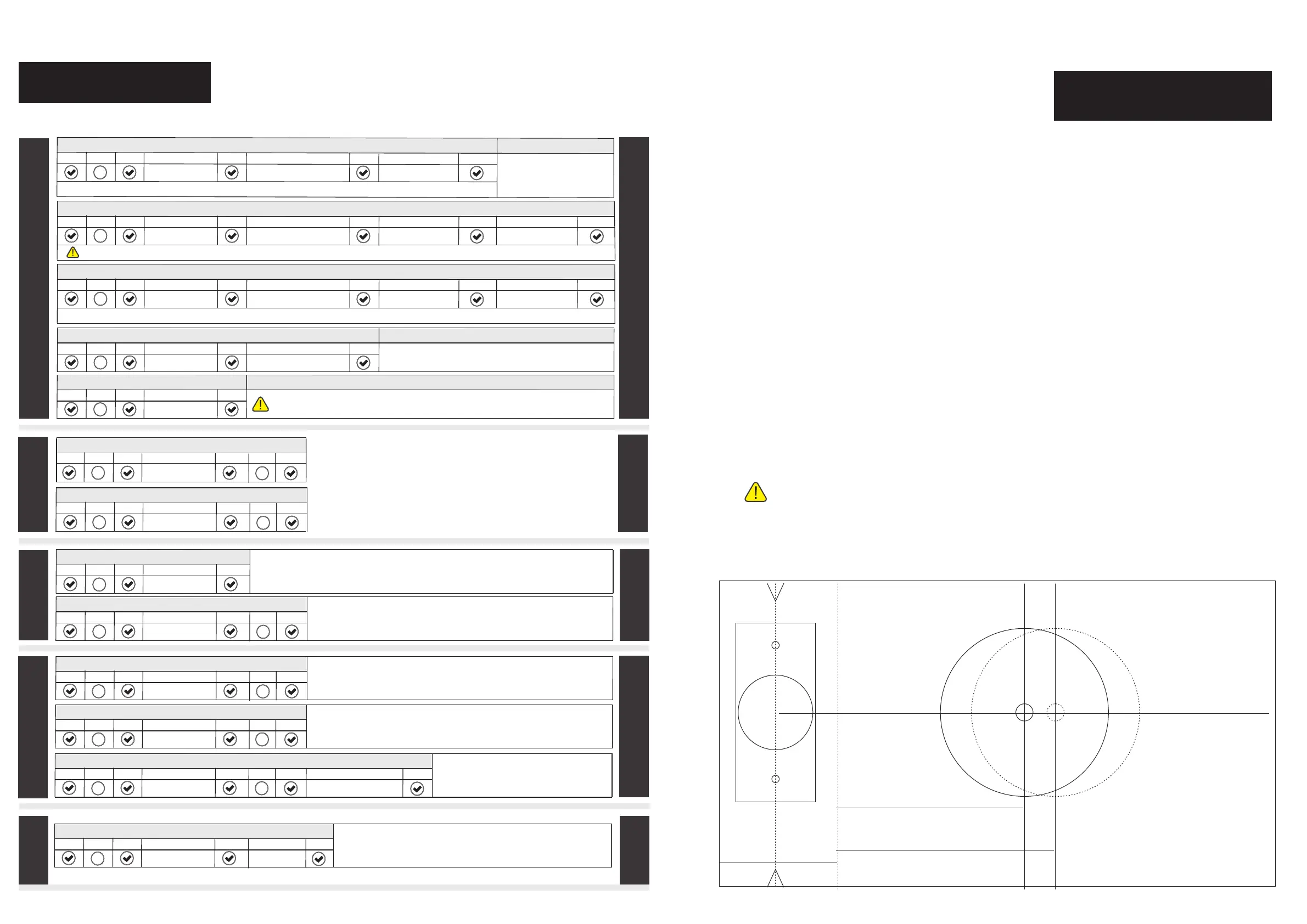
Programming
»If you make a mistake during programming,press the check button repeatedly until the keypad lights up. Then start over.
PASSAGE
BEEPER
ADVANCED
PASSCODE
PASSAGE
T
he automati
c lock time uni
t is seconds.
Minimum is 2 seconds.
M
aximum is 43200 seconds (12 hours).
Default i
s 4 seconds
.
Note : The master code MUST EXIST in the lock and cannot be deleted, but can ONLY be changed.
ADD USER PASSCODE
Note : The New User Passcode must be different from all of the Passcodes currently in the lock.
Press
Press
Press
Press
Press
En
ter
Enter
E
nter same
Master passcode
New user passcode
New user passcode
Press
1
CHANGE MASTER PASSCODE
Press
Press
Press
Press
Press
Enter
Enter
Enter sa
me
Master passcode
Press
2
master passcode
Enter same
New master passcode
New master passcode
Pres
s
CHA
NGE USER PASSCODE
Note : The New user passcode must be different from all of the passcodes currently in the lock.
Press
Press
Press
Press
Press
Enter
Enter
En
ter same
Master passcode
Press
2
Unwanted user passcode
En
ter
New user passcode
New user passcode
Pres
s
DELETE A USER PASSCODE
Press
Press
Press
Press
Press
Enter
Master passcode
3
Unwanted user passcode
Enter
DELETE ALL USER PASSCODES
Press
Press
Press
Press
E
nter
Master passcode
4
Note : The master code cannot be deleted, but can ONLY be changed.
DISABLE BEEPER
ENABLE AUDIO
ENABLE BEEPER
Press
Press
Press
Press
Enter
Master passcode
6
Press
Press
1
Press
Press
Press
Press
Enter
Master passcode
6
Press
Press
0
ENABLE AUDIO
AUTO-LOCK MODE
Press
Press
Press
Press
Enter
Master passcode
Press
Press
ENABLE A
UDIO
ADVANCED PASSAGE MODE
Press
Press
Press
Press
E
nter
Master passcode
Press
Press
1
ENABLE AUDIO
MANUAL-LOCK MODE
Press
Press
Press
Press
Enter
Master passcode
Press
Press
0
0
0
0
2
ENABLE AUDIO
SET AUTO-LOCK TIMER
Press
Press
Press
Press
Enter
Master passcode
Press
Press
9
3
ENABLE
EASY PASSAGE MODE
Press
Press
Press
Press
Enter
Master passcode
5
Enter
Press
Auto-lock timer
In MANUAL LOCK MODE, the auto-lock will turn off.
After unlocking the door with a passcode or finger
print, it
will rema
in unlocked until any button is pressed.
In AUTO-LOCK MODE, the door will automatically lock after each unlocki
ng,
the auto-lock tim
e depends on the setting of the auto-lock timer.
* Press the check button 4 times in a row, t
he door will be immediately locked,
which overrides any working modes.
W
ith EASY PASSAGE MODE active
, th
e door will s
tay unlocked.
Press any button to turn of
f this function when it is no lon
ger needed
.
With ADVANCE
D PASSAGE MODE active,open the door by twisting door handle
directely. Turn off this mode only by entering mas
ter code and check key.
* Press the check button 4 times in a row , the door will be immediately locked,
which overr
ides any working modes.
The activate code is generated by the website,(www.mylock.iulock.com)
Deactivate remote code function when the activate code is 0.
ENABLE AUDIO
ACTIVATE REMOTE CODE FEATURE
Press
Press
Press
Press
Enter
Master passcode
8
Enter
Press
Activate code
PASSCODE
ADVANCED
BEEPER
REMOTE
REMOTE
The beeper can be turned off if desired.
Beepers will still sound to indicate a low battery.


 To Previous Page
 Loading...