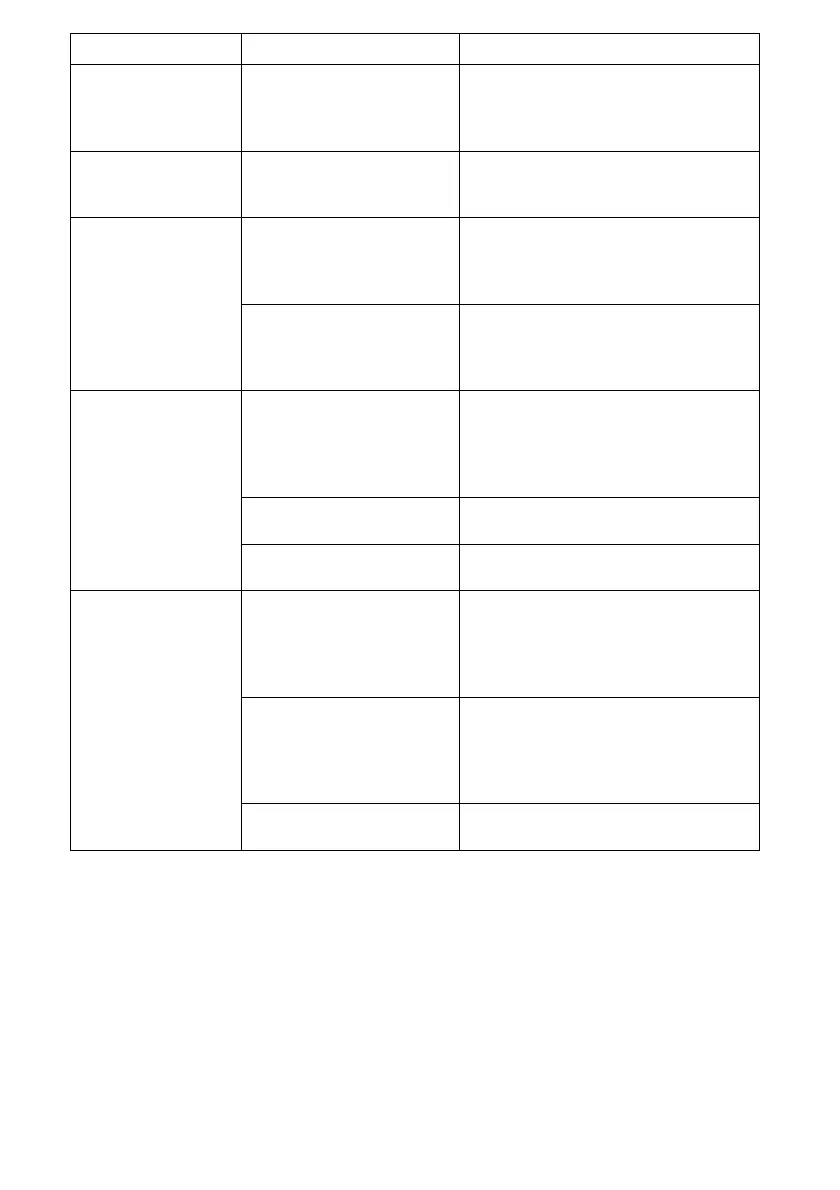
5
Pro
em Poss
e Causes So
ut
on
“Add Water”
indicator
illuminates.
The water reservoir
is almost or
completely empty.
Add water not exceeding
the water full mark and the
ice maker will re-start
automatically.
“Ice Full”
indicator
illuminates.
The ice bucket is
full.
Remove ice from ice storage
bucket.
Ice cubes stick
together.
Ice making cycle is
too long.
Press the power button to
turn o the unit, then press
it again to turn on the unit.
Select the SMALL ice size.
Water temperature
in the water
reservoir is too low.
Replace water in the water
reservoir. Water
temperature between 45°F
and 90°F is recommended.
The ice making
cycle seems
normal but no
ice is made.
Ambient
temperature or
water temperature
in the water
reservoir is too high.
Operate the ice maker in
room temperature below
90°F. Water temperature
between 45°F and 90°F is
recommended.
There is refrigerant
leakage.
Call an authorized technician
to repair.
Pipe in the cooling
system is blocked.
Call an authorized technician
to repair.
“Add Water”
and “Ice Full”
indicator are
both blinking.
Ice is stuck in the
ice making box.
Press the power button to
turn o the unit. Remove the
ice cubes in the ice making
box. Press Power button
again to restart.
Mechanical failure If both indicators remain
blinking after removing ice
cubes and restarting, unplug
the ice maker for 2 minutes
and plug in the unit again.
Components may
be damaged
Call an authorized technician
to repair.


 To Next Page