USB 5V OUT
HDMI/MHL
Projectionist Series™
HDMI PROJECTOR
User Manual
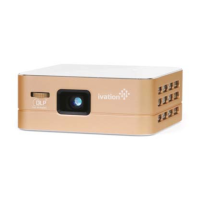
Parts & Controls
1 3.5mm Audio Out Jack
2 5V USB Power Output
3 HDMI & MHL Input
4 DC Power Input
5 Reset Button
6 LED Indicator
7 Power Switch
8 Mode Selector
9 Volume - Button
10 Volume + Button
11 Focus Wheel
12 Optical Lens
Safety Information
The information in this section is provided for your own safety and the safety of others. Please be sure
to read this manual carefully, use the projector in accordance with these instructions, and keep the
manual in a safe place for future reference.
- Keep out of reach of children and the infirm.
- Do not remove cover. Risk of electric shock. Unit contains no user-serviceable parts, and repairs
should be performed by qualified technicians only.
- Do not expose to rain or moisture. Risk of fire or electric shock.
- Do not expose to fire or direct heat sources. Battery may explode.
- Do not use in shower or place on sink/tub ledge. If unit has fallen into water, do not touch.
Unplug immediately.
- Lens, fans and other delicate components may not operate properly in highly dusty or
smoky environments.
- Refrain from looking directly at LED light source.
- Unplug unit during lightning storms and when unused for prolonged period of time.
- Keep cord from coming in contact with hot surfaces.
- Never obstruct unit’s air openings.
- Do not operate unit if:
• Cord or plug is damaged
• Unit has been dropped or damaged
• Water has entered unit
Technical Specifications
Dimensions: 3.9” x 3.9” x 0.8”
LED Lamp Life: >20,000 Hours
Brightness: 100 Lumens
Projection Size: 10"-80" (recommended)
Projection Distance: 14”-87” (recommended)
Contrast: 1000:1
Resolution: 854 x 480 (WVGA)
Aspect Ratio: 16:9
Power Adapter: DC 12V 1500mA
Built-In Battery: 3.7V/3800mA
Battery Projection Time: >2 Hours
Built -In Audio: 2 x 1W Loudspeakers
FCC Statement
This device complies with Part 15 of the FCC Rules. Operation is subject to the following
two conditions:
1. This device may not cause harmful interference.
2. This device must accept any interference received including interference that
may cause undesired operation.
Warning: Changes or modifications to this unit not expressly approved by the party responsible for
compliance could void the user’s authority to operate the equipment.
Note: This equipment has been tested and found to comply with the limits for a Class B digital device,
pursuant to Part 15 of the FCC Rules. These limits are designed to provide reasonable protection
against harmful interference in a residential installation. This unit generates, uses, and can radiate
radio frequency energy and if not installed and used in accordance with the instructions, may cause
harmful interference to radio communications. However, there is no guarantee that interference will
not occur in a particular installation. If this equipment does cause harmful interference to radio or
television reception, which can be determined by turning the equipment o and on, the user is
encouraged to try and correct the interference by one or more of the following measures:
- Reorient or relocate the receiving antenna.
- Increase the separation between the equipment and receiver.
- Connect the equipment to an outlet on a circuit dierent from that to which the receiver
is connected.
- Consult the dealer or an experienced radio/TV technician for help.
Introduction
Thank you for purchasing our rechargeable HDMI pocket projector, and welcome to the Ivation™
family. This user manual is meant to oer you a brief walkthrough of the device’s features and usage
protocols. We hope you find this manual helpful. For additional information and technical support,
please feel encouraged to contact our help team at info@myivation.com.
Operation
Power & Charging:
The Ivation™ rechargeable HDMI pocket projector can be powered either by using the included AC
adapter plugged into a wall outlet, or by drawing power from the internal rechargeable battery.
- To ensure the battery’s optimal performance and lifespan, we recommend that you charge the
projector fully before first use. This takes 3-5 hours.
- Plug the included power cord into the DC Power Input (4).
- The LED Indicator (6) will light up red while the projector is charging, and change to green when the
internal battery is fully charged.
- You may use the projector while it is charging.
- On a full charge, the projector can run approximately 2 hours.
- When the battery runs low, a low batter icon will appear on the projected image.
- If the power cord is not plugged in, the projector will automatically shut o once the battery is drained.
Note: To enhance battery life, minimize use of projector on battery power alone.
Getting Started:
- Locate the HDMI & MHL Input (3), and connect the included HDMI cable.
- Connect the cable’s other end to your media source device.
- When needed, use proper adapters to connect your device to the HDMI cable.
- If desired, connect speakers to the 3.5mm Audio Out Jack (1).
Note: Apple devices require an Apple digital AV adapter (sold separately).
Using Projector:
- Slide the Power Switch (7) to the “On” position.
- Use the Mode Selector (8) to choose between the “Movie” mode for video and the “Document”
mode for text-based media.
- On your connected device, select the media you wish to display.
- If you prefer a brighter picture, try dimming the room lights.
- To adjust the size of the projected image, experiment with moving the projector closer to and
farther away from the wall or projection screen used. Maximum recommended projection size is 80".
Note: When using any of the following source devices, the device screen will be displayed, or
“mirrored”, within the projected image:
- iPad 2nd Generation & Up
- Apple Laptop w/DisplayPort to HDMI Adapter
- PC Laptop w/Type A HDMI Port
- Use the Volume - and Volume + buttons (9 & 10) to adjust the output volume.
- For optimal projection focus, gently roll the Focus Wheel (11) either clockwise or counterclockwise
until image looks sharp.
Using Projector as Power Bank:
The projector’s internal battery is capable of providing charging power to external
devices such as mobile phones.
- Ensure that the internal battery is fully charged by plugging in the projector and checking that the
LED Indicator (6) turns green.
- Using your mobile device’s USB cable, connect it to the 5V USB Power Output (2).
- Consult your device’s screen for charging information.
Box Contents
HDMI Pocket Projector
Power Cable
Folding Tripod
HDMI Cable
Mini HDMI adapter
Micro HDMI adapter
MHL Cable
Drawstring Carrying Bag
User Manual
Distributed by
C&A Marketing, Inc.
2 Bergen Turnpike
Ridgefield Park, NJ 07660
info@myivation.com
MADE IN CHINA
IVATION is a trademark of
C&A IP Holdings, LLC
©2014 All Rights Reserved
Apple, iPad, iPhone, and
iPod Touch are trademarks
of Apple Inc. registered in
the U.S. and other countries.


 Need help?

 General