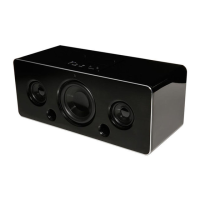
This document describes the iWantit IBTLI17, a wireless speaker dock designed for iPod, iPhone, and iPad devices equipped with a Lightning connector. It also supports Bluetooth® audio, AUX-in, and USB playback.
Function Description:
The iWantit IBTLI17 serves as a versatile audio system, offering multiple input options for music playback. Its primary function is a docking station for Apple devices with Lightning connectors, allowing users to play audio and charge their devices simultaneously. Beyond docking, it provides wireless audio streaming via Bluetooth®, a wired connection through AUX-in, and playback from USB devices. The unit includes a remote control for convenient operation and offers preset equalizer effects to enhance the listening experience.
Important Technical Specifications:
- Model: IBTLI17
- Power Supply: AC 220-240V~50/60Hz
- Rate Power: 25 W
- Output Power: 2 x 20 Watts
- Lightning Docking DC Output Voltage: 5V === 2.1A Max.
- USB Socket DC Output Voltage: 5V === 500 mA Max.
- Bluetooth® Version: V4.2
- Bluetooth® Maximum Power Transmitted: 5 dBm
- Bluetooth® Frequency Bands: 2402 MHz ~ 2480 MHz
- Net Weight: 1.5 kg
- Dimensions (W x D x H): 260 mm x 195 mm x 99 mm
- Supported Apple Devices (Lightning Connector):
- iPhone: iPhone 5, iPhone 5s, iPhone 5c, iPhone 6, iPhone 6 Plus, iPhone 7, iPhone 7 Plus
- iPod: iPod touch (5th generation), iPod nano (7th generation)
- iPad: iPad Air, iPad mini with Retina display, iPad mini, iPad (4th generation)
- USB Playback: Supports MP3 playback only.
- Automatic Standby: The unit will automatically switch to STANDBY mode if idle for more than 15 minutes or if the input signal is close to mute or idle for approximately 15 minutes (in audio on mode).
Usage Features:
- Powering On/Off: The unit enters STANDBY mode (red indicator) when connected to mains. Press the Standby button on the unit or remote control to switch on. To fully power off, disconnect from the mains socket after switching to standby.
- Mode Selection: Users can select between DOCK, Bluetooth®, AUX-in, and USB modes by repeatedly pressing the SOURCE button on the unit or using dedicated buttons (AUX, BT, USB, DOCK) on the remote control.
- Volume Adjustment: Volume can be adjusted using the VOL+/VOL– buttons on the unit or remote control. A MUTE button is available on the remote control.
- Equalizer (EQ) Effects: Preset equalizer effects (DFLT, POP, CLASSIC, JAZZ, ROCK) can be selected via the remote control.
- Docking Operation (iPod/iPhone/iPad):
- Insert the Apple device into the Lightning connector.
- The unit will automatically start playback and begin charging the device's battery.
- Playback can be controlled directly from the Apple device or using the remote control (Play/Pause, Previous/Next Track, Volume).
- For menu navigation on iPad/iPhone/iPod touch/iPod nano 7th generation, users need to access the music menu on their device first.
- It is recommended to remove protective cases from devices for optimal docking.
- The unit does not display music information; users should view it on their Apple device's screen.
- 1st, 2nd, and 3rd generation iPods are not supported for charging.
- Bluetooth® Audio:
- Switch the unit to Bluetooth® mode (BT Indicator flashes blue for pairing).
- Enable Bluetooth® on your device and search for "IBTLI17."
- Enter "0000" if a password is required.
- The unit will prompt "PAIRED" upon successful connection.
- The unit automatically reconnects to the last paired device.
- To pair a new device, press and hold the II/PAIR button on the unit or PAIR button on the remote control to cancel the current connection and enter pairing mode ("PAIRING").
- Operating range is approximately 8 meters without obstruction.
- AUX-in Operation:
- Connect an audio device to the AUX IN socket using a 3.5 mm stereo audio cable.
- Switch the unit to AUX IN mode (AUX IN Indicator lights green).
- Playback starts automatically, and control is managed via the external audio device.
- USB Operation:
- Insert a USB device into the USB socket.
- Switch the unit to USB mode (USB mode Indicator lights orange).
- Playback of MP3 files starts automatically.
- Remote Control: Operates within 5 meters and 40° of the front of the unit. Requires a CR2025, 3V Lithium battery. Includes buttons for Standby, USB, MUTE, Track control, EQ presets, DOCK, AUX, BT, Volume, and PAIR.
Maintenance Features:
- Cleaning:
- Always unplug the unit from the mains socket before cleaning.
- Wipe the case with a slightly moist, lint-free cloth.
- Do not use cleaning fluids containing alcohol, ammonia, or abrasives.
- Do not spray aerosols at or near the unit.
- Battery Replacement (Remote Control):
- Slide and hold the battery release tab.
- Pull out the battery holder, remove the old CR2025 battery, and replace it with a new one, ensuring correct polarity.
- Insert the battery holder back securely.
- Keep new and used batteries away from children due to chemical burn hazard if swallowed.
- General Safety:
- Avoid extreme temperatures, direct sunlight, and heat sources.
- Do not expose to rain, moisture, dripping, or splashing.
- Ensure proper ventilation; do not obstruct vents.
- Do not open the unit; refer all servicing to qualified personnel.
- Always disconnect from mains before moving or connecting other devices.
- Unplug during lightning storms.
- Do not leave unattended for long periods; switch off and disconnect mains cable.
- Ensure the mains cable is not damaged or resting under the unit.
- Dispose of batteries and the unit according to local regulations for recycling.

 Need help?
 General

 To Next Page