Kortinlukijan yhdistäminen
Jos käytössäsi on iZettle Pro, yhdistä kortinlukija
valitsemalla ”Asetukset” > ”Integraatiot” >
”iZettle-asetukset” > ”Kortinlukijat”
Lisätietoa iZettle Reader 2:sta on osoitteessa
izettle.com/fi/help.
Connecting the card reader via Bluetooth
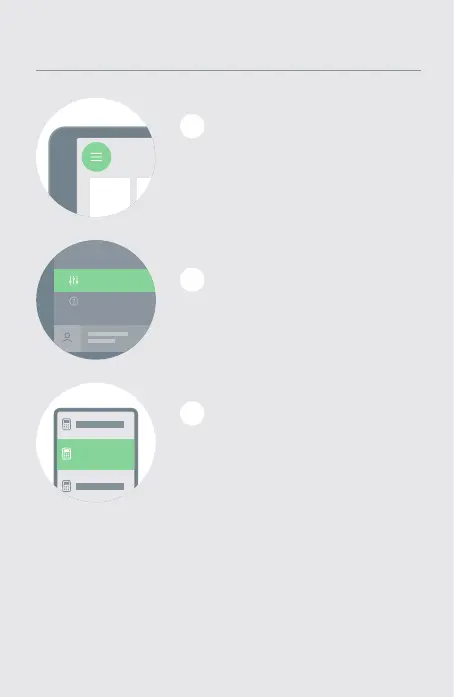
Valitse ”Asetukset”
> ”Kortinlukijat”.
2
Connecting the card reader via Bluetooth
1
Valitse iZettle Reader 2
luettelosta ja noudata näytöllä
näkyviä ohjeita.
3
Connecting the card reader via Bluetooth
Kirjaudu iZettle-sovellukseen ja
napauta vasemmassa yläkulmassa
olevaa valikkopainiketta .
FI


 To Next Page