2/6
Operation Descriptions
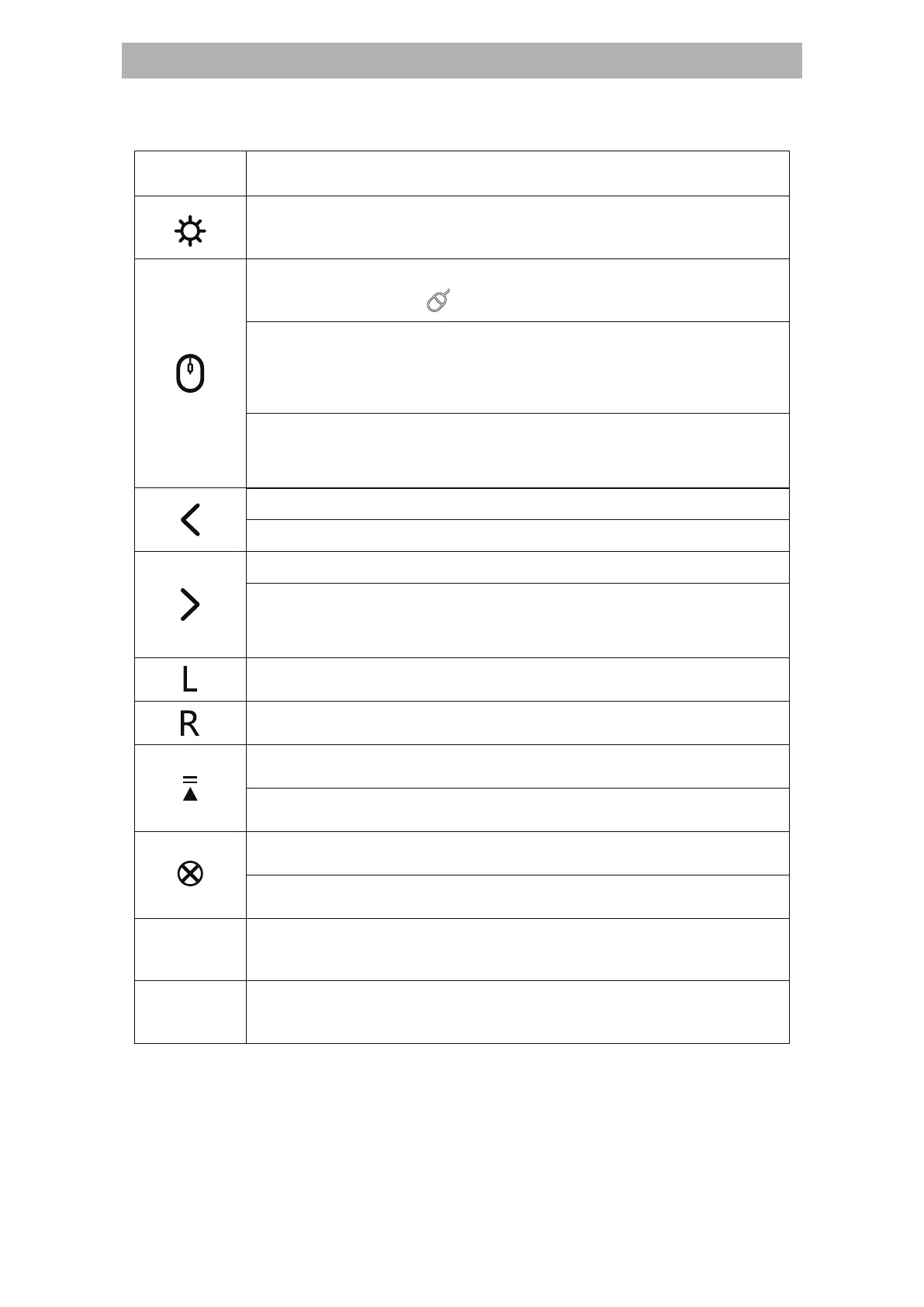
Single click to Page Up
Long Press to Play/Esc (for PowerPoint only)
Single click to Page Down
Mouse Left Key
Mouse Right Key
Long press to Black Screen
(for PowerPoint/Keynote full slideshow only)
Keys Operation Descriptions
Single click to Media Player
Long press to Volume Up
Single click to Close Window
Long press to Volume Down
Push towards “NO” to switch on;
Push towards “OFF” to switch off.
Support USB-C charging
Note: In Mac system Keynote software, only support Page Up,
Page Down, Black Screen, volume control and air mouse
functions.
Power
Switch
Charging
Port
Laser Pointer: Holding the button for laser beam.
Single click to switch on/off Air Mouse. When LED
screen displays “ ”, it is Air mouse Mode.
Long press: Pen function.
Keep pressing this button and move your hand to make marks;
Release your hand to exit. (for PowerPoint full slideshow only)
Double click to erase the marks
(for PowerPoint full slideshow only)


 To Next Page
 Loading...