3/6
How to Use Timer
0
1.
2.
①
②
3.
4.
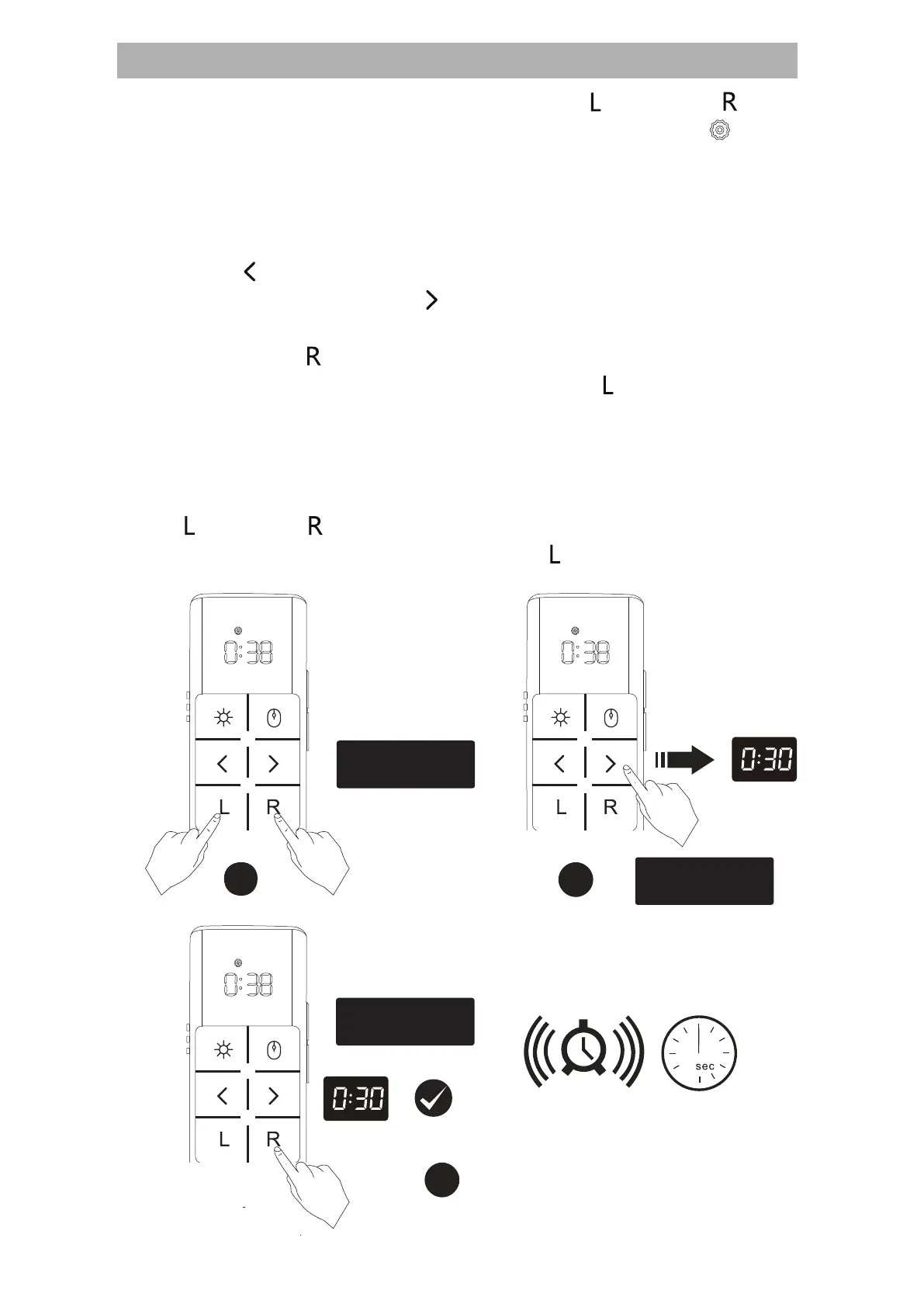
Enter Timer settings interface: Press【 】 and【 】
simultaneously for 2 seconds, LED screen displays【 】
then to set.
Note: If no operation is performed within 15 seconds, the timer
settings will automatically quit.
Timer Setting (Up to 9 hours):
Press【 】once to decrease 1 minute, hold to keep de-
creasing time; Press【 】once to increase 1 minute, hold to
keep increasing time.
Then press【 】once to save settings and start timer, and
then LED displays the countdown; Press【 】once, it will quit
settings.
Vibration reminder: Vibration reminder should be notified at
half time, with 5 minutes and 0 minutes remaining.
Quit: Though start timer but users want to cancel, first press
【 】and【 】simultaneously for 2 seconds to timer set-
tings interface again, then press【 】to quit.
Save settings
2
3
1
Timer settings
Press simultaneously
for 2s


 To Next Page
 Loading...