8
English
EN
USER MANUALWORMHOLE SWITCH
WORMHOLE SWITCH
USER MANUAL
6
SOFTWARE INSTRUCTIONS
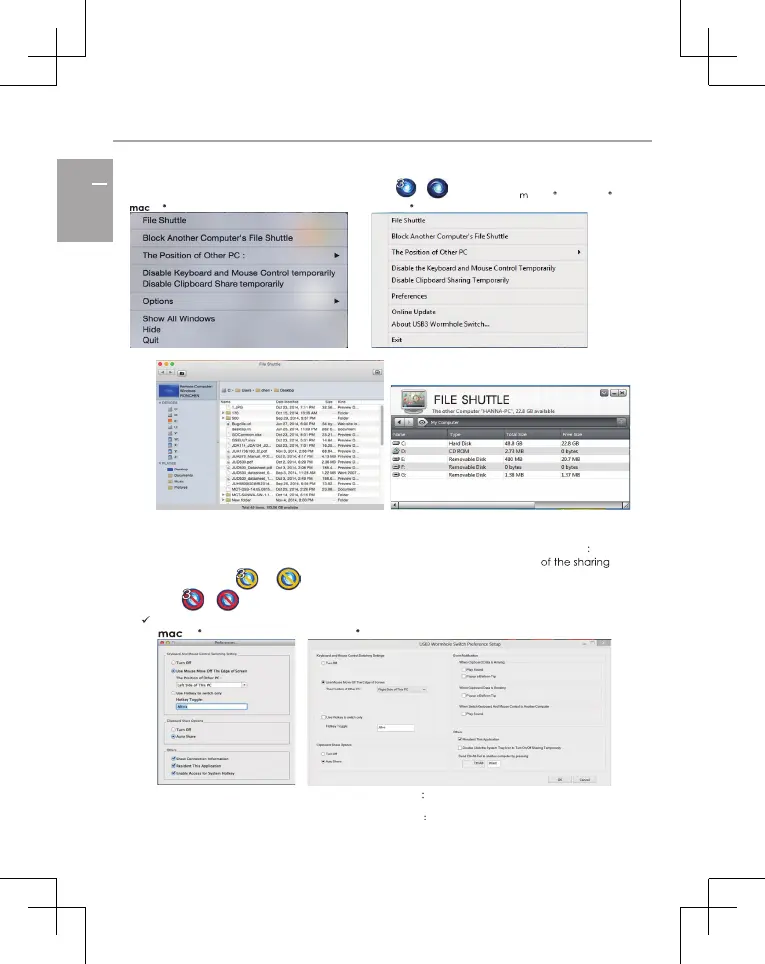
To begin set up, please click the wormhole switch utility icon or
, found on both acOS & Windows .
OS : Windows :
File Shuttle: You will be able to transfer files between the two computers.
The Position of the Other PC: You can quickly set up the position of the other computer by
using one of the 4 options (Right/Left/Up/Down)
Temporarily Disable/Enable the keyboard/mouse and/or clipboard sharing function: You can
quickly disable or enable the sharing option. If temporarily disabling one
functions, the or icon will be shown. If temporarily disabling both functions, the
icon or will be shown.
Preference Setup
OS Windows
Keyboard and Mouse Control Switch Settings:
Off: Turns the mouse/keyboard sharing option off.
Use the Mouse to Move off the Edge of the Screen:
You can adjust your settings so
that your mouse moves from one computer’s screen to the other computer’s screen
from either the right, left, up, down or side of the PC.



 To Next Page