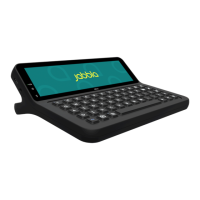
The Jabbla Vibe 12+ is a versatile, symbol-supported communication device designed for individuals with communication impairments who are unable to speak or speak clearly. It runs on the Windows 11 operating system and utilizes the Mind Express graphic communication program to facilitate voice message creation through the selection of images and/or symbols. The device is intended for general use in everyday life, both indoors and outdoors, for users with adequate motor and cognitive abilities.
Function Description
The Vibe 12+ serves as a communication support tool, enabling users to create and convey messages. Its primary interface is a 13-inch capacitive touchscreen, which can be controlled using fingers or a capacitive stylus. In addition to touch, the device supports various control options:
- Mouse Control: Standard Windows functions and Mind Express can be controlled with a mouse connected via the USB-A or USB-C ports.
- Joystick Control: Mind Express can be operated using a joystick, also connectable via USB-A or USB-C ports.
- Scanning Control: The device can be operated in Mind Express through scanning, with external switches (Switch 1 and Switch 2) connectable to dedicated inputs.
- Keyboard Control: Both physical USB-compatible keyboards and an on-screen keyboard are available for controlling Windows functions and Mind Express.
- Environment Control: Equipped with an infrared transmitter and receiver, the Vibe 12+ can learn and transmit infrared codes to control other devices like televisions, radios, and DVD players.
- Calling and Text Messaging: The device can make and receive calls, and send and receive text messages via a smartphone using Bluetooth.
The Vibe 12+ features a partner display on the rear, which can show text, and two powerful integrated speakers for audio output. It also includes front and rear webcams for taking photos and recording videos.
Usage Features
The Vibe 12+ is designed for ease of use and adaptability to individual needs.
- Starting Up and Shutting Down: The device is started by pressing and holding the on/off button for several seconds. It can be shut down via the Windows 11 interface.
- Sleep Mode: The device automatically enters an energy-saving sleep mode, allowing for quick wake-up. Users can manually put the device into sleep mode or wake it by pressing the on/off button or touching the wake-up sensor. Sleep mode settings can be adjusted in Windows 11 Power plan settings.
- Charging: The device is charged using the supplied power adapter. It can be used while charging. For optimal battery life, it is recommended to charge the device daily and maintain a charge status between 40% and 90%.
- Volume Control: Volume can be adjusted using the physical volume buttons on the device, as well as through Mind Express and Windows 11 settings.
- Language Settings: The language of the device's tool can be set via the system tray in the Windows taskbar.
- Switch Configuration: Actions can be linked to external switches (Switch 1 and Switch 2), allowing for customized control, such as left-hand button clicks, right-hand button clicks, or key presses.
- Wake-up Sensor: The wake-up sensor can be activated or deactivated to control whether the device can be woken from sleep mode via touch.
- Audio Output: The integrated loudspeakers can be switched on or off. Headphones can be connected via the headphone socket, and their output is controlled through the software.
- Mounting: The device includes mounting holes for REHADAPT or DAESSY mounting systems, and a fold-out tray stand for ergonomic support.
Maintenance Features
Proper maintenance ensures the longevity and optimal performance of the Vibe 12+.
- Cleaning: Regular cleaning is recommended to prevent the spread of bacteria. Dust should be removed with a dry, soft cloth. For minor stains on the casing, a damp cloth can be used, avoiding alcohol, ammonia, or abrasive agents, and ensuring no moisture enters openings. Screens should be cleaned with a dry cloth or cleaning agents specifically designed for screens, avoiding excessive pressure. Keyboards should be cleaned with a damp cloth and appropriate cleaning agents. Carry cases can be cleaned with a dry or slightly damp cloth or a soft hand brush.
- Battery Storage: For extended storage periods, the device should be charged to approximately 50%, shut down (not in sleep mode), and stored in a dry place at room temperature (20 °C). The battery should be recharged to 50% every 3 months to prevent it from draining completely, which would prevent the device from starting.
- Troubleshooting: The manual provides guidance for common issues such as a slow or unresponsive touchscreen, Windows control system unresponsiveness, partner display/speakers not responding, device overheating, and Bluetooth connectivity problems. It also includes steps for testing switches and the wake-up sensor.
- Reset Options: The rear partner display and speakers can be reset separately using a dedicated button. A complete device reset is possible by pressing and holding the on/off button until the touchscreen darkens, then restarting the device. This should only be done if the device has completely frozen.
- Serial Number and Version Information: Instructions are provided for finding the device's serial number on the rear panel and querying version and license information (for Mind Express) through the Windows taskbar and Mind Express settings, which is useful for support inquiries.
- Repairs: Users are advised not to attempt repairs themselves to avoid damaging the device or invalidating the warranty. Any damage should be addressed by the device distributor.
- Decommissioning and Disposal: At the end of its service life, the device should be shut down, removed from any mounting or carry case, and the charger disconnected. It must not be disposed of with household waste. Specific collection systems should be used, following local legal requirements for environmentally friendly disposal and recycling of components. If fitted with a non-replaceable battery, removal should be done by a qualified professional; replaceable batteries should be disposed of at authorized collection points.

 Need help?
 General

 To Next Page