User manualJABLOTRON 100
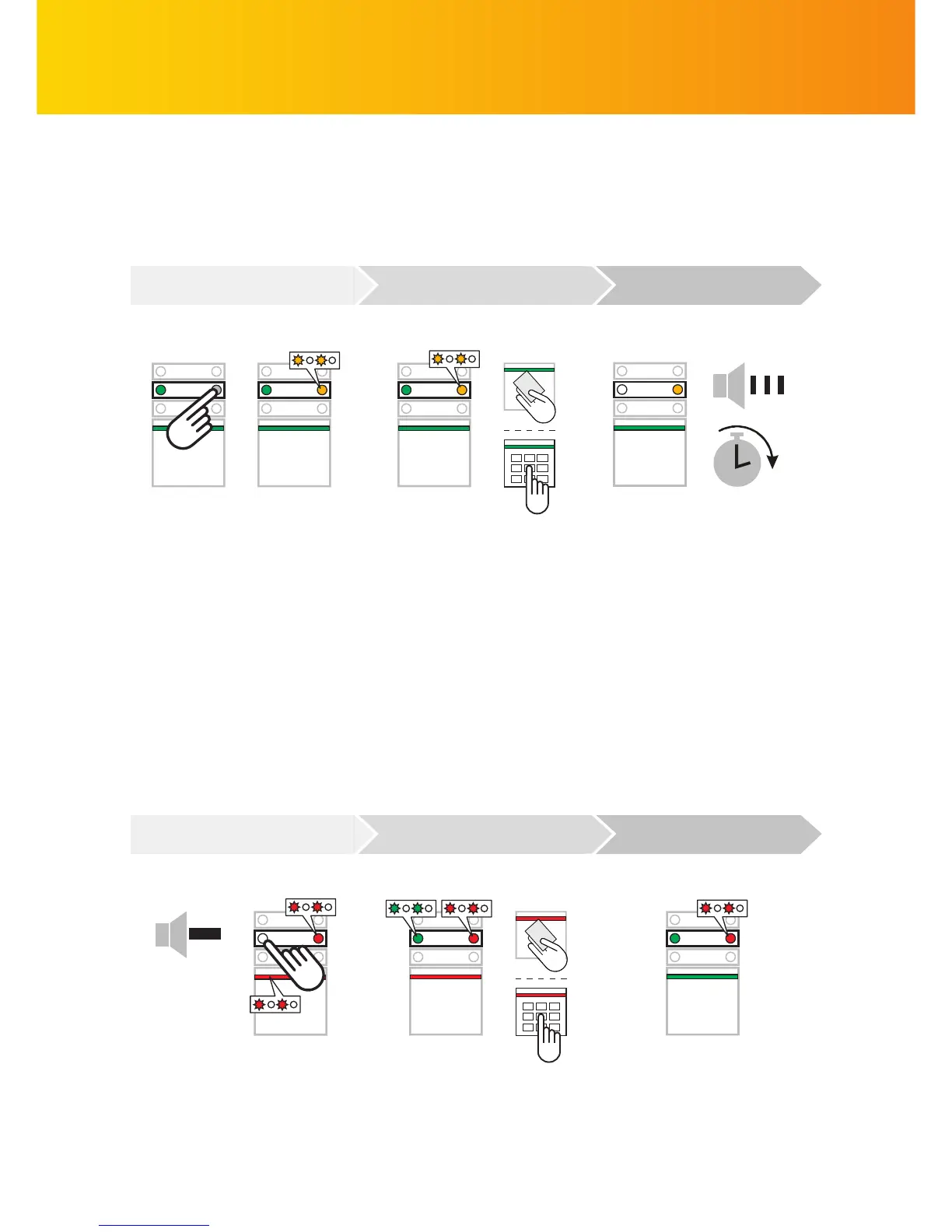
If enabled, partial setting which guards only with selected detectors can be set. You can thus guard for
example windows and doors overnight, while motion detectors ignore movement inside the guarded building.
The command is executed:
The keypad LED turns yellow to
indicate partial setting
3)
.
I confi rm the command by
authorization:
I authorize myself by applying a
card or a tag or by entering
a code on a keypad ...
I want to set the alarm partially:
I press the segment button
which starts fl ashing yellow ...
If we need complete setting (e.g. when leaving the building), it is necessary to press the button twice in the
fi rst step. When you press the button for the fi rst time, the LED starts fl ashing yellow and it turns red after the
second press. When the authorization is confi rmed, the system is set completely.
When the alarm is set partially (yellow LED lit), it can be set completely by repeating the setting procedure
one more time. Partial setting can be set without an authorisation request
3)
.
PARTIAL ALARM SETTING
TERMINATING A TRIGGERED ALARM
COMMAND AUTHORIZATION EXECUTED
COMMAND AUTHORIZATION EXECUTED
It may happen that you forget to unset the system and trigger an alarm. The keypad LED fl ashes red together
with an LED on the corresponding segment. You can terminate the alarm by unsetting the system. An LED on
the segment then indicates the alarm memory
3)
.


 To Next Page