11
Jabra PRO™ 9400 and Jabra GO™ 6400 series EHS set up
A SmartSetup wizard on the touch screen
guides you through the simple process
of connecting phones and setting up EHS
functionality.
Once you’re up and running, the screen’s
colourful icons and intuitive menu system
make remote call-handling a breeze.
Jabra PRO 9400 and Jabra GO 6400 series
support EHS with following phone system
manufacturers: Aastra, Alcatel-Lucent,
Avaya, Cisco, Nortel, Polycom and Sie-
mens
JABRA PRO 9400 AND JABRA GO 6400 SERIES HEADSETS FEATURES A UNIQUE
SCREEN-BASED SET UP SERVICE.
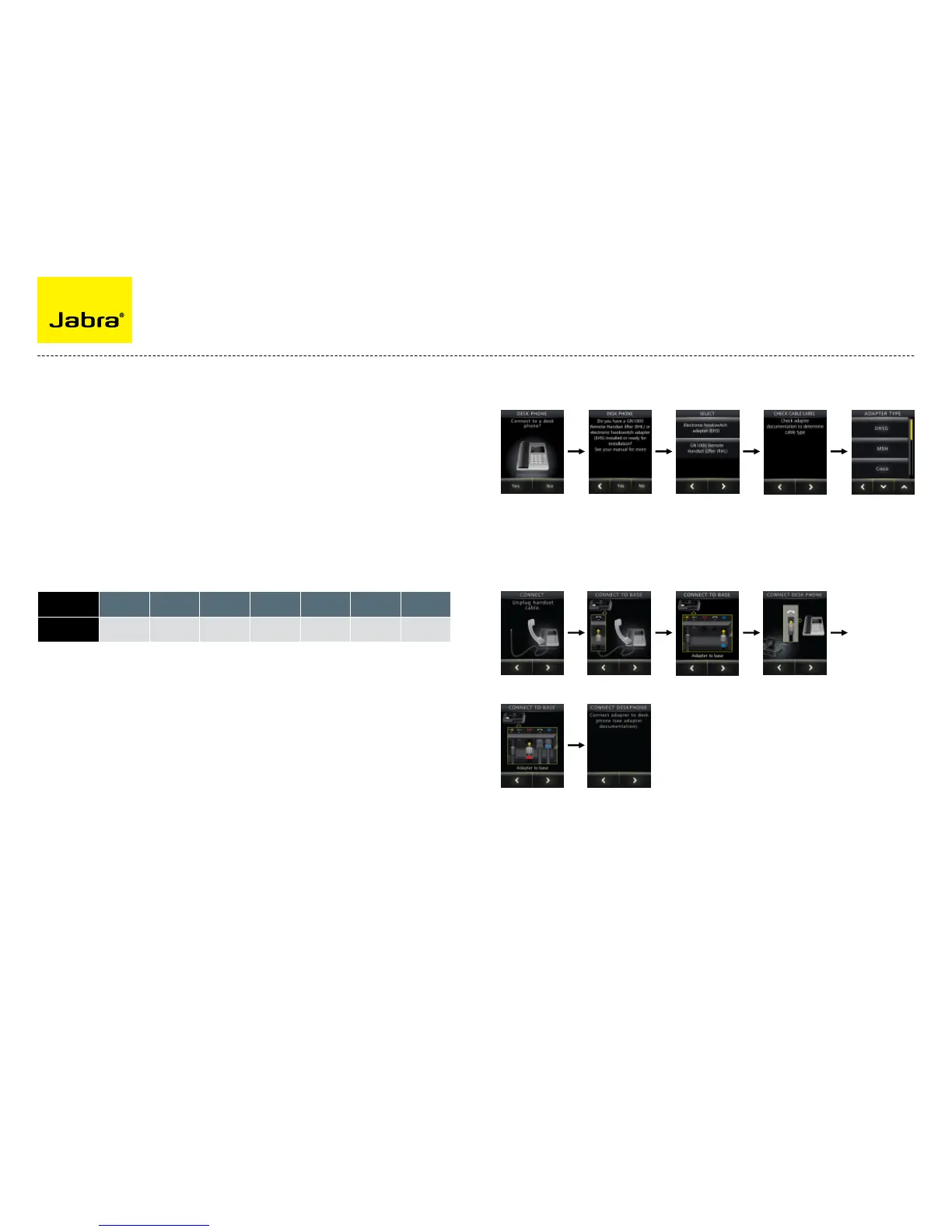
Now connect your headset to your phone:
First choose the remote solution (EHS or Jabra GN1000).
Press Yes to connect
to desk phone
Press Yes Choose Electronic
Hook Switch adapter
Determine cable type Choose EHS mode
Unplug handset cable Connect handset
to base
Connect to base Connect desk phone
Connect to base Connect adapter to
desk phone
Manufacturor Aastra
Alcatel-
Lucent
Avaya Cisco Nortel Polycom Siemens
EHS mode
DHSG MSH DHSG Cisco DHSG DHSG DHSG
The example above illustrates configuration of a Cisco-solution. The specific configuration may
vary from manufacturer to manufacturer.



 To Next Page