Need help?
Do you have a question about the Jabra PERFORM 45 and is the answer not in the manual?
Lists and illustrates the accessories included with the headset, such as USB cable and EarGels.
Details optional accessories available for the Jabra Perform 45, such as a charging stand.
Guides on choosing the correct EarGel size for the most comfortable and best audio experience.
Provides instructions on achieving a secure and comfortable fit for optimal audio quality and comfort.
Instructions on powering on the headset, including LED indicators and audio cues.
Instructions on powering off the headset, including LED indicators and audio cues.
Guides on pairing the Jabra Perform 45 headset with a smartphone via Bluetooth connection.
Instructions on pairing the Jabra Perform 45 headset with a smartphone using NFC technology.
Details how to answer, end, and reject calls using the headset's buttons and voice commands.
Explains the default functions of the customizable button and how to reconfigure it via Jabra Direct.
Details how to manage multiple calls simultaneously, including answering and holding calls.
Describes how to use voice commands for call handling and other headset functions.
Information on connecting the headset to multiple devices simultaneously using Multipoint mode.
Instructions for resetting the headset to factory settings, including re-pairing requirements.
Directs users to frequently asked questions for the Jabra Perform 45 headset.
Guidance on maintaining the headset's battery life, sanitization, and storage conditions.
Step-by-step instructions for cleaning the Jabra Perform 45 headset using soap and water.
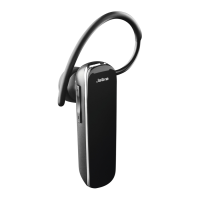
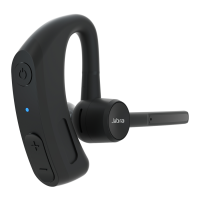
The Jabra Perform 45 is a small, lightweight, and discreet headset designed for clear communication and ease of use, particularly in customer-facing roles. Its primary function is to provide hands-free audio communication, featuring an 80% noise-cancelling microphone to ensure crystal-clear sound during calls. The headset also incorporates a Push-to-Talk feature for instant communication with colleagues, making it suitable for team environments.
The Jabra Perform 45 offers intuitive controls and versatile connectivity options.
Power On/Off: The headset is powered on by pressing and holding the Multi-function button for 1 second until the LED flashes blue and a "Power on" voice prompt is heard. To power off, press and hold the Multi-function button for 3 seconds until the LED flashes red and a "Power off" voice prompt is heard.
Wearing the Headset: The headset can be worn on either the left or right ear. To switch ears, the microphone needs to be rotated horizontally to the other side, then swiveled up and over, pointing towards the mouth for optimal microphone positioning.
EarGel Selection and Fit: For the best audio experience and comfort, it's important to select the most comfortable EarGel size (Small, Medium, or Large). The EarGel should fit firmly in the ear without being squeezed into the ear canal.
Charging: The headset is charged via a USB-C charging port using the supplied USB charging cable. A full charge takes approximately 140 minutes. The LED indicator shows charging status: red for charging and blue for fully charged.
Bluetooth Pairing: To pair with a phone, ensure the headset is powered off. Press and hold the Multi-function button for approximately 6 seconds until "Pair mode" is heard and the LED flashes red and blue. Then, select "Jabra Perform 45" from the Bluetooth menu on the phone.
NFC Pairing: If the phone supports NFC, ensure the headset is powered on and NFC is enabled on the phone. Place the NFC zone of the phone against the NFC zone of the headset until the connection is confirmed.
Call Handling:
Volume Control: Adjust volume using the Volume up (+) or Volume down (-) buttons when listening to music or on a call.
LEDs On/Off: Press both the Volume up and Volume down buttons simultaneously to turn the LEDs on or off.
Transferring Audio: While on a call, press and hold (2 seconds) the Volume down button to transfer call audio between the headset and the paired phone.
Redialing: Press and hold (1 second) the Volume down button until a beep is heard to redial the last number.
Microphone Mute/Unmute:
Customizable Button: By default, this button activates voice controls or mutes the microphone during a call. It can be reconfigured using the Jabra Direct app for functions like Push-To-Talk, speed dial, accessing a second paired mobile device, or checking the battery level.
Voice Controls: The headset recognizes English voice commands for hands-free call handling. To activate, press the Customizable button when not on a call. Available commands include "Answer," "Ignore," "What can I say?" (to hear a list of commands), "Pair mode," "Am I connected?", "Check battery," "Redial," "Callback," and "Cancel."
Multipoint Mode: The headset can pair with up to 8 phones and connect to two simultaneously. It monitors both connected phones, allowing calls to be answered from either one. A notification will be heard in the headset if a second call comes in while already on a call.
Reset Headset: To reset the headset, ensure it's powered on. Press and hold (10 seconds) both the Volume down button and the Customizable button until two beeps are heard. Then, power off the headset. This clears the list of paired devices and resets all settings, requiring re-pairing with the phone.
Proper care ensures the longevity and optimal performance of the Jabra Perform 45.
Battery Care: To prevent battery depletion, avoid storing the headset in extreme hot or cold environments, such as a closed vehicle in summer or winter. For extended storage, recharge the headset at least every three months.
Sanitization: For daily cleaning, 70% isopropyl alcohol wipes are recommended.
Water Exposure: If the headset is exposed to water, allow sufficient time for it to dry thoroughly, which may take up to one hour.
Cleaning:
Jabra Direct App: The Jabra Direct desktop application is available for download from jabra.com/direct. It helps support, manage, and enable optimal functionality for Jabra devices, including reconfiguring the Customizable button.
 General
| Bluetooth version | 5.1 |
|---|---|
| Bluetooth profiles | AVRCP, HFP, HSP |
| Standby time | 216 h |
| Charging source | USB |
| Battery recharge time | 2.3 h |
| Battery charge indicator | Yes |
| Voice guidance languages | English |
| Number of microphones | 2 |
| Microphone sensitivity | -42 dB |
| Cable length | 1.2 m |
| Certification | ISED, Proposition 65 |
| Operating keys | Volume +, Volume - |
| Volume control | Button |
| Number of paired devices remembered | 8 |
| Sustainability certificates | CE, Federal Communications Commission (FCC), REACH, RoHS |
| Cables included | USB Type-C |
| Eartips material | Silicone |
| Accessories included in set | 3 sizes silicone eartips |
| Driver unit | 10 mm |
| Headphone frequency | 20 - 20000 Hz |
| Package depth | 108 mm |
| Package width | 28.5 mm |
| Package height | 163 mm |
| Audio formats supported | SBC |
| Storage temperature (T-T) | -10 - 45 °C |
| Operating temperature (T-T) | -10 - 60 °C |
 Weight and Dimensions
| Depth | 27 mm |
|---|---|
| Width | 109 mm |
| Height | 60 mm |
| Weight | 18 g |

 To Next Page