03
1513
1110
18
12
16
19
17
14
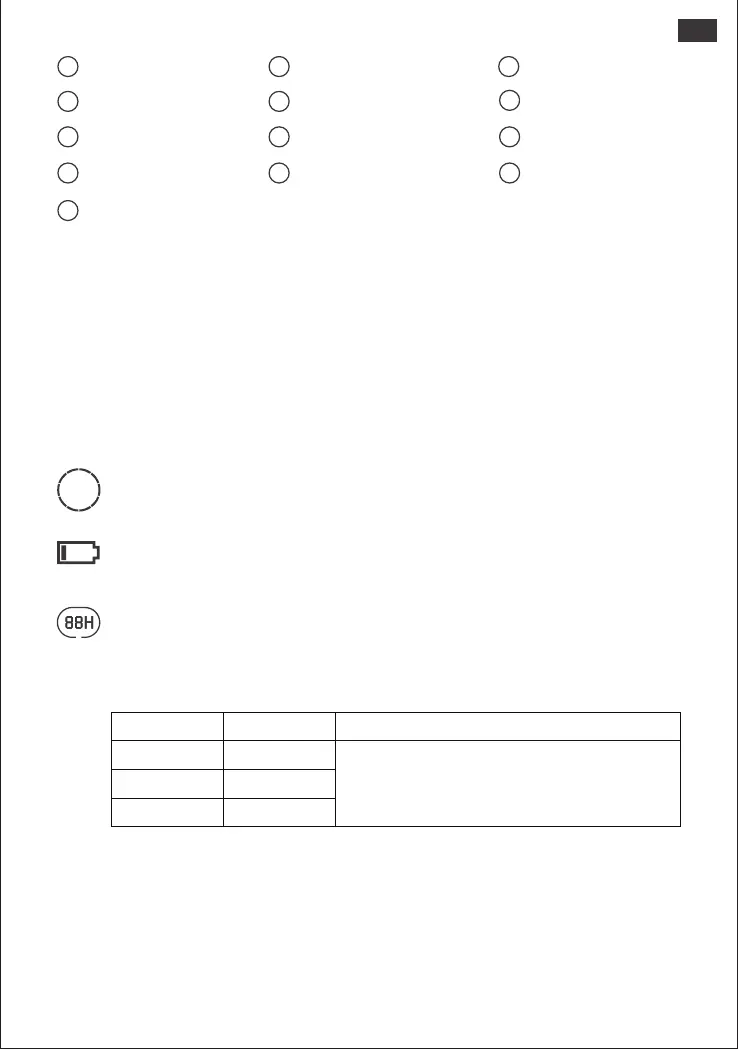
AC Wall Charging Indicator
Solar Charging Indicator
Car Charging Indicator
Low Battery Indicator
8
7
9
Remaining Battery Percentage
Fault Code
High Temperature Warning
Low Temperature Warning
Energy Saving Mode
Remaining Discharge Time AC Power Indicator
Battery Power Indicator
US
Battery Power Indicator
When the product is being charged, the orange circle around the battery percentage will
light up in sequence. When charging other devices, the orange circle will stay on.
Low Battery Indicator
When the battery is less than 20%, the Low Battery Indicator will stay on. When less than 5%,
the Low Battery Indicator will flash. When it is being charged, this Indicator will be o.
UPS:
Once you have connected the mains and the AC input port of the product via the AC charging cable,
you can use the AC output port of the product to power your unit (at this point the AC power comes
from the mains, not the battery of the product). In the event of a sudden loss of mains power, the
product can automatically switch to battery mode within 20ms. This product does not support 0ms
switching. Do not connect to equipment with high uninterruptible power requirements such as data
servers and workstations. Please test several times to confirm compatibility before use and it is
recommended to connect to only one device. Do not use more than one unit at a time to avoid
triggering the overload protection. Failure to follow these instructions may result in equipment failure or
loss of data for which we cannot be held responsibl
Output Output Power Defaults
AC Output
All outputs turned o automatically after 12 hours
≤25W
≤2W
≤2W
USB Output
Car Output
Energy Saving Mode
To avoid forgetting to turn o the output which results in battery consumption, the product
turns the Energy Saving Mode on by default. This occurs when no device is connected or the
connected device is less than or equal to a certain value. (Refer to the table below for more
details), the device will automatically turn o all outputs after 12 hours.
To turn o the Energy Saving Mode
Long press the AC Button and Main Power Button until the Energy Saving Mode icon
disappears. In Non-Energy Saving Mode, please remember to turn o the products to avoid
battery consumption.
Output Power
To turn on the Energy Saving Mode
Long press the AC Button and Main Power Button until the Energy Saving Mode icon lights up
on the screen.







 To Next Page